
Summary
Slack automation bots are the backbone of modern team efficiency, handling everything from lead alerts to complex DevOps workflows. However, scaling these bots often leads to connectivity hurdles like the slack 130:err_proxy_connection_failed error.
This article explores how professional proxy solutions—specifically rotating residential proxies and static ISP proxies—act as the invisible engine behind the scenes. By managing authentication, bypassing strict firewalls, and providing geo-targeted reliability, proxies ensure your Slack workflows remain uninterrupted and secure.
What Are Slack Automation Bots and How Do They Work?

At its core, a Slack bot is a web application that communicates with Slack’s servers via APIs. These bots can be built using the Slack workflow API, custom Python scripts, or frameworks like Hubot.
Common Use Cases for Automation
- Onboarding: Automatically sending welcome resources to new hires.
- Approvals: Streamlining expense or leave requests within a channel.
- Alerting: Sending real-time notifications from tools like Grafana or Salesforce.
- Knowledge Sharing: Using AI to answer repetitive queries based on internal documents.
While the Workflow Builder Slack provides is excellent for simple tasks, enterprise-level automation requires custom code. This is where “the last mile” problem occurs: connecting your internal secure servers to Slack’s public cloud.
Why Do Slack Automation Bots Need Proxies?
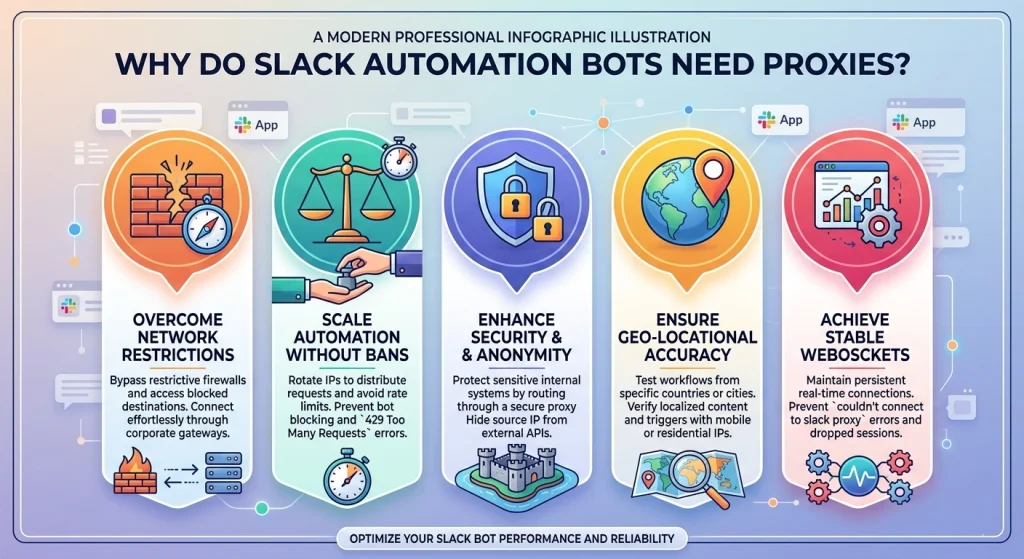
If you have ever encountered the error couldn’t connect to slack proxy, you’ve felt the frustration of a broken workflow. Proxies serve four critical functions for bot developers and users.
1. Bypassing Network Restrictions and Firewalls
Many corporate environments operate behind strict firewalls that block standard WebSocket connections (Port 443). A slack proxy server acts as a middleman, allowing the bot to tunnel traffic through an authorized gateway. Without a proper slack proxy configuration, your bot might be unable to maintain the persistent connection required for real-time messaging.
2. Avoiding API Rate Limits and IP Bans
Slack monitors the volume of requests coming from a single IP address. If your slack bot automated messages are sent too frequently from one location, Slack may temporarily flag the IP. By using rotating residential proxies from OkkProxy, your bot can cycle through millions of real user IPs, making your automated traffic look like organic human interaction.
3. Enhancing Security and Anonymity
An access proxy creates a security barrier between Slack and your sensitive internal applications. Instead of exposing your database directly to the internet, the bot interacts with a proxy that manages identity and authentication (OAuth2/SAML). This is vital for maintaining auditability and compliance.
4. Reliable Geo-Targeting
For global teams, seeing how a bot performs in different regions is crucial. Rotating mobile proxies allow you to test your Slack workflow automation from specific geographic locations, ensuring that localized content and time-zone-specific triggers function correctly.
Choosing the Right Proxy for Your Slack Bot
Not all proxies are suitable for every task. Selecting the wrong type can lead to high latency or frequent disconnects.
| Proxy Type | Best For | Why Use It? |
| Rotating Residential Proxies | High-volume messaging & Scraping | Uses real home IPs; virtually impossible to block. |
| Static ISP Proxies | Account management & Persistence | Provides the speed of a datacenter with the trust of an ISP. |
| Rotating Mobile Proxies | Location-sensitive tasks | Uses 4G/5G carrier IPs for the highest trust score. |
| Static Mobile Proxies | Long-term session stability | Ideal for bots that need to stay logged in from a mobile device. |
| Rotating Datacenter Proxies | High-speed internal alerts | Cost-effective and extremely fast for non-sensitive tasks. |
Pro Tip: For most Slack automation bots, we recommend static ISP proxies. They offer the stability needed for long-lived WebSocket connections while providing a high-reputation IP that Slack’s security systems trust.
Resolving Connectivity: The “Slack 130:err_proxy_connection_failed” Issue
One of the most common pain points for IT teams is the slack 130:err_proxy_connection_failed error. This typically happens when the Slack desktop client or a bot instance cannot authenticate with the local proxy.
How to Fix Slack Proxy Issues:
- Check Slack Proxy Settings: In the Desktop app, navigate to Preferences > Advanced. Ensure it matches your system settings.
- Configure Environment Variables: For Linux users, ensure HTTPS_PROXY is set in your bash profile.
- Use a Dedicated Slack Socks5 Proxy: Unlike standard HTTP proxies, SOCKS5 is better at handling the full-duplex communication required by WebSockets.
- Verify Authentication: Many slack proxy server failures are simply due to expired credentials or incorrect IP whitelisting in your OkkProxy dashboard.
Step-by-Step: Setting Up a Proxy for Your Slack Bot
Whether you are using Ansible slack proxy configurations or a simple python slack client proxy, the setup process follows a similar logic.
For Python Developers (Slack-Bolt)
If you are building a bot with the Bolt framework, you can specify a proxy agent:
Python
from slack_bolt import App
import os
app = App(
token=os.environ.get(“SLACK_BOT_TOKEN”),
proxy=”http://username:password@proxy.okkproxy.com:port”
)
For Linux Environments
When running a bot as a background service on Ubuntu, use the slack –proxy-server flag or set the system variables:
export https_proxy=”http://your-okkproxy-ip:port”
Real-World Case Study: Scaling DevOps Notifications
A mid-sized SEO agency used a jenkins slack plugin proxy to notify their team of ranking changes. As their client list grew, their server’s static IP was flagged by Slack for “unusual activity.”
The Solution:
They switched to OkkProxy’s rotating residential proxies. By distributing the notification pings across a pool of residential IPs, they eliminated the “429 Too Many Requests” errors.
The Result:
- 100% notification delivery rate.
- Zero manual intervention required for IP unblocking.
- Improved security via encrypted proxy tunneling.
FAQ: Frequently Asked Questions
Why is my Slack app not connecting on a desktop proxy?
This is often due to the mac slack proxy settings or windows slack proxy not properly inheriting the system’s root certificate. Ensure you slack load proxy ca certificate if you are using an intercepting proxy for security monitoring.
Can I use a free proxy for Slack automation?
We strongly discourage this. Free proxies are often blacklisted by Slack, lack the speed for real-time automation bots for slack, and pose a massive security risk to your workspace data.
What is the difference between Slack Workflow vs App?
Slack workflow examples usually involve internal triggers within the Slack UI. A “Slack App” is a full-featured bot that can call external APIs, requiring a more robust slack proxy configuration to reach external servers securely.
Final Checklist for Your Slack Automation
To ensure your Slack automation bots run smoothly, follow this professional checklist:
- Identify the IP Type: Use static ISP proxies for consistency or rotating residential proxies for scale.
- Test WebSockets: Ensure your proxy supports Port 443.
- Monitor Logs: Keep a slack proxy statement log for compliance.
- Regional Accuracy: If your bot serves global users, use rotating mobile proxies to verify local triggers.
Takeaway
Slack automation bots are only as reliable as the network they run on. By integrating high-quality proxies from OkkProxy, you remove the limitations of IP blocking, bypass restrictive firewalls, and ensure your data remains secure.
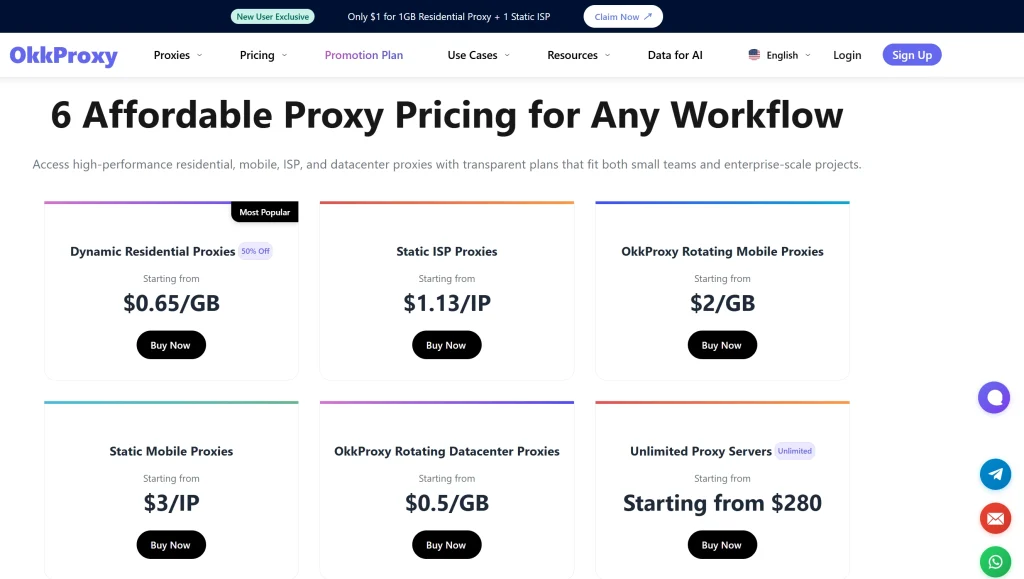
Ready to stabilize your Slack workflows? Explore OkkProxy’s Residential Proxy Solutions and find the perfect fit for your automation needs.
Related Reading
- Static IP Selection for Cross-Border E-Commerce: Datacenter IP vs Residential IP
- SOCKS5 vs HTTP Proxy: Which One Should You Use?
- Top 10 Rotating Residential Proxies Tips: Ultimate 2026 Guide
- Bright Data Just Cut Mobile Proxies: What Should You Use Instead? (OkkProxy Review)
- Stop Overpaying for Sneakers: These Are the Beaters You Can Abuse Daily
For more information on industry standards for secure bot communication, refer to the Internet Engineering Task Force (IETF) guidelines on Proxy Servers.