Executive Summary
Setting up a rotating proxy python pipeline is the most effective strategy to prevent IP bans, bypass CAPTCHAs, and scale automated data collection. By distributing client requests across dynamic IP pools, digital marketers and data analysts can extract competitive intelligence, monitor global SERPs, and manage multi-region assets without interruption. This guide provides a complete, step-by-step walkthrough for configuring proxy rotation using requests, httpx, selenium, and playwright, while integrating OkkProxy’s premium rotating residential proxies for max stability and 99.9% request success rates.
What Is a Rotating Proxy Python Setup and Why Do You Need It?
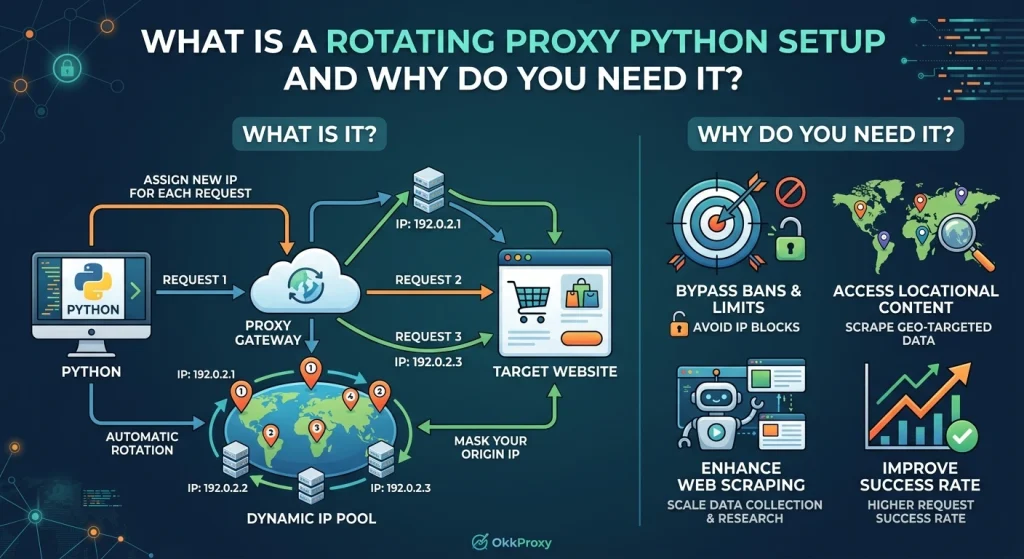
In modern web scraping and automated data harvesting, web servers rely on sophisticated anti-bot security systems like Cloudflare, DataDome, and PerimeterX. These platforms evaluate request velocity, header consistency, and IP reputation. When your script sends hundreds of rapid requests from a single IP address, target servers trigger rate limits, present CAPTCHAs, or issue permanent IP bans.
A rotating proxy python framework solves this challenge by programmatically routing each outbound HTTP request through a different IP address from an established proxy pool.
[ Your Python Script ]
│
▼
[ Proxy Gateway / Rotator ] ───► Rotates IP Address per Request
│
┌───────┼────────┬───────┐
▼ ▼ ▼ ▼
[IP 1] [IP 2] [IP 3] [IP 4] ───► [ Target Website / API ]
Core Benefits for Businesses and Marketers
- Bypass Rate Limits & Bot Protection: Distributing request loads across thousands of unique IP addresses prevents rate-limiting triggers.
- Accurate Geo-Targeted Data: Access localized search results, ad campaigns, and e-commerce pricing across different countries by using targeted residential sub-nets.
- Enhanced Task Stability: Automate SEO rank tracking and market research with uninterrupted connectivity.
Choosing the Right Proxy Architecture for Your Python Scraper
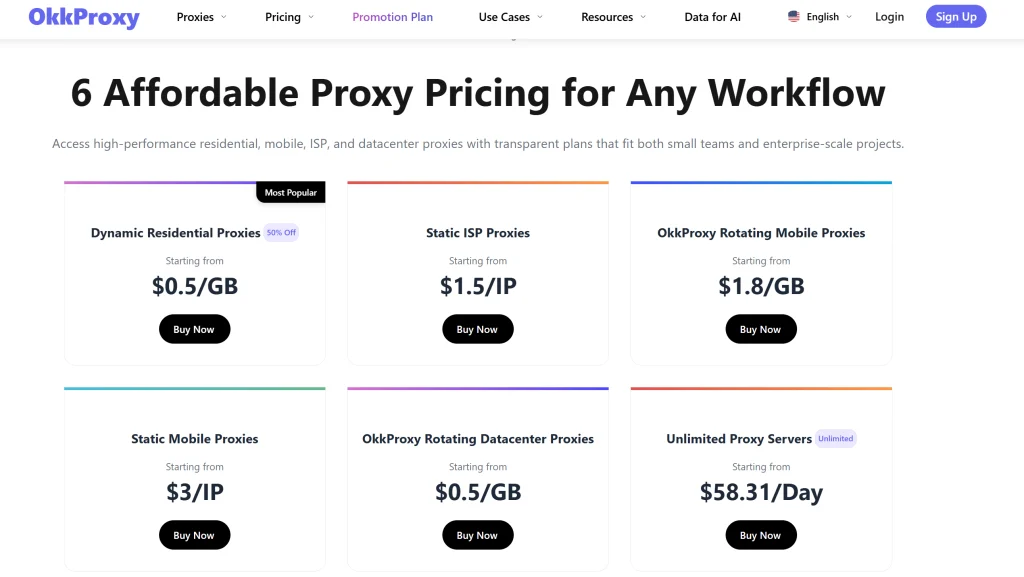
Selecting the correct proxy network directly impacts data quality, extraction speed, and operational budget. OkkProxy provides tailored proxy solutions designed for specific enterprise use cases:
| Proxy Type | IP Source | Stealth & Trust Score | Best For |
| Rotating Residential Proxies | Genuine Household ISPs | Extremely High (99.8%) | High-scale e-commerce scraping, SERP monitoring, Cloudflare bypass |
| Static ISP Proxies | Datacenter-hosted with Residential ASN | High | Multi-account management, persistent seller dashboards |
| Rotating Mobile Proxies | Real 4G/5G Mobile Networks | Highest (99.9%) | High-security platforms, social media automation, ad verification |
| Static Mobile Proxies | Dedicated Mobile IPs | High | Long-term app automation, localized social profile maintenance |
| Rotating Datacenter Proxies | High-Speed Cloud Servers | Moderate | High-speed public API harvesting, bulk non-protected directories |
Real-World Field Insights from OkkProxy
When scraping strict platforms like Amazon, Google SERPs, or target sites guarded by advanced behavioral engines, datacenter IPs are often flagged instantly due to their cloud provider ASNs. Utilizing OkkProxy rotating residential proxies ensures your requests originate from real household devices, making your automated traffic indistinguishable from organic human visitors. Learn more about preventing exposure in our guide on How to Prevent Proxy IP Leaks.
Checklist: Prerequisites Before Configuring Python Proxies
Before writing proxy logic in Python, complete this setup checklist to ensure seamless execution:
- Python Environment: Python 3.8+ installed.
- Dependency Installation: Install required libraries (pip install requests httpx selenium playwright).
- Environment Security: Store proxy credentials in environment variables (.env) rather than hardcoding.
- Header Management: Prepare a pool of diverse User-Agent strings to pair with IP rotation.
- Network Verification: Verify target protocol support (HTTP, HTTPS, SOCKS5).
Method 1: Configuring Rotating Proxy Python Scripts with requests
The requests module is the most popular library for synchronous HTTP data extraction in Python.
Step 1: Install Dependencies
Open your terminal and install requests:
Bash
pip install requests
If you are operating behind a restricted network or corporate proxy during installation, execute:
Bash
pip install –proxy “http://username:password@proxy.okkproxy.com:8000” requests
Step 2: Custom Client-Side Proxy Rotation Logic
If you maintain a list of static or rotating proxy endpoints, you can implement round-robin rotation using Python’s native itertools.cycle:
Python
import os
import random
import time
import itertools
import requests
# Load credentials securely from environment variables
PROXY_USER = os.getenv(“OKK_PROXY_USER”, “your_username”)
PROXY_PASS = os.getenv(“OKK_PROXY_PASS”, “your_password”)
# List of OkkProxy endpoint nodes
PROXY_HOSTS = [
“us.okkproxy.com:8000”,
“uk.okkproxy.com:8000”,
“de.okkproxy.com:8000”,
“jp.okkproxy.com:8000”
]
# Build full authenticated proxy URLs
PROXY_POOL = [f”http://{PROXY_USER}:{PROXY_PASS}@{host}” for host in PROXY_HOSTS]
proxy_iterator = itertools.cycle(PROXY_POOL)
user_agents = [
“Mozilla/5.0 (Windows NT 10.0; Win64; x64) AppleWebKit/537.36 (KHTML, like Gecko) Chrome/122.0.0.0 Safari/537.36”,
“Mozilla/5.0 (Macintosh; Intel Mac OS X 10_15_7) AppleWebKit/537.36 (KHTML, like Gecko) Chrome/122.0.0.0 Safari/537.36”,
“Mozilla/5.0 (X11; Linux x86_64) AppleWebKit/537.36 (KHTML, like Gecko) Chrome/122.0.0.0 Safari/537.36”
]
target_urls = [
“https://httpbin.org/ip”,
“https://httpbin.org/user-agent”,
“https://httpbin.org/headers”
]
def run_rotating_proxy_python():
for url in target_urls:
current_proxy = next(proxy_iterator)
proxies_config = {
“http”: current_proxy,
“https”: current_proxy
}
headers = {“User-Agent”: random.choice(user_agents)}
try:
print(f”Sending request via: {current_proxy}”)
response = requests.get(url, proxies=proxies_config, headers=headers, timeout=10)
response.raise_for_status()
print(“Response:”, response.json())
except requests.exceptions.RequestException as e:
print(f”Request failed for {current_proxy}: {e}”)
time.sleep(random.uniform(1.5, 3.0))
if __name__ == “__main__”:
run_rotating_proxy_python()
Step 3: Server-Side Back-Connect Proxy Integration (Recommended)
Managing client-side arrays of proxy IPs can become complex at enterprise scale. OkkProxy simplifies this with automatic back-connect gateway endpoints. Instead of managing IP lists in your code, you connect to a single gateway entry port, and OkkProxy automatically rotates the IP address server-side for every request:
Python
import requests
# Single OkkProxy Back-Connect Gateway
BACKCONNECT_PROXY = “http://customer_id-zone-residential:password@gw.okkproxy.com:9000”
proxies = {
“http”: BACKCONNECT_PROXY,
“https”: BACKCONNECT_PROXY
}
# 5 consecutive requests automatically receive 5 distinct residential IPs
for i in range(5):
response = requests.get(“https://httpbin.org/ip”, proxies=proxies)
print(f”Request {i+1} IP:”, response.json()[“origin”])
Method 2: High-Performance Async Rotation with httpx
When building high-concurrency web crawlers, synchronous blocking libraries like requests can slow down execution. Using httpx with asynchronous tasks allows you to handle thousands of concurrent requests smoothly.
Python
import asyncio
import random
import httpx
PROXY_POOL = [
“http://user:pass@us.okkproxy.com:8000”,
“http://user:pass@uk.okkproxy.com:8000”,
“http://user:pass@de.okkproxy.com:8000”
]
urls_to_scrape = [f”https://httpbin.org/ip?task={i}” for i in range(10)]
async def fetch(url: str, proxy: str):
headers = {“User-Agent”: “Mozilla/5.0 (Windows NT 10.0; Win64; x64)”}
try:
async with httpx.AsyncClient(proxy=proxy, timeout=10.0) as client:
response = await client.get(url, headers=headers)
print(f”Task Done: {url} | Assigned IP: {response.json().get(‘origin’)}”)
except httpx.HTTPError as exc:
print(f”Error requesting {url} through {proxy}: {exc}”)
async def main():
tasks = [fetch(url, random.choice(PROXY_POOL)) for url in urls_to_scrape]
await asyncio.gather(*tasks)
if __name__ == “__main__”:
asyncio.run(main())
Method 3: Rotating Proxies in Headless Browsers (Selenium & Playwright)
Dynamic single-page applications (SPAs) built with modern JavaScript frameworks require browser rendering engines. Here is how to configure proxies in headless browser automation setups.
3.1 Selenium Proxy Setup
Pass the –proxy-server argument to Chrome Options:
Python
from selenium import webdriver
from selenium.webdriver.chrome.options import Options
def run_selenium_proxy():
chrome_options = Options()
chrome_options.add_argument(‘–proxy-server=http://gw.okkproxy.com:9000’)
chrome_options.add_argument(‘–headless’)
driver = webdriver.Chrome(options=chrome_options)
try:
driver.get(“https://httpbin.org/ip”)
print(“Rendered Page Content:\n”, driver.page_source)
finally:
driver.quit()
if __name__ == “__main__”:
run_selenium_proxy()
3.2 Playwright Proxy Setup
Playwright handles proxy authentication natively without requiring custom extensions:
Python
import asyncio
from playwright.async_api import async_playwright
async def run_playwright_proxy():
async with async_playwright() as p:
browser = await p.chromium.launch(
headless=True,
proxy={
“server”: “http://gw.okkproxy.com:9000”,
“username”: “your_okkproxy_username”,
“password”: “your_okkproxy_password”
}
)
page = await browser.new_page()
await page.goto(“https://httpbin.org/ip”)
print(“Playwright Output:”, await page.inner_text(“body”))
await browser.close()
if __name__ == “__main__”:
asyncio.run(run_playwright_proxy())
Troubleshooting Common Python Proxy Errors
Even well-structured code can run into occasional network errors. Here is how to diagnose and resolve common proxy issues:
Diagnostic Matrix
| Error Code / Message | Root Cause | Practical Fix |
| 407 Proxy Authentication Required | Incorrect username/password or un-whitelisted IP. | Double-check credential encoding. Ensure special characters in passwords are URL-encoded (urllib.parse.quote). |
| 429 Too Many Requests | Exceeded target website rate limits. | Switch to rotating residential proxies or increase pause delays between requests. |
| ProxyConnectionError / Timeout | Dead or unresponsive proxy node. | Implement strict request timeouts (timeout=5) and automatic retry handlers. |
| SSL: CERTIFICATE_VERIFY_FAILED | Outdated certificates or SSL inspection issues. | Upgrade certification bundles (pip install –upgrade certifi). Avoid setting verify=False in production. |
Client Success Story: Scaling Global E-Commerce Intelligence
The Challenge
A global market research agency needed to track pricing trends across 2 million e-commerce product pages daily. Using basic datacenter proxies resulted in an 80%+ block rate, frequent CAPTCHA loops, and broken data pipelines.
The OkkProxy Solution
The team integrated OkkProxy Rotating Residential Proxies via a server-side back-connect gateway. By routing requests through authentic residential IPs across 190+ target regions, the scraper achieved:
- 99.9% Request Success Rate: Completely eliminated CAPTCHA roadblocks.
- 5x Faster Execution: Removed manual IP list management and failed-request retries.
- 100% Data Accuracy: Unlocked hyper-localized geo-pricing without triggers.
Explore more web scraping strategies in our guide to 15 Profitable Web Scraping Projects.
External Resources & Industry Standards
For further reading on HTTP specifications, web standards, and proxy architecture, consult these authority resources:
- MDN Web Docs: HTTP Proxy Servers & Tunneling – Standard documentation on HTTP proxy headers and tunneling protocols.
- Python Requests Official Documentation – Official developer guidelines for configuring proxies in Python.
- Internet Engineering Task Force (IETF) RFC 7231 – The official HTTP/1.1 semantics and content standards.
Key Takeaways
- Automate IP Rotation: Avoid manually cycling proxy lists in your code by utilizing back-connect gateways.
- Match Proxy Type to Target Security: Use rotating datacenter proxies for speed on simple targets, and reserve rotating residential proxies or mobile proxies for sites with advanced anti-bot protections.
- Pair IPs with Headers: Always rotate User-Agent strings alongside IP addresses to prevent fingerprint mismatches.
Frequently Asked Questions (FAQ)
What is the difference between rotating proxies and sticky sessions?
Rotating proxies change your IP address automatically on every single request, making them ideal for high-volume stateless web scraping. Sticky sessions hold the same IP address for a set duration (e.g., 5 to 30 minutes), which is necessary for tasks requiring user logins or multi-step checkout flows.
How do I fix the 407 Proxy Authentication Required error in Python?
A 407 error indicates invalid credentials or an unapproved origin IP address. Verify your username and password, ensure special characters are properly URL-encoded, or confirm that your current IP is whitelisted in your OkkProxy dashboard.
Why should I avoid free proxy lists for Python web scraping?
Free proxy lists are notoriously unstable, often suffer from high latency, and are heavily flagged by security systems. More importantly, unencrypted free proxies pose security risks, including potential data manipulation or MITM monitoring. Professional projects rely on verified, secure networks like OkkProxy.
Ready to Scale Your Web Scraping Pipelines?
Avoid IP bans and keep your data collection running smoothly. Try OkkProxy Rotating Residential Proxies Today to access over 90 million ethically sourced IPs worldwide with 99.9% uptime!