A large proxy pool does not mean that a specific task will receive the same number of different IP addresses. The result depends on the selected location, the proxy connection mode, and the number of requests.
That is why, before launching a large-scale task, it is more useful to test your actual working configuration than to rely on the network size advertised by the provider. This lets you see in advance how many unique IPs the setup returns, how often addresses repeat, and how many connections fail.
To do this, reproduce the conditions of the upcoming workload and run a test on a smaller sample. If the task is performed through Telegram Soft Expert, the check can be carried out directly in the software.

Proxy Pool Size Does Not Show How Many IPs a Specific Task Will Receive
A provider may advertise a very large network overall, but a user does not get access to that entire resource at once.
The available sample depends on the connection settings. For example, you may select a specific country or city. In that case, only the relevant part of the network will be used in the test.
The result also changes depending on the session mode. With a sticky connection, one IP is kept for a specified period. With a rotating connection, the address may change between requests.
This means two metrics should be treated separately:
| Metric | What it shows |
| Network size | The scale of the provider’s infrastructure |
| Unique IPs in the test | How many different addresses the specific configuration returned |
| Duplicate IPs | How many times an address that had already appeared was returned again |
| Connection errors | How many requests could not be completed successfully |
| Geographic targeting | Which part of the network is available under the selected conditions |
| Session mode | How long one IP is retained or how the address is rotated |
Independent proxy research also distinguishes between the advertised network size and the number of unique addresses obtained during real-world testing. For example, in a 2026 study, global networks were tested with millions of connections over 21 days, while individual geographic samples were tested separately.
This is an important principle for any proxy test. A large number in a provider’s product description does not replace testing your own configuration.
Why Duplicate IPs Appear During Testing
A repeated address does not, by itself, mean that a proxy is unsuitable for the task.
The first thing to check is which connection mode is being used.
Geographic Targeting Limits the Available Part of the Network
If you select a specific country, you are no longer using the provider’s entire global network. Selecting a city narrows the available sample even further.
That is why comparisons should be made under the same conditions. For example, you can first test an entire country and then repeat the same test with city-level targeting.
This makes it easier to see how much the available sample changes.
OkkProxy supports country- and city-level targeting, with additional parameters available for certain connection options. The service also supports rotating and sticky connections.
A Sticky Connection Is Designed to Keep the Same IP
In sticky mode, one address can be used continuously for a specified period of time.
As a result, a series of requests using the same session identifier may return the same IP. This says nothing about the size of the entire pool; it is simply a consequence of the selected mode. If the task requires a consistent network address, this behavior is expected.
A Rotating Connection Does Not Guarantee That Every IP Will Be New
With a rotating connection, addresses are refreshed, but that does not mean every new request is guaranteed to receive an IP that has not appeared earlier in the sample.
The same address may appear again even when many different IPs are available.
For this reason, it is better to measure not only the number of repeats, but also the ratio of unique addresses to the total number of successful connections.
The key principle is simple: a duplicate IP is a measurement result, not a diagnosis by itself.
What to Check Before Launching a Large-Scale Task
Once the working conditions are defined, you can move on to measurement.
There is no need to collect dozens of metrics. Four are enough for a practical test.
1. Does the connection work?
First, make sure the proxies actually establish a connection.
If some connections fail, that metric should not be mixed with duplicate counts. A duplicate means the connection succeeded but returned an IP that had already appeared. An error means the request did not produce a valid result.
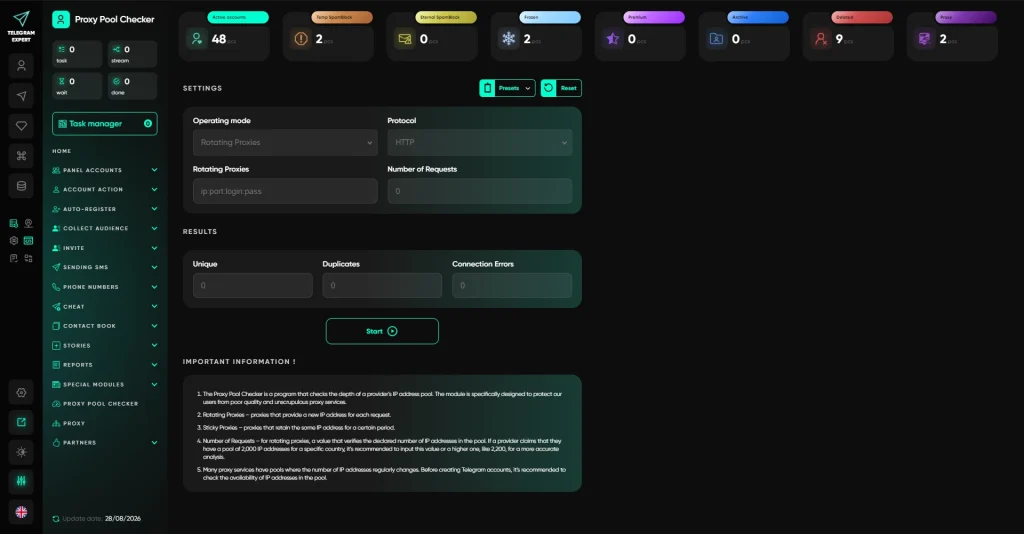
Telegram Expert includes both a proxy check and a dedicated proxy pool checker for this purpose. The checker shows unique and duplicate IPs as well as connection errors.
2. How many IPs were unique?
This is the main metric for a rotating pool.
Suppose you run 5,000 checks. Of these, 4,620 return unique IPs, while the remaining results use addresses that have already appeared.
In that case, you can record the actual result of that specific test as follows:
5,000 successful connections produced 4,620 unique IPs.
This does not mean the provider’s entire pool contains only 4,620 addresses. The result applies only to the selected configuration, the time of the test, and the number of requests made.
3. How many addresses were repeated?
Duplicate counts are useful for comparing different configurations.
You can test an entire country and then a specific city. You can compare different connection modes. You can also repeat the same test later.
When the methodology stays the same, the results become much easier to compare.
4. Does the result match the selected mode?
This check is essential. If a sticky connection is being used, keeping the same IP may be a completely normal result.
If a rotating mode is being used, it makes sense to evaluate the diversity of the returned addresses.
The same evaluation cannot be applied to every task. A high number of unique IPs is useful when the workflow needs a diverse sample. For long-running work that depends on a consistent network state, address stability matters more.
How to Prepare a Test That Reflects the Real Workload
A test is useful only when it resembles the task you are actually going to run.
Use the Same Geographic Targeting
If the accounts will work through IPs from a specific country, test that same country.
If the workflow requires a specific location, include it in the test.
There is little value in testing an unrestricted global network if the real workflow will use a single city.
Use the Same Connection Mode
If the address is expected to change during the workflow, test a rotating connection.
If the address needs to remain the same, test a sticky session.
Otherwise, the result will describe a different configuration and will not accurately reflect the upcoming workload.
Choose a Realistic Test Volume
There is no need to try to test every address in the provider’s advertised network.
Even large independent studies use a limited sample and a fixed methodology. In a 2026 study of global residential networks, up to 3.6 million connections were made over 21 days. This was a comparative test, not an attempt to enumerate the entire infrastructure.
For a normal production task, it is more useful to choose a test volume comparable to the expected workload.
If you need to perform several thousand operations tomorrow, testing a similar number of connections will tell you more than making a few dozen requests and extrapolating the result to the entire task.
How to Automate Proxy Testing in Telegram Soft Expert
When only a few accounts are involved, proxies can be checked manually. As the number of connections grows, however, this quickly becomes a separate routine task.
You need to test the addresses, identify errors, review duplicates, determine which connections overlap, and then assign suitable proxies to the working accounts.
This is where specialized Telegram software becomes useful.
Telegram Expert brings account management, registration, warm-up, audience collection, communication, and bulk operations into one workspace. The software also includes dedicated proxy tools, so proxy testing can become part of the overall account-management workflow.
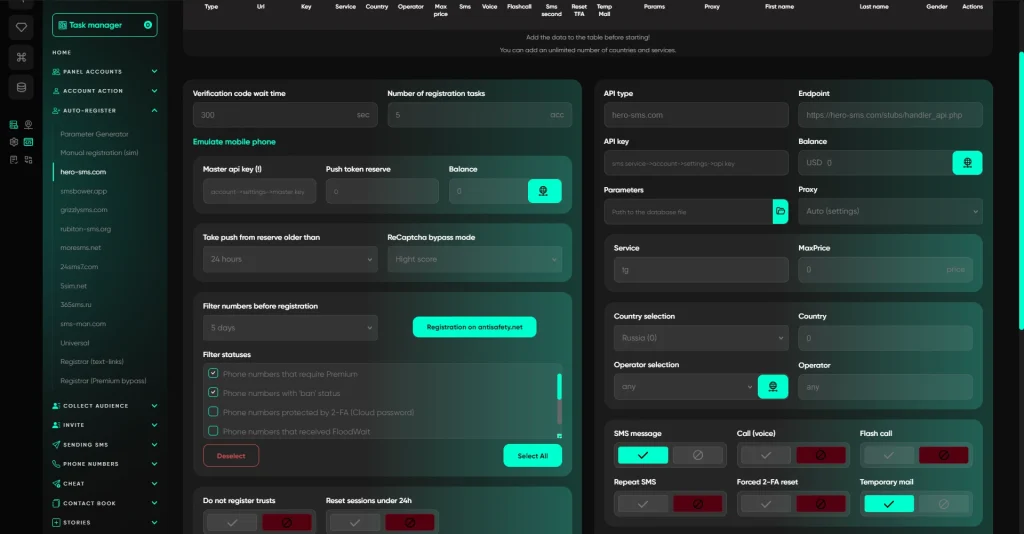
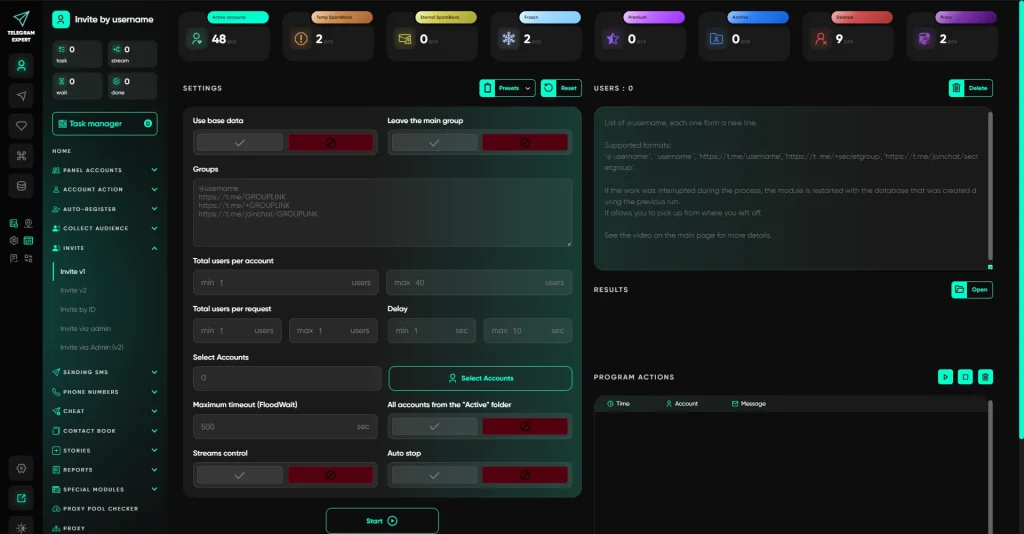
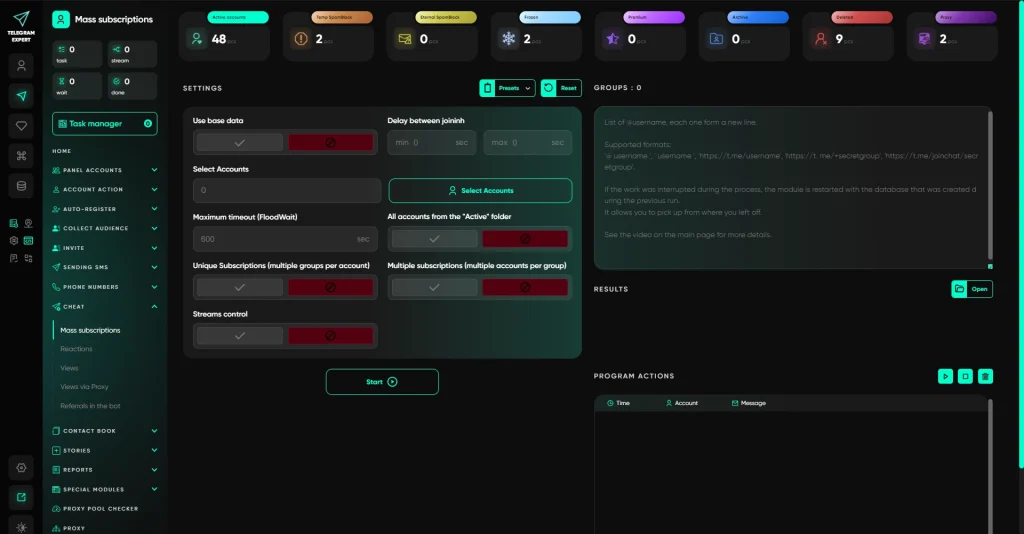
At this point, you are no longer checking just one address. You have a single workspace where proxies can be prepared, tested, and then assigned to accounts once suitable connections have been identified.
How to Test a Proxy Pool in Telegram Expert
First, prepare the connection details. Telegram Expert supports HTTP and SOCKS5 proxies. You can add a proxy list to the software and check whether the connections work correctly.
Then open the proxy pool checker.
For rotating proxies, specify the number of requests. The software checks the connections one by one and collects statistics on the IP addresses returned.
The results show:
- the number of unique IPs;
- the number of duplicate IPs;
- connection errors.
Sticky proxies use a separate test mode. Load the proxy list into the software to identify overlaps between connections. If different proxies lead to the same external IP, that is a separate result worth taking into account when working with a large number of accounts.
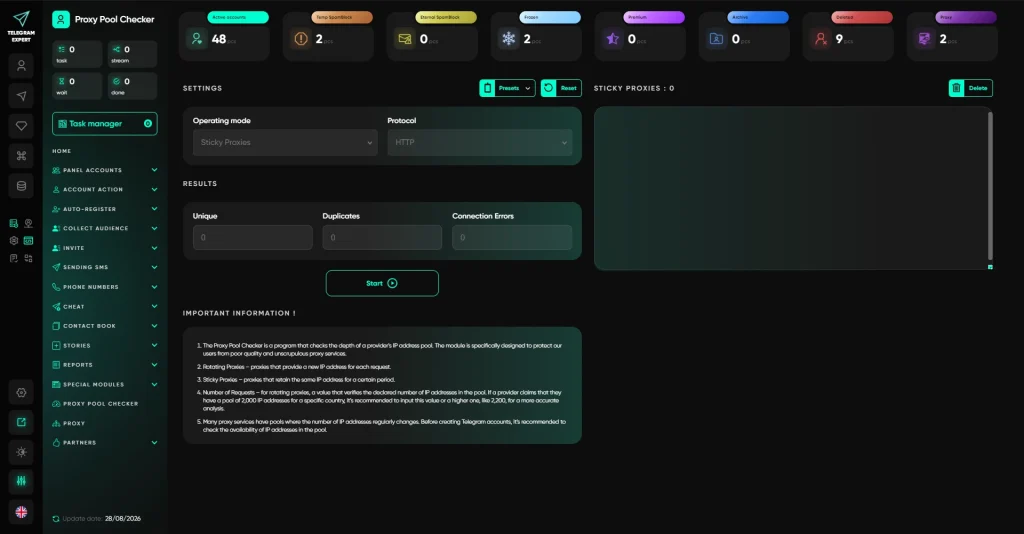
After the test, the results can be used to configure the working database. This approach is more convenient than manual checking because the network resource is evaluated first and only then distributed across the accounts.
How to Read the Test Results
Collecting statistics is not enough. The numbers need to be interpreted in the context of the test conditions.
If a Rotating Pool Produces Duplicate IPs
Look at several metrics together:
- the total number of successful connections;
- the number of unique IPs;
- the number of duplicates;
- the selected geography;
- the session mode;
- the sample size;
- the result of a repeat test.
A single duplicate says nothing about the quality of the entire pool.
If the same test produces similar results several times, that is a much more useful observation.
The composition of dynamic residential networks also changes over time. That is why independent tests of these networks are usually conducted over several days or weeks rather than at a single point in time.
If Sticky Connections Share the Same IP
First, check how the sessions are assigned.
If several requests use the same sticky session identifier, receiving the same IP is expected.
If the connections are independent but several of them receive the same external address, that is an overlap worth considering when proxies are assigned to accounts.
If There Are Many Connection Errors
A high level of IP uniqueness does not compensate for a large number of failed connections.
For example, 900 unique IPs out of 1,000 attempts may look good at first. But if the other 100 requests failed, those failures need to be tracked separately.
This is why the Telegram Expert checker shows connection errors alongside unique and duplicate addresses.
Uniqueness measures the diversity of the addresses returned. Reliability measures how many connections were completed successfully at all. These metrics cannot replace one another.
What to Change If the Result Does Not Fit the Task
If the test produces an unsuitable result, start by identifying the cause.
Review the Geographic Targeting
If the task allows you to use an entire country instead of a single city, compare both options.
Broader geographic targeting can potentially provide access to a larger part of the available network. However, it should only be changed when doing so is consistent with the project’s requirements.
Check the Session Mode
If you expected the IP to change, make sure a rotating mode is actually being used.
If the address is supposed to stay the same, do not judge the result by the number of unique IPs.
Choose the Right Proxy Type
OKKProxy offers several connection types, including residential, mobile, datacenter, and static options. Residential connections are available in both rotating and sticky modes, with geographic targeting as well.
The right choice therefore depends on the task itself.
If the workflow needs a persistent address, the maximum number of unique IPs is not the primary criterion.
If the task involves a large series of independent operations, on the other hand, it makes sense to evaluate the diversity of the returned addresses separately.
FAQ
If a provider advertises millions of IPs, why does the test show fewer?
Because the total network size and the actual sample available to a user are not the same metric. The result depends on geographic targeting, session mode, the timing of the test, and the number of connections. Independent research also shows a difference between the advertised network size and the number of unique addresses actually obtained during testing.
Does any duplicate IP mean the pool is small?
No. In sticky mode, repeats are expected. In rotating mode, repeats can still occur, so they need to be evaluated together with the other metrics.
How many requests are needed for a reliable test?
There is no universal number. It is better to choose a volume close to the expected workload and repeat the test under the same conditions.
Should the pool be tested again later?
For dynamic networks, repeated testing helps show how the set of available addresses changes over time. That is why large independent studies run tests over several days rather than relying on a single snapshot.
What does the proxy pool checker in Telegram Expert show?
It tests the selected connections and shows unique and duplicate external IPs. For rotating proxies, you can specify the number of requests. The software also reports connection errors. For sticky connections, it can identify IP overlaps between different proxies.
What Matters Before You Start
The checker does not determine the provider’s full network size. It shows how the selected configuration behaves in a specific test.
Before launching a large Telegram task, reproduce the conditions of the upcoming workload: select the required geography, choose the appropriate session mode, run a realistic number of checks, and evaluate unique IPs, duplicates, and errors separately.
Telegram Soft Expert moves this process from a manual routine into the account workflow. You can test the network resource first, evaluate the result, and only then use suitable proxies in subsequent operations.
This approach provides data for the actual task you are about to run rather than an abstract estimate of the proxy pool’s size.