Quick answer
A GOAT proxy routes supported browser traffic through an intermediary and changes the public IP address that GOAT sees for that connection. Start with your direct connection for everyday sneaker shopping and checkout. If you need to compare authorized network routes, a static ISP proxy gives you one consistent exit IP. Use a residential or mobile proxy only when your test requires that network type. Confirm the shipping destination and total in GOAT, and use official support if a security check or order problem interrupts your session.
What Is a GOAT Proxy?
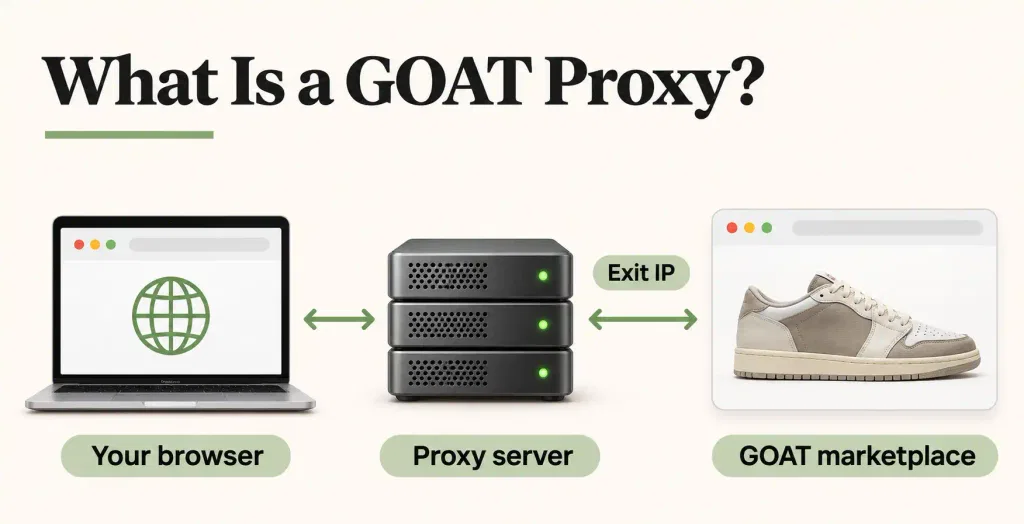
GOAT is a marketplace for sneakers, apparel, and accessories. A GOAT proxy is a general-purpose proxy used when accessing the marketplace. Your browser sends supported traffic to the proxy, which forwards it to GOAT and carries the response back. The public IP at the far end of that route is the exit IP. An HTTP proxy can use the CONNECT method to establish a tunnel for HTTPS traffic. The browser still needs to verify the certificate for the destination, and the proxy only handles traffic that the client actually sends through it. HTTP Semantics, RFC 9110
When comparing proxies for GOAT, separate the network the exit IP comes from, how long the IP stays the same, and how the service bills you. A residential proxy uses an address associated with a household internet network. A mobile proxy uses an address associated with a carrier network. A datacenter proxy uses a hosting-network address. Static, sticky, and rotating describe the behavior of the connection over time. A sticky session holds an assigned address for a defined window, subject to service conditions. A static plan assigns an address for the purchased period. How residential proxies work · Rotating vs. sticky proxies
What can a proxy change during sneaker shopping?
A proxy can change the route to GOAT and the apparent network location of a supported browser request. That makes it useful when you have a specific connectivity question and permission to run the check. A different route can add latency, and the browser can still send the same cookies and account information. An exit IP in another city also leaves your shipping address, payment details, and order eligibility as separate inputs. Use GOAT’s displayed checkout total for the destination you actually intend to ship to. GOAT shipping costs · GOAT sales tax calculation
How to Use a GOAT Proxy in 7 Steps
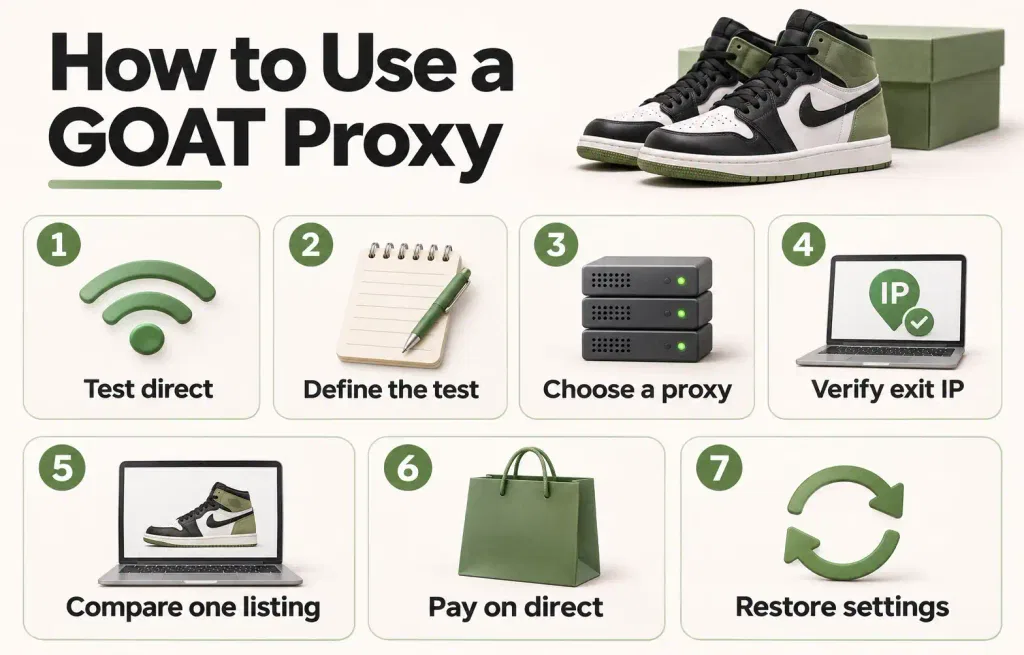
1. Start with a direct connection
Open one public sneaker listing in your usual browser over a trusted connection. Record the time, the page, and what happened. For example, distinguish a page that failed to open from a page that loaded but showed the wrong currency or a missing size. If the direct route loads reliably, finish your shopping on it. If the connection fails on one Wi-Fi network, try your normal mobile data connection as a separate baseline. That comparison may answer the network question before you spend money on a proxy.
2. Define what you want to test
Write a question you can answer with one comparison, such as “Does the same public page load through our approved regional connection?” For a brand or agency, document the pages, regions, purpose, and collection method your authorization covers. GOAT’s Terms of Use restrict scraping and circumvention of protective measures. Use approved data sources or obtain authorization for any research that needs automated collection. If you encounter a block or verification prompt, follow the official instructions. GOAT Terms of Use
3. Match the session mode to the test
For a fixed-route comparison, static ISP proxies keep the network variable easier to track. If the test calls for a household-network route, consider rotating residential proxies with a sticky setting for the length of the comparison. Use rotating mobile proxies only when the test explicitly calls for a carrier network. Confirm the region, session duration, and authentication method for the particular endpoint before paying. Select the smallest plan that will cover the test. OKKProxy static ISP overview · Mobile vs. residential proxies
4. Configure and verify the browser
In your provider dashboard, copy the assigned host, port, and supported protocol. Enter them in an approved browser proxy tool or the browser’s supported system proxy settings. If the plan uses username and password, enter them in the appropriate credential fields and keep them out of screenshots and logs. If it uses IP allowlisting, confirm the network you are connecting from is authorized. Use a trusted IP-check service to confirm the intended browser is using the expected exit IP and region before visiting GOAT. A browser proxy setting may apply only to that browser or profile. OKKProxy browser setup documentation
5. Compare the same public listing
Keep the device, browser version, listing URL, shoe size, condition, and visible region or currency settings consistent. Make the comparison while signed out and within a short window. Record whether the listing opened, whether its images and price rendered, and the approximate time to a usable page. If only one route has missing images, record the difference as an observation. Cache, transient network congestion, or the listing changing during the test could explain the result. A small number of manual checks can establish whether a route is usable for you under those conditions.
6. Use your trusted direct route for payment
When you are ready to buy, return to the trusted connection and confirm you are on GOAT’s official site or app. Reopen the listing and verify the size, condition, shipping address, and total before submitting the order. If you see a certificate warning, stop and resolve the network or browser problem before entering any personal information. If a payment appears to go through and confirmation is missing, check GOAT’s order guidance before submitting again. GOAT order confirmation help
7. Record the outcome and restore your settings
Save a short note with the route, proxy type, configured region, public exit country, time, listing, and outcome. Keep personal details, credentials, and payment information out of shared notes. Disable the temporary proxy or restore your approved settings when finished. If the direct route is consistently usable, keep it as your shopping default. If a work test shows a repeatable routing issue, share the observations with your IT team or proxy provider so they can investigate the exact connection.
Example of a controlled browsing check
Suppose a listing opens on your phone over mobile data, but its images repeatedly stall on your home Wi-Fi. A useful first comparison is to load that same listing on the same laptop, once over Wi-Fi and once over a trusted phone hotspot. If both tests on the laptop stall, try the listing in another browser to see whether the problem follows the browser. If only Wi-Fi stalls, share the time and symptoms with your internet provider. If an approved GOAT proxy comparison is still needed, use one fixed route and compare it against the direct baseline. Record the result as a routing observation for that device and time.
GOAT Proxy Types and OKKProxy Pricing
The table pairs five OKKProxy product types with the network conditions they can help you evaluate. Prices are in USD. Traffic plans bill by data volume, while static plans bill by IP and service period. Check the minimum purchase and plan duration before comparing rates. OKKProxy pricing
OKKProxy product | Best fit for an approved test | Advertised pricing |
|---|---|---|
One assigned IP for repeated browser checks | Broadcast from $1.50/IP for 7 days | |
Household-network checks in supported regions | From $0.50/GB at 10,000 GB | |
Checks across mobile carrier routes | $3.20/GB at 1 GB and $1.80/GB at 1,000 GB | |
Static mobile proxies | A mobile-network test that needs a persistent endpoint | From $3/IP. Public page shows a $3 one-day option |
Rotating datacenter proxies | Low-cost testing on a site you own or have permission to test | Public starting rate of $0.50/GB |
Static ISP and static mobile plans
The OKKProxy product sheet lists Broadcast static ISP IPs at $1.50 for seven days or $5 for 30 days. Premium Native IPs are listed at $4.50 for seven days or $8 for 30 days, per IP. An assigned IP makes it easier to repeat a check under similar network conditions. Ask which locations are available and what happens to the assigned address at renewal. For static mobile, OKKProxy’s public pricing page shows one-, seven-, and 30-day options at $3, $18, and $60 for the displayed selection. Confirm the carrier, available location, and IP persistence for the plan you select. OKKProxy static mobile pricing
Rotating residential and mobile plans
For teams comparing residential proxies for GOAT-related network research, the supplied product sheet lists three residential tiers. Mini lists country-level targeting and starts at $1.50/GB for a 2 GB package. At 10 GB, Mini lists $1.30/GB, Pro $1.10/GB, and Promax $1.00/GB. Pro and Promax list country and city options. Promax has a one-month validity window, while Mini and Pro list no traffic expiration. The $0.50/GB rate corresponds to a 10,000 GB tier, equivalent to $5,000 at the stated unit rate. A small package can cost less overall for occasional manual tests. OKKProxy residential pricing
The product sheet lists rotating mobile at $2.80/GB for 10 GB, $2.50/GB for 50 GB, $2.30/GB for 100 GB, and $2.00/GB for 500 GB. Choose the mobile pool when the network type is part of the research question. For example, if a team is checking its own mobile storefront, testing across approved carrier connections can help determine whether a reported issue is specific to one network. If the team needs to repeat a longer sequence with one assigned endpoint, compare the static mobile option first.
Rotating datacenter plans and support
Rotating datacenter proxies provide hosted exit IPs for checks such as testing a CDN configuration on a staging storefront. Use this option when you care about the behavior of the application across hosting routes. For a shopper opening a few pages, start with the connection you already use. OKKProxy offers a dashboard and setup documentation for its endpoints. If protocol compatibility, location availability, or proxy sourcing matters to your team, verify those details with support for the exact product before buying. Guide to rotating datacenter proxies · Guide to proxy source transparency
How to use the OKKProxy coupon free90
OKKProxy’s supplied offer lists free90 for 10% off account recharges. Enter the code during the OKKProxy recharge flow and check that the discount appears before paying. Ask support about current eligibility if the code is unavailable or the amount differs. The offer applies to an OKKProxy recharge under its promotion terms. GOAT orders are purchased separately. OKKProxy website
GOAT Proxy Troubleshooting and Checklist
What you see | What to check | Next step |
|---|---|---|
Proxy authentication prompt or HTTP 407 | Host, port, credentials, and allowlist | Verify the settings with your proxy provider |
Certificate warning | Browser trust settings and any network interception | Stop before sharing credentials or payment details |
CAPTCHA, access denial, or a rate-limit message | GOAT’s official instructions and your approved scope | Stop the test and use GOAT Support as needed |
Different price or currency | Size, condition, region settings, and shipping destination | Compare the same listing and confirm the final GOAT total |
HTTP 407 is a proxy authentication response. A security prompt on the marketplace can have a different cause. In either case, document the exact message and the stage at which it appeared. For example, if an approved browser test receives a 407 before the listing loads, confirm the endpoint setup on a neutral site. If the listing loads but GOAT later asks you to verify your account, follow GOAT’s instructions. HTTP 407 in RFC 9110
Checklist before you connect
· Verify that the intended use is permitted and start with a direct baseline.
· Confirm the selected IP type, location, session duration, and package cost.
· Test the proxy’s public IP using the browser you actually configured.
· Compare the same listing, size, condition, and currency within a short window.
· Stop at security prompts and complete purchases through your trusted direct connection.
Takeaway. Match the proxy to the question you need to answer. A fixed route helps when you need repeatable network observations. A residential or carrier exit helps when network type is part of an approved test. For sneaker purchases, check the actual destination, size, condition, and total in GOAT before paying.
Frequently Asked Questions
Do I need a proxy to shop on GOAT?
Most shoppers can use the official GOAT website or app on their normal connection. If a page fails to load, check whether another trusted connection works and whether the same issue affects other pages. A paid proxy makes sense when you have a specific, permitted network test that a direct connection cannot answer.
Is a GOAT proxy the same as Goat VPN?
Here, GOAT refers to the sneaker marketplace. The term “Goat VPN” can refer to a separate VPN app or service. A browser proxy typically routes only the traffic of the client you configure, while a VPN commonly applies at the device level, depending on its settings. For sneaker shopping proxies, check which browser or app the configuration affects.
Can GOAT proxies get me a lower sneaker price?
An exit IP changes the apparent source of supported traffic. To compare offers accurately, use the same listing, size, condition, and shipping destination. GOAT displays the checkout amount with applicable charges, which can differ by destination and order. Compare the total payable for your actual order. GOAT item price guidance
Is a static ISP proxy or a sticky residential session better?
Choose a static ISP proxy when the same assigned IP matters across multiple approved checks over the plan period. Choose a sticky residential session when you need a household-network exit for one short, controlled test. Ask the provider what happens at the end of the sticky window and whether that window covers the full comparison.
Will a GOAT proxy make checkout faster?
A proxy adds an intermediary and can increase latency. Timing also depends on your device, browser, network, and GOAT’s own services. If you want to diagnose slow loading, measure a public page on a trusted direct connection first. Complete payment through the official site or app and check your order history if confirmation is delayed.
Can I use a proxy for GOAT market research?
Start with GOAT’s terms and document what your team is authorized to collect. For broader e-commerce benchmarking, use licensed datasets, approved feeds, or sites your team controls. Record the source, observation time, currency, and listing attributes so the results can be interpreted consistently.