Summary
Not all residential proxies originate from genuine home internet connections. Providers frequently market cheap datacenter blocks, recycled commercial subnets, or improperly configured cloud infrastructure as true residential traffic. This comprehensive guide covers how anti-bot systems detect fake residential proxy IPs, step-by-step technical auditing protocols using ASN analysis, latency benchmarking, and OS fingerprinting, and how OkkProxy ensures 100% ethically sourced, authentic ISP and residential networks for high-stakes web scraping and account management.
5 Hidden Risks of Residential Proxies: 2026 Spotting Guide
If you buy residential proxy services for your business, you expect a clean IP address leased directly from a major consumer Internet Service Provider (ISP) like Comcast, AT&T, or Vodafone. You expect your web scrapers, automation tools, or multi-account management platforms to blend in seamlessly with everyday consumer web traffic.
However, the proxy industry has an open secret: many commercial residential proxies are not residential at all.
As anti-bot mechanisms like Cloudflare, Akamai, Datadome, and Kasada grow more sophisticated, detection rates for low-quality proxy networks have skyrocketed. Cheap proxy providers frequently mask datacenter IP ranges or commercial hosting subnets, marketing them as “cheap residential proxies” or “unlimited rotating residential proxies.” When your scrapers use these compromised IPs, target websites detect the discrepancy instantly—resulting in aggressive CAPTCHAs, IP bans, and burned accounts.
In this deep dive, we draw upon years of infrastructure management and client deployment data at OkkProxy to expose how fake residential proxies operate, how modern detection engines identify them, and the exact step-by-step methodologies you can use to audit your proxy pool.
What Is a Residential Proxy and Why Does Authenticity Matter?
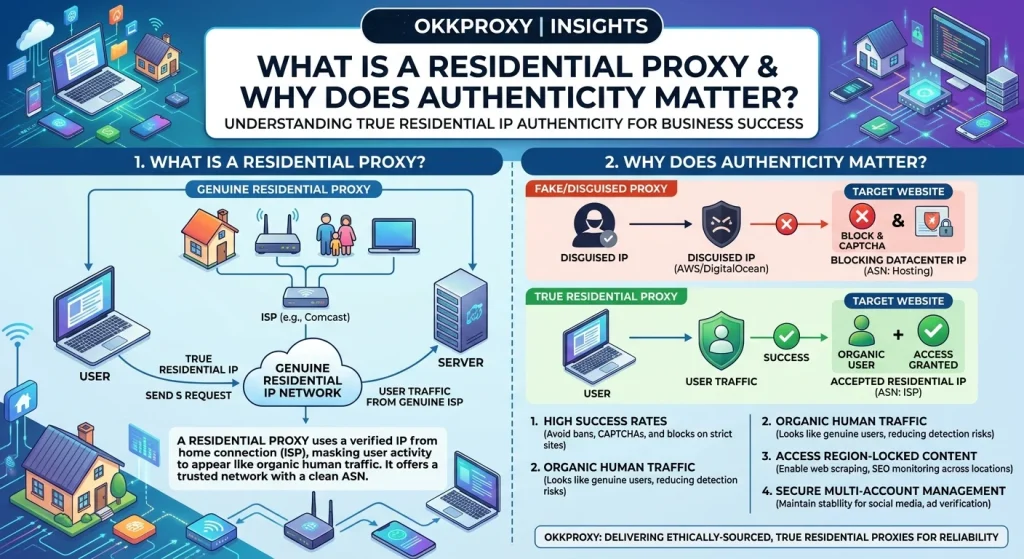
Before evaluating proxy quality, we must clearly define what is a residential proxy in a technical context.
A residential proxy is an IP address assigned by a consumer ISP to a residential homeowner. When a device using a residential IP sends an HTTP request, target servers inspect the IP’s Autonomous System Number (ASN) and registry data (ARIN, RIPE, APNIC), categorizing the traffic as standard home broadband or mobile data.
Residential vs Datacenter Proxies: The Core Differences
Understanding datacenter vs residential proxies comes down to origin, trust score, and cost structure:
- Datacenter Proxies: Originating from cloud servers (AWS, DigitalOcean, Hetzner, OVH), datacenter proxies deliver extreme speeds and datacenter proxies unlimited bandwidth. However, because these subnets are publicly listed as hosting infrastructure, security filters block them aggressively.
- Residential Proxies: Sourced from home internet connections, true residential proxies carry maximum trust scores. They pass strict bot mitigations but usually feature pay-per-gigabyte pricing due to the complexity of sourcing consumer IPs ethically.
- Static ISP Proxies: Also known as static residential proxies, these IPs are hosted in enterprise data centers but registered under official consumer ISP ASNs (e.g., Spectrum, Verizon). They deliver the lightning-fast speed of datacenter setups combined with the high trust of residential subnets.
To verify raw network details directly from authoritative internet registries, you can inspect registered ASNs using the official APNIC IP Lookup Tool.
The Spectrum of “Fake” Residential Proxies: What Are Providers Selling?
When asking how do residential proxy providers source IPs, the answer separates ethical providers from unreliable ones. Providers offering cheap proxies or suspiciously cheap unlimited bandwidth residential proxy plans often resort to three common misconfigurations:
1. Pure Datacenter Subnets Re-tagged as ISP
Some rogue sellers purchase bulk IP blocks from commercial hosting providers and update the WHOIS record or organization string to mimic an ISP name. While the WHOIS text says “Local Telecom,” the underlying Autonomous System Number (ASN) remains flagged in security databases as a data center.
2. Commercial / Enterprise ISP Lines (DC ISP Proxies)
Providers buy bandwidth from corporate fiber suppliers rather than consumer residential broadband. While technically assigned to a telecommunications company, these dc isp proxies lack real residential behavior—such as dynamic DHCP rotations or typical residential TCP/IP stack signatures.
3. Compromised / Unethically Sourced Botnet IPs
Some free residential proxy lists or suspicious resi proxy providers build pools by secretly bundling SDKs into free software, turning consumer devices into proxy nodes without informed consent. As highlighted in security warnings from the FBI and cybersecurity firms, these infected nodes suffer high churn, terrible latency, and severe legal risks for end users.
How Anti-Bot Systems Detect Fake Residential Proxies
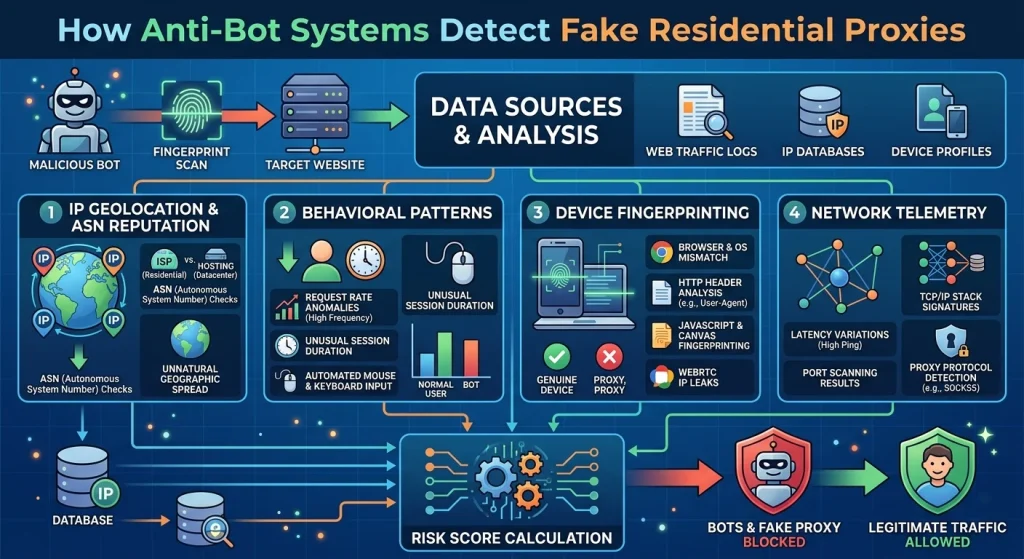
Security vendors like Cloudflare, Kasada, Fingerprint, and Datadome do not rely on a single metric to evaluate IP trust. Instead, they use multi-layered risk scoring engines. If you are wondering are residential proxies detectable, the answer is yes—especially when configured poorly.
Key Detection Signals
- ASN and Registry Classification Integrity: Detection engines query authoritative databases (IPinfo, MaxMind, IPQualityScore). If an IP claims to be residential but belongs to AS14061 (DigitalOcean) or AS16509 (Amazon.com), it is immediately flagged as a datacenter proxy.
- rDNS (Reverse DNS) PTR Records: Genuine consumer IPs exhibit ISP-specific PTR patterns, such as c-73-24-110-12.hsd1.ma.comcast.net or dynamic.ppp.telecom.de. Fake residential proxies hosted in cloud servers often show generic strings or hostnames matching VPS nomenclature (vps-102-node.hostingcompany.com).
- TCP/IP Stack Fingerprinting (p0f): The TCP SYN packet sent by a server OS (e.g., Linux Kernel 5.x with specific Window Sizes and TTL values) differs significantly from a consumer operating system (Windows 11, macOS, iOS). If an incoming request presents a mobile/desktop browser User-Agent but the underlying TCP stack reveals a bare-metal Linux web host, anti-bot scripts increment the risk score.
- RTT (Round-Trip Time) Latency Anomalies: Real residential proxies involve a two-hop relay: Client -> Proxy Server -> Residential Node -> Target Website. This route adds noticeable physical latency. When a “residential proxy” responds with ultra-low latency identical to AWS US-East servers, the system knows the request originated directly from a server farm.
- Open Port and Service Scanning: Security systems scan common server management ports (e.g., 22 for SSH, 8080/3128 for open proxy daemons, 3389 for RDP). Consumer residential routers block these ports by default; open server management ports indicate host infrastructure.
Technical Auditing Guide: How to Verify a Residential Proxy Step-by-Step
To check whether your residential ip proxy pool is authentic, follow this systematic auditing workflow.
Step-by-Step Verification Protocol
- Step 1: Inspect ASN & IP Intelligence Metadata
- Query your proxy IP through authoritative database API endpoints (e.g., IPinfo, MaxMind, or GreyNoise). Verify that the ASN and Company Type explicitly state ISP or Residential, not Hosting or Data Center.
- Step 2: Check Reverse DNS (rDNS) PTR Records
- Perform a reverse DNS lookup using standard CLI tools: dig -x [YOUR_PROXY_IP] +short. Look for consumer dynamic hostnames (dhcp, dyn, res, broadband). If the record points to a cloud domain or returns empty, flag the node for further review.
- Step 3: Measure RTT Latency Hops
- Ping target destination endpoints through your proxy host and compare total latency against direct cloud-to-cloud connection benchmarks. Real consumer proxies add 80ms–250ms of network overhead depending on geographic location.
- Step 4: Verify TCP Stack & OS Fingerprints
- Send a test request to an OS fingerprinting service (such as p0f or passive OS detection endpoints). Ensure your HTTP User-Agent string (e.g., Windows 10 Chrome) matches the OS signature returned at the network protocol layer.
Python Verification Script
Below is an automated Python script designed to audit your proxy pool against authoritative IP registries, checking ASN types and reverse DNS records.
Python
import requests
import socket
def audit_proxy_ip(proxy_ip: str):
print(f”— Auditing Proxy IP: {proxy_ip} —“)
# 1. Query IP Intelligence Data
try:
response = requests.get(f”https://ipinfo.io/{proxy_ip}/json”)
data = response.json()
org = data.get(“org”, “Unknown”)
asn_type = data.get(“company”, {}).get(“type”, “Unknown”)
print(f”[+] ASN & Org Info: {org}”)
print(f”[+] Reported Type: {asn_type}”)
except Exception as e:
print(f”[-] IP intelligence query failed: {e}”)
# 2. Perform Reverse DNS (rDNS) Lookup
try:
rdns_name, _, _ = socket.gethostbyaddr(proxy_ip)
print(f”[+] Reverse DNS PTR Record: {rdns_name}”)
# Check for hosting / datacenter indicators
dc_keywords = [“hosting”, “cloud”, “vps”, “server”, “dedicated”]
if any(keyword in rdns_name.lower() for keyword in dc_keywords):
print(“[!] WARNING: PTR record displays datacenter/hosting indicators!”)
else:
print(“[✓] PTR record appears consistent with ISP hostnames.”)
except socket.herror:
print(“[-] Reverse DNS PTR record not found.”)
# Example Usage:
# audit_proxy_ip(“162.210.192.4”)
Deep Comparison: Proxy Architectures Explained
Selecting the ideal proxy configuration requires aligning your performance requirements with the appropriate network type. The table below compares technical performance metrics across proxy types available at OkkProxy.
Proxy Architecture Performance Matrix
| Proxy Type | ASN Type | Detection Risk | Average Speed | Best Use Cases | Pricing Structure |
| Rotating Residential Proxies | Consumer Broadband ISP | Very Low | Moderate (100–300ms) | Large-Scale Web Scraping, E-commerce Data, Ad Verification | Pay per GB |
| Static ISP Proxies | Consumer ISP (Data Center Hosted) | Low | Fast (20–50ms) | Social Media Account Management, E-commerce Store Management | Fixed IP / Monthly |
| Rotating Mobile Proxies | Cellular Carrier (4G/5G) | Lowest | Variable (150–400ms) | Sneaker Bots, Mobile App Scraping, Highly Restricted Platforms | Pay per GB / Time-Based |
| Static Mobile Proxies | Cellular Carrier (4G/5G Dedicated) | Lowest | Fast (50–120ms) | High-Value Account Creation & Long-Term Management | Dedicated Monthly |
| Rotating Datacenter Proxies | Hosting / Cloud Provider | High | Ultra-Fast (<15ms) | Bulk Indexing, Non-Protected Sites, Market Research | Unlimited Bandwidth / Low Cost |
For a full breakdown of mobile versus residential configurations, read our detailed comparison on Mobile Proxies vs Residential Proxies: Which Is Right for Your Business?.
Real-World Case Studies: How OkkProxy Solved Fake Proxy Issues
To illustrate the real-world impact of proxy quality, consider two actual operational migrations handled by OkkProxy.
Case Study 1: Resolving Block Rates in E-Commerce Scraping
- Client Background: A global price intelligence firm monitored 50,000 retail URLs daily across target sites in North America and Europe.
- The Problem: The client used a provider selling cheap residential proxies with supposedly unlimited rotating residential proxies capacity. Despite setting up dynamic rotation, their scrapers faced a 64% block rate enforced by Cloudflare WAF.
- Audit Diagnosis: OkkProxy conducted an IP pool audit and discovered that 41% of the provider’s “residential” IPs were actually subnets belonging to low-cost European cloud servers with spoofed WHOIS data.
- The Solution: The client migrated to OkkProxy rotating residential proxies, gaining access to a pool of over 60 million ethically sourced consumer IP addresses with granular geo-targeting options down to state and city levels.
- The Result: Block rates plummeted from 64% to under 2.1%, while successful daily request throughput increased by 310%.
Case Study 2: Protecting Multi-Account Operations on Social Media
- Client Background: A digital marketing agency managed over 300 client social media and brand monitoring profiles.
- The Problem: Using low-cost static residential proxy addresses from an unverified provider, the agency experienced sudden account verification checkpoints and shadowbans across 45 client accounts in a single week.
- Audit Diagnosis: The proxy provider had assigned “shared static residential IPs” that were simultaneously used by aggressive sneaker bots. Furthermore, the IP subnets belonged to enterprise data centers rather than residential ISPs.
- The Solution: The agency deployed dedicated OkkProxy static ISP proxies, providing clean, single-tenant residential IP assignments from tier-1 consumer providers like AT&T, Verizon, and Comcast.
- The Result: Account checkpoints were completely eliminated, maintaining 100% operational uptime across all managed brand accounts over a 12-month period.
Read more about account protection techniques in our guide on How to Build a Secure and Effective Global Social Media Marketing Matrix.
How to Audit and Choose a Trusted Proxy Provider
When evaluating a proxy service website, a trusted proxy provider, or searching for the best residential proxy providers 2026, avoid platforms that rely on vague marketing terms. Use this practical evaluation checklist before making a decision to buy proxies:
Proxy Evaluation Checklist
- ASN Verification: Can the provider confirm that every IP in their residential pool is classified under consumer ISP ASNs?
- Ethical Sourcing Transparency: Does the provider explicitly explain how residential IPs are sourced (e.g., opted-in peer networks, direct ISP leases)?
- Flexible Session Control: Does the control panel support both instant rotation per request and sticky sessions (up to 30+ minutes)?
- Geographic Precision: Can you target specific countries, states, and cities without paying extra hidden fees?
- Protocol Support: Does the proxy infrastructure support HTTP, HTTPS, and SOCKS5 protocols natively?
- Free Trial & Testing Options: Does the platform offer a residential proxy free trial or structured pilot for business validation?
Why Businesses Choose OkkProxy
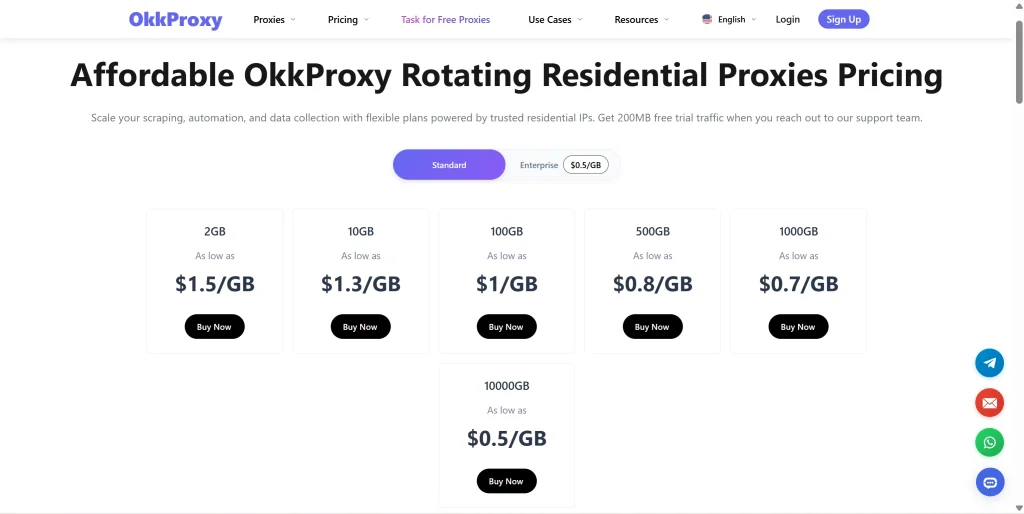
At OkkProxy, we prioritize transparency, network reliability, and ethical infrastructure:
- Massive Global Network: Access millions of verified residential IPs across 190+ locations worldwide, including targeted pools for Canada residential proxies, US private proxies, and European networks.
- Enterprise ISP Partnerships: Our static ISP proxies utilize clean, dedicated subnets assigned directly by tier-1 consumer ISPs, providing maximum speeds and zero block rates.
- Full Protocol Flexibility: Switch seamlessly between HTTP, HTTPS, and SOCKS5 configurations across all rotating and static endpoints.
- Dedicated 24/7 Technical Support: Our engineering team provides direct assistance with integration scripts, custom routing rules, and pool architecture.
Frequently Asked Questions (FAQ)
What is a residential proxy, and how does it work?
A residential proxy is an IP address provided by a consumer Internet Service Provider (ISP) to a homeowner. When you connect through a residential proxy, your internet traffic is routed through that residential IP address, making your requests appear as though they originate from a regular home user. This helps bypass anti-bot blocks and geographic restrictions.
How do I check if a proxy IP is genuine residential or datacenter?
You can inspect an IP address using IP intelligence tools like IPinfo or MaxMind. Look at the ASN and Organization fields: genuine residential IPs list consumer telecom providers (e.g., Comcast, AT&T, Vodafone), whereas fake residential proxies list cloud hosting companies (e.g., AWS, DigitalOcean, Hetzner). Additionally, check the reverse DNS PTR record for dynamic ISP hostnames.
Are residential proxies legal to use?
Yes, using residential proxies is fully legal in most jurisdictions worldwide, provided they are used for legitimate activities like web scraping, brand protection, market research, and ad verification. However, sourcing proxies ethically—with informed consent from bandwidth owners—is critical to ensure legal compliance.
What is the main difference between Static ISP proxies and Rotating Residential proxies?
Rotating residential proxies change your IP address periodically or with every HTTP request, making them ideal for scraping millions of pages without hitting rate limits. Static ISP proxies assign you a fixed, dedicated residential IP hosted in high-speed data centers, making them perfect for tasks that require a consistent identity, such as maintaining social media accounts or managing e-commerce stores.
Why do cheap residential proxies often fail on target websites?
Cheap residential proxy services often rely on poorly configured datacenter subnets, recycled IP blocks flagged by security databases, or unreliably sourced peer networks. Because advanced anti-bot engines analyze TCP signatures, latency hops, and ASN metadata, these cheap proxies are detected and blocked almost immediately.
Key Takeaways
- Not All Residential Proxies Are Real: Rogue providers frequently market low-cost datacenter subnets or commercial IPs as residential proxies.
- Anti-Bot Systems Audit Deep Signals: Security filters inspect ASN tags, rDNS PTR records, TCP/IP stack signatures, and latency hops to flag spoofed IPs instantly.
- Perform Technical Audits Early: Use Python scripts and IP lookup tools to verify ASN metadata and reverse DNS hostnames before scaling your operations.
- Match the Right Proxy to Your Task: Use rotating residential proxies for high-volume web scraping, and static ISP proxies for long-term account management.
- Quality Beats Volume: Investing in ethically sourced, authentic proxy infrastructure from providers like OkkProxy lowers operational costs by maximizing request success rates and eliminating account bans.