Quick Summary:
Websites challenge you with CAPTCHAs because automated scrapers and bad bots make up nearly half of all global web traffic. Security firewalls flag connections based on shared IP addresses, lack of browser cookies, or unnatural request speeds. If you are a digital marketer, data analyst, or SEO professional running automated tasks, standard troubleshooting like clearing cookies isn’t enough.
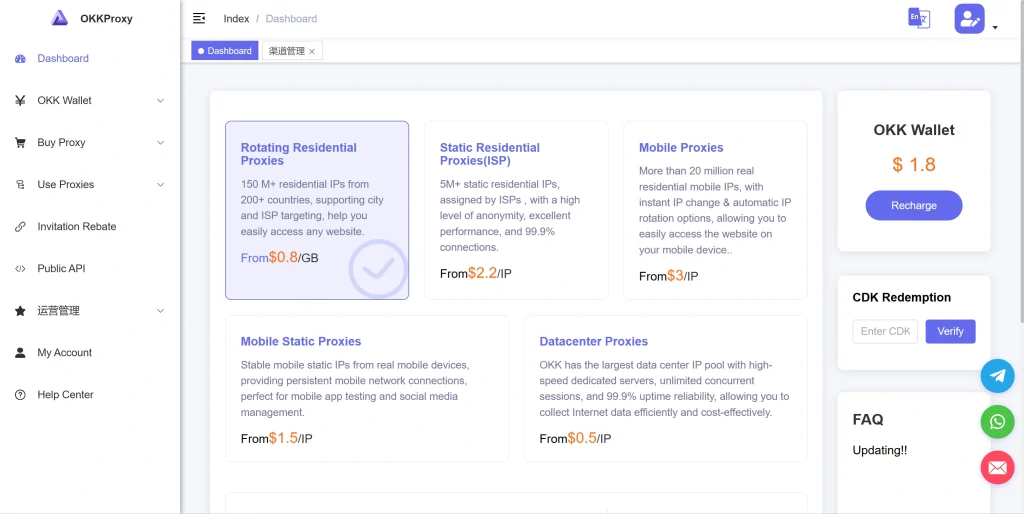
To permanently stop websites from thinking I’m a bot, you must upgrade your network infrastructure. Transitioning to premium rotating residential proxies or static ISP proxies from OKKProxy ensures your automation looks identical to organic human behavior, eliminating blocks and safeguarding your data workflows.
The Invisible Digital Wall: Why You’re Being Flagged as a Machine
It is the ultimate irony of the modern internet. You are sitting at your desk, eyes strained, clicking through a grid of traffic lights, crosswalks, or storefronts. You are playing an unintended Are you a Robot game or desperately trying to pass an automated Are you a robot test just to access a webpage.
For everyday users, a website keeps asking if ima robot because of a security barrier known as a CAPTCHA (Completely Automated Public Turing test to tell Computers and Humans Apart). But if you are a digital marketer tracking search engine rankings, a data analyst scraping market intelligence, or an ad verification specialist, these loops are more than an annoyance—they are an operational bottleneck that skews data accuracy and halts business growth.
If your core goal is to stop websites from thinking I’m a bot, you first need to understand the underlying triggers. Why does Cloudflare, Akamai, or Google’s reCAPTCHA engine point a finger at your connection?
Why Do Websites Think I’m a Robot? The Core Triggers
When a web server receives a request from your browser, it doesn’t just look at the URL you want to open. It analyzes an intricate digital fingerprint consisting of your network routing, hardware properties, and behavioral telemetry.
Here are the primary reasons why do websites think I’m a robot:
1. High-Risk or Blacklisted IP Addresses
Your Internet Protocol (IP) address is your digital return address. If you are using a legacy commercial VPN or low-grade public proxies, you are sharing that exact same IP address with thousands of other users across the globe. If just one of those users launches a malicious script, spams a forum, or targets a server, that entire IP address gets flagged or blacklisted by global Web Application Firewalls (WAFs). When your request arrives from that same “burned” IP, the server assumes you are part of the attack.
2. The Clues Hidden in Autonomous System Numbers (ASN)
Every IP address belongs to an Autonomous System Number (ASN), which identifies the network provider. Commercial VPNs and cheap proxy providers buy their infrastructure from data centers (like AWS, DigitalOcean, or Linode). Security firewalls know that real human consumers do not browse the web from inside an enterprise data center. Therefore, requests originating from a data center ASN automatically face strict verification protocols.
3. Missing or Suspicious Browser Cookies
You might ask: Why do websites ask for cookies during normal browsing? Cookies are not just for targeted advertising; they serve as a historical trust footprint. A clean browser with zero cookie history, missing local storage, or a generic, unconfigured User-Agent string looks exactly like a headless automated scraping script (such as Puppeteer or Selenium). By over-optimizing for privacy or clearing session histories constantly, you accidentally signal to firewalls that your browser instance was generated a split second ago by a machine.
4. Excessive Request Velocity
Humans are fundamentally slow. We read headers, move our cursors organically, scroll down pages, and wait before clicking links. Automated scripts execute tasks at breakneck speeds, sending hundreds of concurrent connection requests per second. If your data tools query a target site faster than humanly possible, the system instantly deploys a verification wall to preserve server bandwidth.
Decoding the Tech: Why Do Certain Websites Ask “Are You a Robot?”
To successfully circumvent verification traps, teams must realize that modern human verification frameworks have evolved far beyond analyzing wavy letters or matching shapes. Platforms like Google’s reCAPTCHA v3 or Cloudflare’s Turnstile work quietly in the background, utilizing advanced machine learning models to calculate a real-time “risk score” for your session.
When you click a checkbox that asks you to ask you confirm that youre not a robot, the security engine evaluates several background signals:
- Mouse Trajectory Vectoring: Automated bots usually move cursors along mathematically direct, linear coordinates. Real humans move the mouse in curved, imperfect, and variable trajectories, often decelerating as they approach an interactive element.
- Active Browser Environment Integrity: The script challenges your browser to render complex background graphics via HTML5 Canvas or WebGL. If the hardware rendering values do not align with your stated User-Agent string, a mismatch is flagged.
- The Connected Google Account Ecosystem: When analyzing why does Google keep asking me if I’m a robot?, the reason often links directly to your Google authentication status. Google uses its massive ecosystem data to verify identity. If you are logged into a legitimate, long-standing Google account that regularly watches YouTube videos and drafts emails, your baseline trust score surges, allowing you to pass through reCAPTCHA barriers invisibly.
5 Practical Methods to Stop Websites from Thinking You’re a Bot
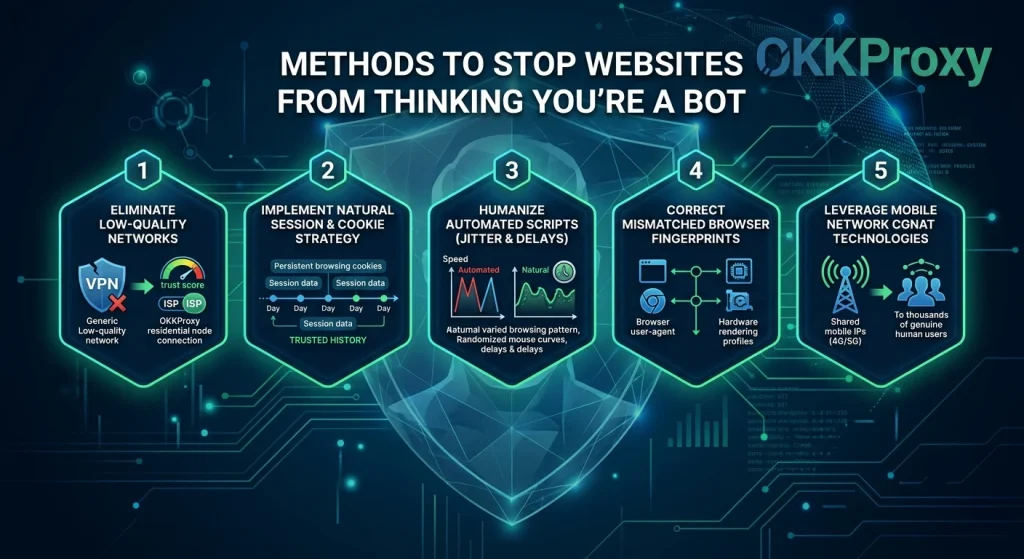
If you are struggling with recurring challenges on your personal devices or business infrastructure, use these five verified techniques to clean up your network presence and stop websites from thinking I’m a bot.
Method 1: Transition away from Low-Quality Commercial Networks
If you rely on budget commercial VPNs or datacenter IPs for data aggregation, you will face endless CAPTCHAs. To stop security systems from triggering, route your operations through an elite network provider like OKKProxy.
By leveraging OKKProxy’s rotating residential proxies, your connection utilizes genuine, consumer-tier IP addresses assigned by legitimate Internet Service Providers (ISPs) like Comcast, AT&T, or Verizon. Because these IPs belong to actual households, anti-bot firewalls treat them with maximum trust, allowing your automated processes to proceed completely unhindered.
Method 2: Implement a Natural Session and Cookie Strategy
Always maintain human-like cookie persistence when configuring multi-account management setups or parsing scripts. If you run browser automation, do not launch blank profiles for every new request. Utilize anti-detect browsers to preserve local cookies and cache parameters. A robust cookie profile answers the question of why do websites ask for cookies by providing a verified trail of trusted interaction history.
Method 3: Humanize Your Automated Scripts (Jitter and Delays)
If you are developing web crawlers, avoid setting strict, rhythmic interval loops. If a script requests a page exactly every 2.000 seconds, an anti-bot engine will flag the mathematical certainty of the pattern. Introduce “jitter”—randomized delays ranging between 1.5 and 5.5 seconds—to emulate the organic hesitation of a real consumer exploring a site.
Method 4: Correct Mismatched Browser Fingerprints
Security engines look for discrepancies between your HTTP request headers and your browser’s internal JavaScript environment. For example, if your User-Agent header claims you are running Google Chrome on Windows 11, but your browser’s WebGL features point to a Linux architecture, the system flags the manipulation. Ensure your fingerprint configurations are completely synchronized and accurate.
Method 5: Leverage Mobile Network CGNAT Technologies
When dealing with exceptionally aggressive platforms (such as social networks or strict e-commerce portals), utilize rotating mobile proxies or static mobile proxies. Mobile carrier networks assign IPs via Carrier-Grade NAT (CGNAT), meaning thousands of legitimate human cellular users share the exact same IP addresses simultaneously throughout the day. Because blocking a mobile IP risks blocking thousands of real potential customers, websites maintain incredibly lenient threshold rules for cellular traffic.
Troubleshooting Platform-Specific Challenges
How Do I Stop Google From Asking Me If I’m a Robot?
If you are repeatedly stuck in an endless loop where Google Are you a robot queries interrupt your daily search tasks, it typically means your current public IP address is outputting what Google classifies as “unusual traffic.” This is an incredibly common issue for teams running bulk keyword research or monitoring local search positions.
To resolve this on your local machine:
- Audit Your Network for Background Synchronization: Ensure no hidden browser tabs or developer extensions are executing automated background processes or scrapers.
- Deactivate Shared Cloud Routing Environments: If you encounter a prompt like ask you confirm that youre not a robot mac, the underlying trigger is often Apple’s built-in iCloud Private Relay feature. Private Relay splits and encrypts network paths, hiding your geographic source and forcing Google’s security systems to drop your trust level. Disabling Private Relay via your iCloud settings will instantly resolve the loop.
- Deploy Enterprise Infrastructure: For teams performing ongoing rank tracking, the optimal long-term fix is to route requests through OKKProxy’s static ISP proxies. These proxies give you a dedicated, unchanging IP with residential classification, allowing you to run continuous keyword analysis safely without constantly triggering “unusual traffic” alerts.
Eliminating the Bot Trap on Chat Platforms
Many web professionals experience issues with strict verification barriers on communication nodes, searching for answers on how to stop omegle from asking if youre a robot or wondering why does omegle ask if your a robot.
Because anonymous communication hubs are primary targets for automated advertising spam bots, their internal firewalls have a near-zero tolerance policy for shared IP architectures. If you use a standard proxy or commercial VPN on these platforms, you will be flagged instantly.
- The Household Solution: Perform a complete hardware restart on your office router. Unplug the power source for 3 to 5 minutes. When your router reconnects, your consumer ISP will provision a fresh, clean IP from its residential pool, stripping away your previous bad reputation scores.
- Clear Local Device Configurations: Flush your operating system’s internal domain name cache (DNS) to wipe out outdated connectivity states that might be triggering defensive firewall firebacks.
Selecting the Right Proxy Infrastructure to Avoid CAPTCHAs
For corporate platforms, marketing agencies, and data engineering teams, manually solving puzzles is not a scalable choice. To permanently stop websites from thinking I’m a bot, you need a proxy matrix that aligns directly with your specific business goals.
OKKProxy Product Breakdown and Use Cases
To maintain consistent data extraction speeds, consult this specialized alignment guide:
- Rotating Residential Proxies: These proxies draw from a pool of millions of real consumer household connections worldwide. Because the system automatically rotates your IP with every single page request or set time interval, target firewalls cannot accumulate enough historical data to trigger a CAPTCHA. This makes them ideal for massive web scraping pipelines and cross-border competitor price matching.
- Static ISP Proxies: If your marketing team needs to manage client social profiles or access e-commerce dashboards, changing your IP every few minutes looks highly suspicious and can cause account suspensions. Static ISP proxies give you the incredible connection speeds of a data center combined with the pristine reputation of an ISP residential network string, giving you a long-term, trusted online identity.
- Rotating Mobile Proxies: These utilize 4G and 5G cellular network routing blocks. They are the ultimate tool for navigating highly defensive platforms (like Instagram or TikTok) that track account interactions down to mobile carrier towers.
- Static Mobile Proxies: Offers a dedicated, unchanging mobile cellular node for use cases requiring a persistent mobile network environment without the interruption of identity switches.
- Rotating Datacenter Proxies: The preferred option when speed and massive processing bandwidth are your primary metrics, and your target websites use straightforward, legacy security firewalls rather than advanced behavioral monitoring.
Technical Integration: How to Configure Proxies in Python Automation
To demonstrate how easily you can apply these enterprise methods, look at this structured Python example using the requests library. This snippet outlines how to configure a script using authenticated residential credentials to bypass a bot-detection firewall silently.
Python
import requests
import random
import time
# OKKProxy Premium Authentication Credentials
PROXY_USER = ‘your_okkproxy_username’
PROXY_PASS = ‘your_secure_password’
PROXY_HOST = ‘residential.okkproxy.com’
PROXY_PORT = ‘8000’
# Setting up the trusted network gateway string
proxy_string = f”http://{PROXY_USER}:{PROXY_PASS}@{PROXY_HOST}:{PROXY_PORT}”
proxies = {
“http”: proxy_string,
“https”: proxy_string
}
# A curated pool of verified, synchronized User-Agents
user_agents = [
“Mozilla/5.0 (Windows NT 10.0; Win64; x64) AppleWebKit/537.36 (KHTML, like Gecko) Chrome/120.0.0.0 Safari/537.36”,
“Mozilla/5.0 (Macintosh; Intel Mac OS X 10_15_7) AppleWebKit/605.1.15 (KHTML, like Gecko) Version/17.2 Safari/605.1.15”
]
target_url = “https://www.example-target-website.com/data”
def fetch_data_without_blocks():
headers = {
“User-Agent”: random.choice(user_agents),
“Accept-Language”: “en-US,en;q=0.9”,
“Accept-Encoding”: “gzip, deflate, br”,
“Connection”: “keep-alive”
}
try:
# Executing the request through OKKProxy’s clean residential network node
response = requests.get(target_url, proxies=proxies, headers=headers, timeout=10)
if response.status_code == 200:
print(“Data extracted successfully – Zero CAPTCHAs triggered!”)
return response.text
except Exception as e:
print(f”Connection optimization required: {e}”)
# Introducing natural human jitter delays between automation actions
time.sleep(random.uniform(1.5, 4.5))
fetch_data_without_blocks()
Operational Checklist: Maintaining High Trust Scores
Follow this checklist to keep your automated scrapers and local devices running cleanly without triggering bot alarms:
- Verify Network ASN: Avoid running business automation or client data trackers through cheap, shared datacenter hosting providers.
- Match System Architecture: Ensure your operating system headers, language options, and user-agent details form a fully aligned browser fingerprint.
- Implement Cookie Sessions: Preserve trusted tracking cookies between session requests rather than wiping your profile data completely.
- Incorporate Organic Jitter: Add randomized delays between connection actions to simulate human browsing patterns.
- Leverage Residential Infrastructure: Switch your enterprise tasks to high-tier Socks5 Proxies or Twitter Proxies to keep your data pipelines clear of verification blocks.
Frequently Asked Questions (FAQ)
Why does Google keep asking me if I’m a robot?
Google triggers these security barriers when it detects unusual request volumes or patterns originating from your network IP address. This typically happens if you are using a shared VPN, sharing a public Wi-Fi network with an infected or malicious device, or sending automated high-velocity keyword search queries.
Is an “Are you a robot” test safe to complete?
Official verification checks like Google reCAPTCHA or Cloudflare Turnstile are safe and secure. However, be aware of fake CAPTCHA scams on shady streaming or file-sharing sites. These scams often show a deceptive pop-up saying “Click Allow to verify you are not a robot.” Clicking “Allow” actually grants malicious websites permission to flood your system with push notifications, pop-up ads, or spyware. Authentic human checks will never ask you to update your computer software or alter your browser settings.
Can I get free Robux without asking if your a robot?
No. Any application, forum post, or online tool that promises to give you free rubux without asking if your a robot is a malicious scam designed for data phishing. These platforms use the allure of bypassing human verification steps to steal your personal accounts, capture credit card data, or trick you into installing adware on your device.
How do I stop automated data scripts from hitting CAPTCHAs?
The most reliable way to prevent automated scripts from getting blocked is to optimize your underlying network layer rather than trying to fix it at the visual layer. Transition your automation tools to OKKProxy’s premium rotating residential network nodes, employ proper cookie-preservation strategies, and utilize specialized tool configurations such as Scraping Twitter with Python to maintain an organic, human-like browsing profile.
Final Thoughts: Securing a Frictionless Digital Future
The ongoing battle between security firewalls and automated software isn’t slowing down. As artificial intelligence models become more sophisticated, anti-bot engines will continue to raise their defenses. This means standard web browsers will face increasingly aggressive scrutiny, and the traditional methods of masking your digital footprint—like cheap data centers or overused commercial VPNs—will no longer be enough to slide under the radar.
To permanently stop websites from thinking I’m a bot, you have to change how you present your identity to the network. For everyday users, this means keeping a clean browser history, logging into trusted accounts, and avoiding network setups that mask your traffic too aggressively. For companies and data professionals who rely on large-scale automation, it means investing in a premium proxy infrastructure.
By routing your data pipelines through OKKProxy’s rotating residential proxies or static ISP proxies, you ensure that your automated tasks always look like organic human behavior. This eliminates frustrating CAPTCHA loops, protects your collection scripts from IP bans, and lets your team focus on gathering clean, accurate market intelligence without constant interruptions.