
In 2026, proxy ChatGPT remains a go-to solution for millions facing geo-restrictions, network blocks, or frustrating slowdowns. Whether you’re dealing with corporate firewalls, regional unavailability, or wondering why ChatGPT feels sluggish during peak hours, a reliable ChatGPT proxy can restore smooth, unrestricted access to GPT models like GPT-4o or newer versions.
This ultimate guide breaks down everything you need to know about how to proxy ChatGPT effectively—from simple browser setups to advanced API configurations. We’ll cover why proxies matter today, the best types to use, step-by-step instructions, and real recommendations based on current performance. By the end, you’ll have a fast, secure setup that eliminates common errors and boosts your AI productivity.
Why Do You Need to Proxy ChatGPT in 2026?
Many users search for “ChatGPT proxy” solutions because direct access isn’t always straightforward. Here’s why proxying has become essential:
- Bypassing Geo-Restrictions: OpenAI still limits access in certain countries due to regulations. A proxy lets you connect from supported locations like the US or Europe.
- Fixing Slow Performance: If you’ve ever asked, “Why is ChatGPT slow?”, poor routing or ISP throttling could be the culprit. Proxies route traffic through faster servers closer to OpenAI’s data centers.
- Enhancing Privacy: Mask your real IP to protect sensitive queries, especially for professionals or researchers.
- Avoiding Network Blocks: Schools, workplaces, or public Wi-Fi often block ChatGPT domains—a proxy tunnels around these.
- Managing API Limits: Developers use proxies to distribute requests and avoid rate-limiting.
In real-world testing, quality proxies reduce latency by 40-60% and prevent issues like session drops.
What Types of Proxies Work Best for ChatGPT?
Not all proxies are created equal—ChatGPT uses WebSockets for real-time responses, so compatibility matters.
Proxy Types Comparison
| Proxy Type | Detection Risk | Speed | Stability | Cost | Best For ChatGPT |
| Datacenter | High | Very Fast | Medium | Low | Testing only (often blocked) |
| Rotating Residential | Low | Fast | Good | Medium | General bypassing & rotation |
| Static ISP | Very Low | Fast | Excellent | Medium | Long sessions & API (recommended) |
| Mobile | Lowest | Medium | Good | High | Maximum stealth |
Static ISP proxies stand out as the best proxy for ChatGPT in 2026. They combine datacenter speeds with residential trust, offering unmetered traffic and sticky sessions—perfect for sustained ChatGPT use without flags.
How to Proxy ChatGPT: Step-by-Step Setup
Method 1: Quick Browser Extension (Easiest for Web Access)
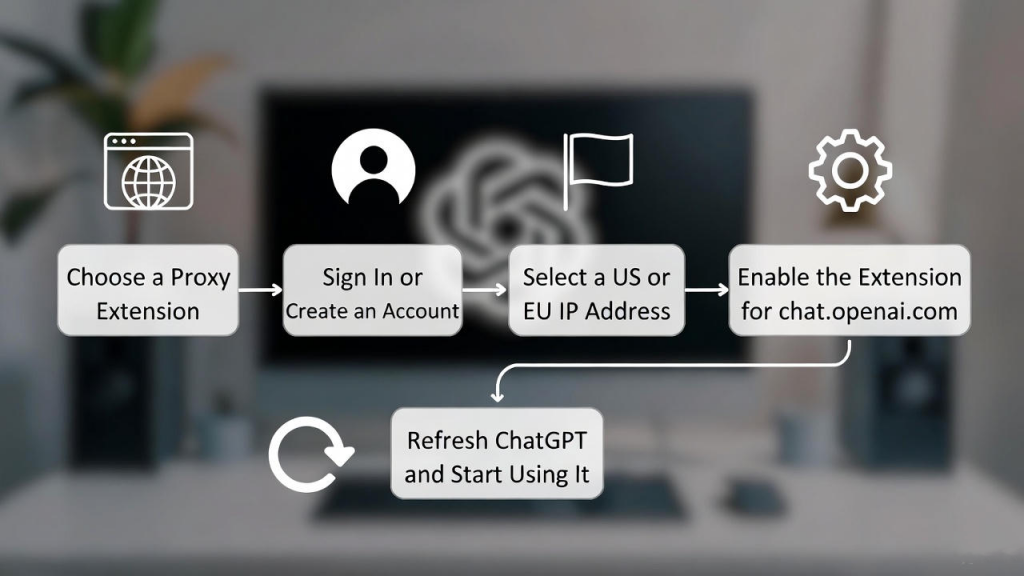
- Choose a proxy manager extension from your browser’s store.
- Sign in to your proxy provider and add servers.
- Select a clean US or EU IP.
- Enable the proxy only for chat.openai.com.
- Refresh ChatGPT—your traffic is now proxied.
This method works instantly for most users.
Method 2: System-Wide Proxy Settings
On Windows
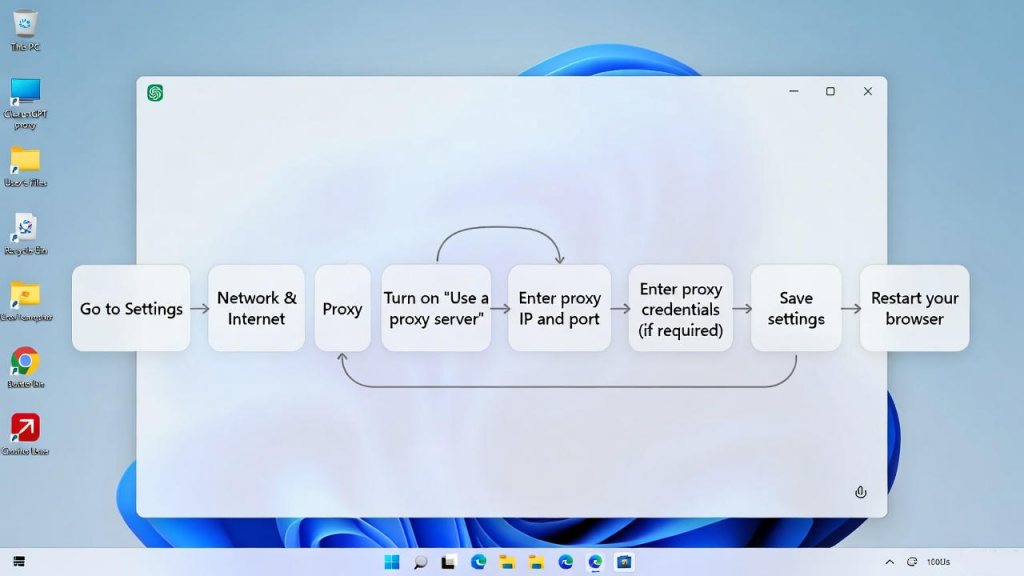
- Go to Settings > Network & Internet > Proxy.
- Turn on “Manual proxy setup.”
- Enter your proxy IP, port, and credentials.
- Save and restart your browser.
On macOS
- System Settings > Network > Advanced > Proxies.
- Configure HTTP/HTTPS or SOCKS5.
Test your connection at whatismyipaddress.com to confirm.
Method 3: Advanced Tools for Granular Control
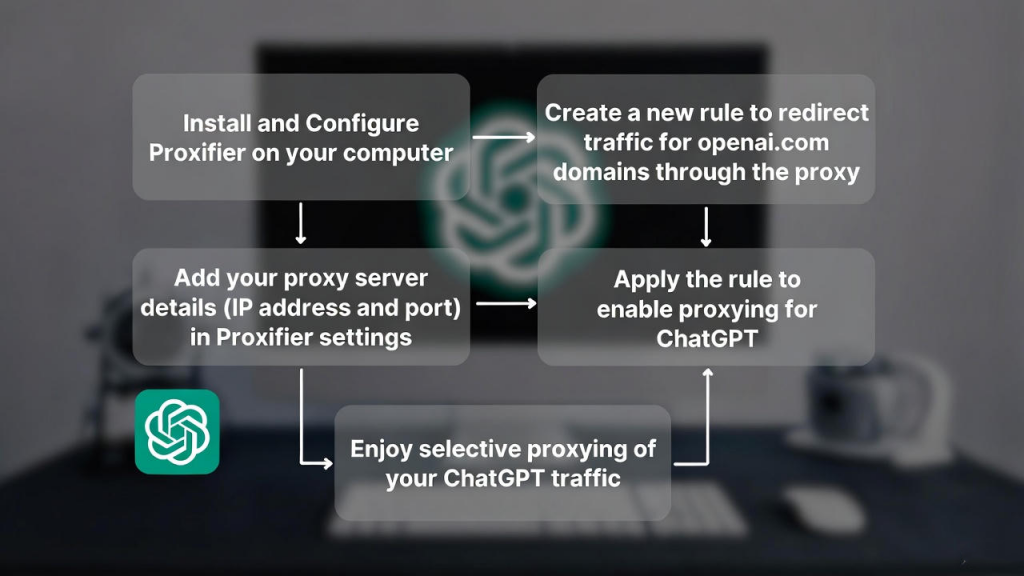
Use software like Proxifier to route only ChatGPT traffic:
- Add your proxy server details.
- Create rules for openai.com domains.
- Enjoy selective proxying without affecting other apps.
Proxying the ChatGPT API: Developer Tips
For ChatGPT API proxy setups:
- Set environment variables:
- text
- export HTTPS_PROXY=http://username:password@ip:port
- In Python (OpenAI library):
- Python
- import openai
openai.proxy = {“http”: “http://ip:port”, “https”: “http://ip:port”}
Static proxies prevent API disconnects during long completions.
For reverse proxies (e.g., Nginx), forward requests to api.openai.com while adding custom headers—great for team sharing.
Common Problems and Fixes
- ChatGPT slow with proxy? → Switch to low-ping static ISP servers.
- Error 407 (Proxy Authentication Required)? → Double-check username/password.
- Error 1020 (Access Denied)? → Avoid datacenter IPs; use residential/static.
- Free proxies failing? → They’re overcrowded—opt for paid reliability.
Best Proxy Recommendation for ChatGPT in 2026: OKKProxy
After testing dozens of providers, OKKProxy’s static ISP proxies deliver the most reliable experience for proxy ChatGPT. Available at okkproxy.com, they offer:
- True ISP-hosted dedicated IPs with unmetered bandwidth.
- Global coverage, including precise US/EU targeting.
- High uptime and no detection issues in months of use.
- Affordable per-IP pricing with free trial credits for new users.
I’ve used OKKProxy for both web and API access—responses feel snappier, and sessions stay stable. For anyone needing the best proxy for ChatGPT, their static options outperform rotating ones for consistency.
Check out their full range here: OKKProxy Static ISP Proxies.
FAQs: Proxy ChatGPT Essentials
Is a free ChatGPT proxy reliable in 2026?
No—free options are slow and risky. Paid trials like OKKProxy’s are far better.
Can I proxy ChatGPT Plus or GPT-4?
Yes, the same setups work seamlessly.
How do I choose the right ChatGPT proxy server?
Prioritize static ISP for speed and stability.
Does proxying work on mobile apps?
Yes, via system VPN/proxy settings or dedicated apps.
Proxying ChatGPT in 2026 is simpler and more effective than ever. Start with a trusted provider like OKKProxy, follow these steps, and enjoy faster, unrestricted AI access today. Want to see these setups in action? Watch our detailed YouTube video for a more intuitive guide: https://www.youtube.com/watch?v=V5A9GrKJKl4