
Managing more than one TikTok account on a single phone is no longer a niche requirement—it’s a mainstream need for creators, brands, marketers, and cross-border e-commerce sellers. It is essential to understand how to have multiple TikTok accounts on your phone, whether you want to separate personal and business content, manage client accounts, or scale TikTok marketing safely.
This guide goes far beyond basic tutorials. You’ll learn how many TikTok accounts you can have on one phone, whether a phone number can be linked to multiple TikTok accounts, how to reduce the risk of bans, and how professionals safely run multiple TikTok accounts at scale using tools like OKKProxy.
By the end, you’ll clearly know the best method for your situation—and how to future-proof your TikTok growth.
Why Do People Want Multiple TikTok Accounts on One Phone?
Running multiple TikTok accounts isn’t just about convenience. It’s a strategic choice for many users.
Common Use Cases
- Personal + Business accounts (creator vs brand identity)
- Multiple niche accounts (fitness, tech, lifestyle, etc.)
- Agency or client account management
- Backup accounts in case of restrictions
- Cross-border TikTok marketing and dropshipping
- A/B testing content and ads
TikTok itself acknowledges this need and offers native support—but only up to a point.
Can You Have Two TikTok Accounts on One Phone?
Yes. You can have multiple TikTok accounts on one phone, and TikTok officially supports this feature.
How Many TikTok Accounts Can You Have on One Phone?
| Account Type | TikTok Official Limit |
| Personal/Creator Accounts | Up to 5 |
| Business Accounts | Up to 5 |
| Total per Device | Typically 3–5 |
Important: While TikTok allows up to five accounts per device, frequent switching or unusual behavior may still trigger reviews.
So if you’re wondering “Can I have two TikTok accounts on the same phone?”—the answer is absolutely yes.
How to Make a TikTok Account on a Phone
Before diving into advanced setups, let’s start with the basics.
How to Open a New Account on TikTok With a Phone Number
- Download and open the TikTok app
- Tap Profile (bottom right)
- Tap Sign up
- Choose Use phone number
- Enter your phone number and verification code
- Set username and password
This method is simple—but it raises an important question.
Can a Phone Number Be Linked to Multiple TikTok Accounts?
How Many TikTok Accounts per Phone Number?
Officially: One phone number = one TikTok account
So if you’re asking: “Can you have multiple TikTok accounts with the same phone number?” The answer is no, not directly.
How to Make Another TikTok Account With the Same Phone Number
While TikTok restricts phone numbers, users commonly use:
- Email addresses instead of phone numbers
- Virtual phone numbers (SMS services)
- Linked accounts (Google, Apple, Facebook)
| Method | Allowed by TikTok | Risk Level |
| Different email | Yes | Low |
| Virtual phone number | Limited | Medium |
| Same phone number | No | High |
For professional users, relying on email + IP isolation is safer.
How to Make a New TikTok Account on the Same Phone (Official Method)
TikTok’s built-in Add Account feature is the safest way to manage multiple profiles.
How to Add and Switch Accounts on TikTok
- Open TikTok → Tap Profile
- Tap your username at the top
- Select Add account
- Sign up or log in with a different email or phone number
- Switch accounts anytime from the same menu
Key Advantages
- No logout required
- Officially supported
- Easy account switching
- Ideal for up to 3–5 accounts
How to Run Multiple TikTok Accounts Safely (Advanced Guide)
TikTok’s built-in Add Account feature is the safest way to manage multiple profiles.
How to Add and Switch Accounts on TikTok
- Open TikTok → Tap Profile
- Tap your username at the top
- Select Add account
- Sign up or log in with a different email or phone number
- Switch accounts anytime from the same menu
Key Advantages
- No logout required
- Officially supported
- Easy account switching
- Ideal for up to 3–5 accounts
How to Run Multiple TikTok Accounts Safely (Advanced Guide)
If you only manage two accounts, the built-in method is enough. But if you’re running multiple TikTok accounts for business, things get more complex.
Risks of Managing Too Many Accounts on One Phone
- Shared IP address
- Same device fingerprint
- Behavioral pattern overlap
- Increased risk of shadow bans
TikTok uses advanced anti-fraud systems—especially for marketing-heavy accounts.
How Professionals Scale: Proxy + Account Isolation
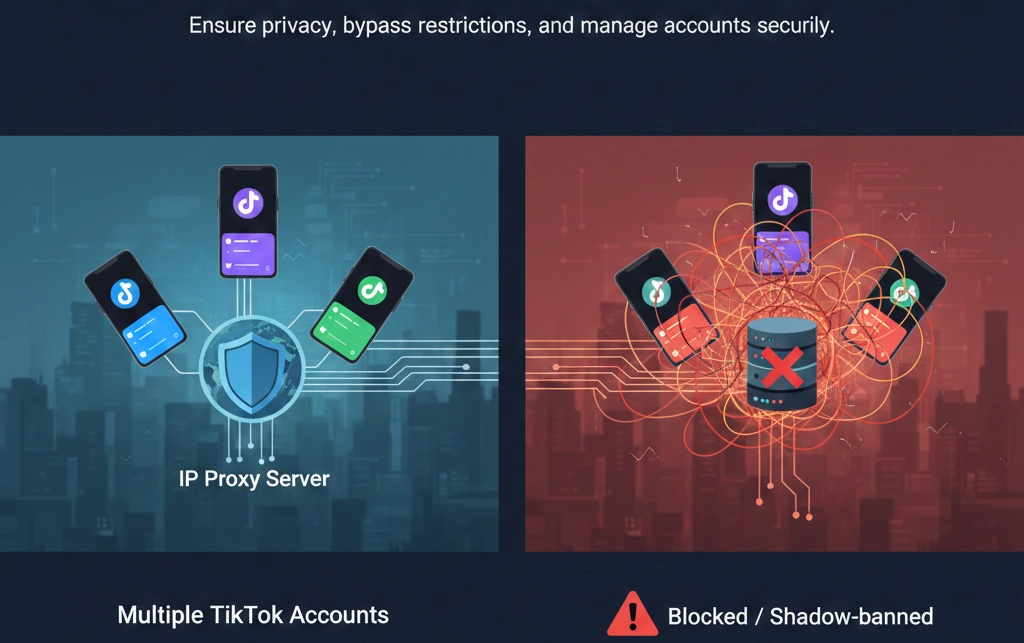
This is where OKKProxy becomes essential.
Why IP Matters for Multiple TikTok Accounts

TikTok tracks:
- IP address
- Location consistency
- Login behavior
- Device fingerprint
Using the same IP for many accounts is a red flag.
TikTok Automatic Account Maker Proxy: What It Means
A TikTok automatic account maker proxy setup allows:
- Unique IP per account
- Geo-targeted registrations
- Reduced correlation risk
- Scalable account creation
Why Choose OKKProxy for TikTok?
OKKProxy provides:
- Residential & static IPs
- Country-level targeting (US, UK, EU, SEA)
- High IP cleanliness
- Stable sessions for TikTok logins
- Ideal for multi-account TikTok operations
| Feature | OKKProxy Advantage |
| IP Type | Residential & Datacenter |
| Geo Targeting | 190+ regions |
| Stability | Long session support |
| TikTok Compatibility | Optimized |
| Use Case | Multi-account, ads, automation |
For agencies, dropshippers, and creators managing many profiles, combining TikTok’s account system with OKKProxy IP isolation is the safest approach.
Best Practices to Avoid TikTok Account Bans
Follow these guidelines:
- Use unique emails or phone numbers
- Avoid logging multiple accounts on the same IP
- Warm up new accounts slowly
- Separate content niches clearly
- Don’t automate aggressively without protection
- Use trusted proxy providers like OKKProxy
Comparison: Methods to Have Multiple TikTok Accounts on One Phone
| Method | Best For | Risk | Scale |
| TikTok Add Account | Personal users | Low | Small |
| Multiple Emails | Creators | Low | Medium |
| Virtual Numbers | Testing | Medium | Medium |
| Proxy + Isolation (OKKProxy) | Business & agencies | Low | High |
FAQs: Multiple TikTok Accounts on One Phone
Can you have multiple TikTok accounts with the same phone number?
No. TikTok allows only one account per phone number.
How many TikTok accounts can you have on one phone?
Typically 3–5 using TikTok’s built-in feature.
Can I have two TikTok accounts on the same phone?
Yes, and TikTok officially supports it.
How to run multiple TikTok accounts for business?
Use separate emails, isolate IPs, and use a professional proxy service like OKKProxy.
Is using a proxy against TikTok rules?
Using proxies is not illegal, but misuse can violate TikTok’s terms. Always follow platform rules.
Final Thoughts: The Smart Way to Manage Multiple TikTok Accounts
If you’re a casual user, TikTok’s Add Account feature is more than enough. But if you’re serious about growth, marketing, or cross-border operations, understanding how to have multiple TikTok accounts on your phone is only the first step.
To truly scale safely:
- Respect TikTok’s limits
- Separate identities properly
- Use professional infrastructure
OKKProxy helps bridge the gap between TikTok’s native features and real-world business needs—offering secure, scalable IP solutions that align with TikTok’s risk control systems.
Whether you’re managing two accounts or two hundred, the right strategy makes all the difference.
