
As cloud phone technology rapidly evolves, DuoPlus cloud phone has emerged as a leading solution for users who need anti-detection and multi-account isolation. OkkProxy is dedicated to providing users with high-quality, high-anonymity proxy services.
In cross-border e-commerce, overseas social media marketing, and multi-account operations, having a stable, secure, and flexible network environment is often the key to success.
To help users make the most of their proxy setups, this article walks through how to configure OkkProxy on DuoPlus Cloud Phone — unlocking true remote access and network isolation.
Why Choose DuoPlus?
- Unlimited Multi-Instance: Seamlessly run hundreds or even thousands of cloud phones directly from your browser, ensuring smooth and efficient operations.
- Batch Control: Upload files in bulk, and batch install/uninstall apps to streamline device management.
- One-Click Skin Change: Modify hardware and proxy settings on the fly, including mobile proxy, GPS, SIM card, time zone, and language settings — with full IP simulation support.
- One-Click New Device: Instantly wipe data and refresh your cloud phone with new device parameters — perfect for lowering device rotation costs.
- Team Collaboration: Add sub-accounts and set admin permissions to enable collaborative cloud phone management.
- ROOT Access: Easily enable ROOT permissions for advanced operations.
- Group Management: Organize devices into groups for more structured, team-friendly management.
- Line Switching: Switch video streaming lines as needed for smoother live broadcasts.
- OBS Streaming Support: Stream audio and video directly from your PC’s OBS software — ideal for 24/7 unattended livestreaming.
More features are on the way to enhance usability and meet the diverse needs of users across platforms like TikTok and Telegram, as well as for cross-border stores, app publishing, live commerce, and remote business communications.
New users get 1 month of free DuoPlus Cloud Phone service upon registration!
How to Set Up OkkProxy on DuoPlus Cloud Phone
Step 1: Get Your OkkProxy SOCKS5 Proxy
Before getting started, head over to OkkProxy’s official site to register and purchase your desired proxy package. You’ll receive detailed credentials including IP address, port, protocol, and authentication. Currently, DuoPlus supports the mainstream SOCKS5 protocol — flexible for a wide range of use cases.
Step 2: Log Into DuoPlus
1.Visit theDuoPlus website and complete your registration.
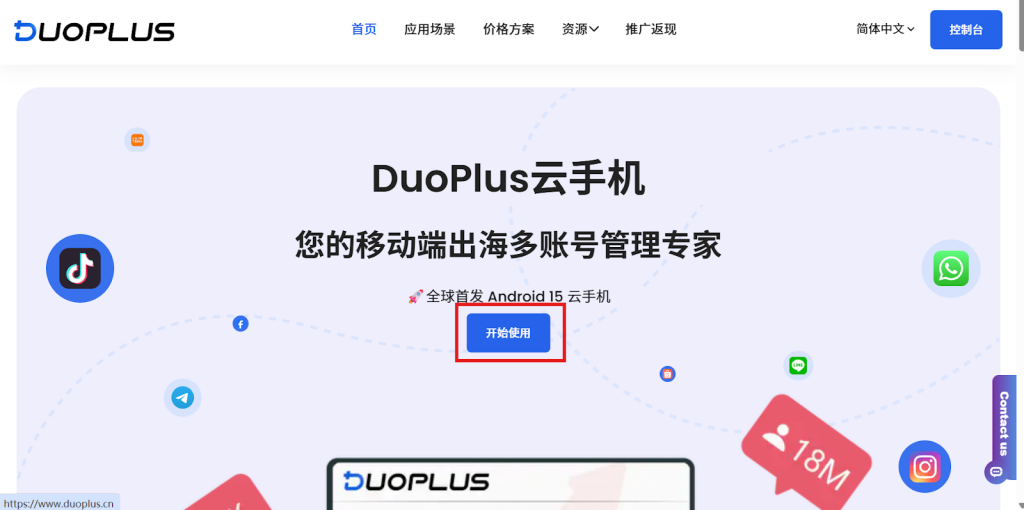
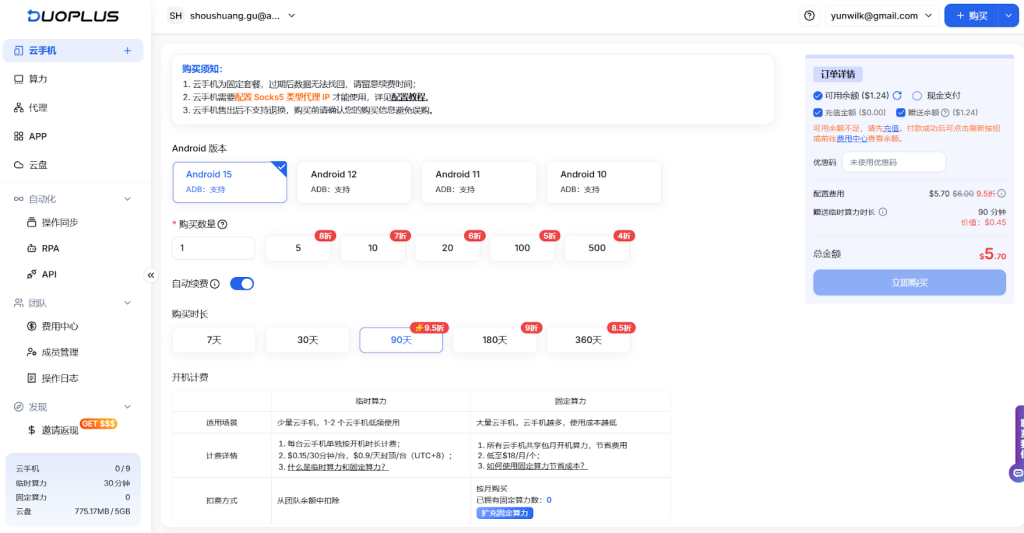
2.Log into your dashboard and purchase a cloud phone package based on your needs. New users receive 1 month of free cloud phone access + 30-minute trial time.
Step 3: Configure the Proxy on Your Cloud Phone
3.Click on the cloud phone you’ve purchased to open the configuration page, and select “Custom Proxy” as the proxy mode.
4.Fill in your proxy credentials (IP, port, username, password), and click “Check Proxy” to confirm if the configuration is working properly.
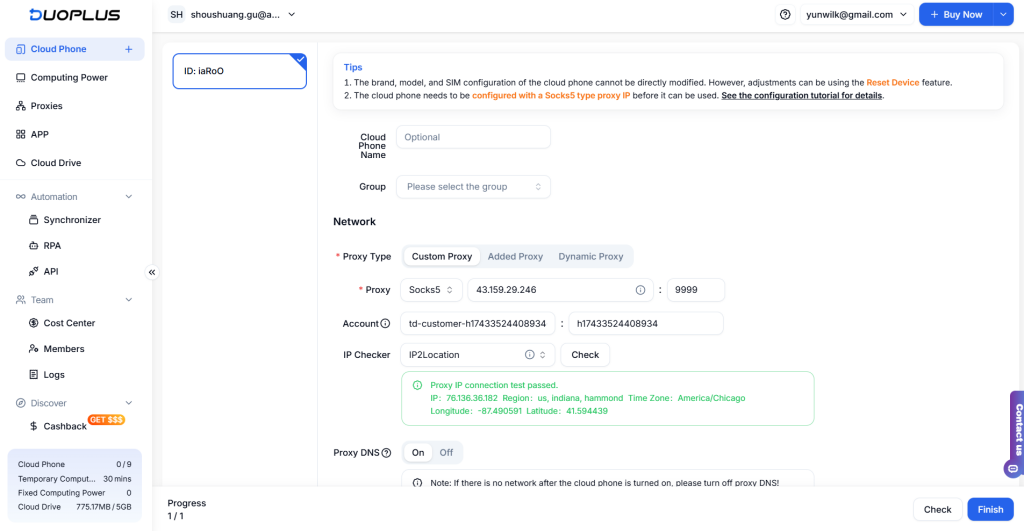
5.Once all other settings are complete, click “Finish Configuration” — and you’re ready to start using DuoPlus Cloud Phone with OkkProxy!
Final Thoughts
As platform risk control measures become increasingly strict in 2025–2026, building a secure, controllable, and fully isolated operating environment has become non-negotiable for cross-border users managing high-value accounts.
The combination of DuoPlus Cloud Phone and OkkProxy delivers exactly that — a near-perfect synergy of control and anonymity. DuoPlus provides a genuine Android system with ROOT privileges, unlimited multi-opening, one-click batch control, real-time synchronization, and built-in OBS streaming support, allowing you to run dozens (or hundreds) of independent instances simultaneously without fingerprint crosstalk. OkkProxy complements this with 90M+ ethically sourced residential and ISP IPs across 200+ countries, ultra-low latency (<80 ms in most regions), automatic rotation or long-term sticky sessions, and full SOCKS5/HTTP support — giving every cloud phone instance a clean, unique, and geo-authentic network identity.
In real-world tests, teams using DuoPlus + OkkProxy report 95%+ account survival rates even under heavy daily activity, plus up to 3–5× gains in operational efficiency thanks to centralized scripting and remote management.
