If you are researching how to choose a YouTube proxy, you are likely facing issues such as geo-restrictions, IP blocks, slow access, or account safety concerns. YouTube applies strict regional controls and anti-abuse systems, which means using the wrong proxy can easily result in CAPTCHAs, limited playback, or even account suspension.
This guide explains how to choose a YouTube proxy correctly by breaking down proxy types, legal considerations, setup methods, and best practices. You will also learn when a proxy is necessary—and when it is not—so you can make informed decisions instead of relying on unreliable free tools.
What Is a YouTube Proxy and How Does It Work?
A YouTube proxy is a proxy server that routes your YouTube traffic through a different IP address. Instead of connecting directly to YouTube, your requests pass through an intermediary server.
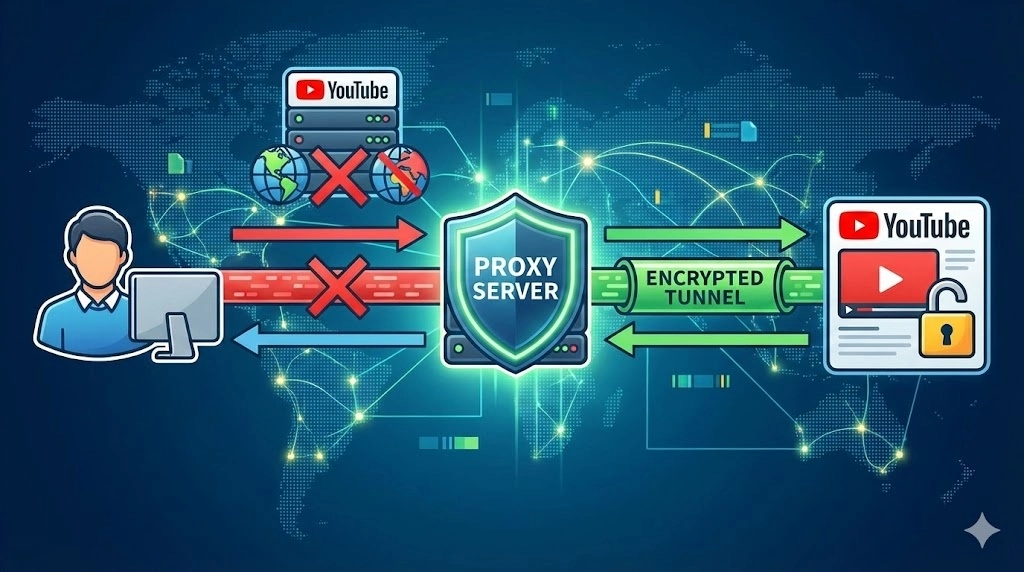
What is a proxy server and how it works (YouTube context)?
- Your device sends a request to the proxy
- The proxy forwards the request to YouTube
- YouTube responds to the proxy
- The proxy sends the data back to you
This process allows users to:
- Open YouTube with a proxy from restricted regions
- Test YouTube content from different countries
- Protect accounts from IP-based detection
Why Do People Use Proxies for YouTube?
People use proxies YouTube users trust for several legitimate reasons:
- Accessing geo-blocked videos
- Managing multiple YouTube accounts
- SEO and ad verification
- Content localization testing
- Public data collection (titles, comments, views)
However, proxies should not be used for fake views or engagement, which violates YouTube’s Terms of Service.
Is Using a YouTube Proxy Legal?
Is using a YouTube proxy legal? In most regions, yes—using a proxy itself is legal.
What matters is how you use it:
- Legal: content access, testing, research
- Risky: automation abuse, fake traffic, fraud
Always comply with local laws and platform policies.
Types of YouTube Proxies Explained
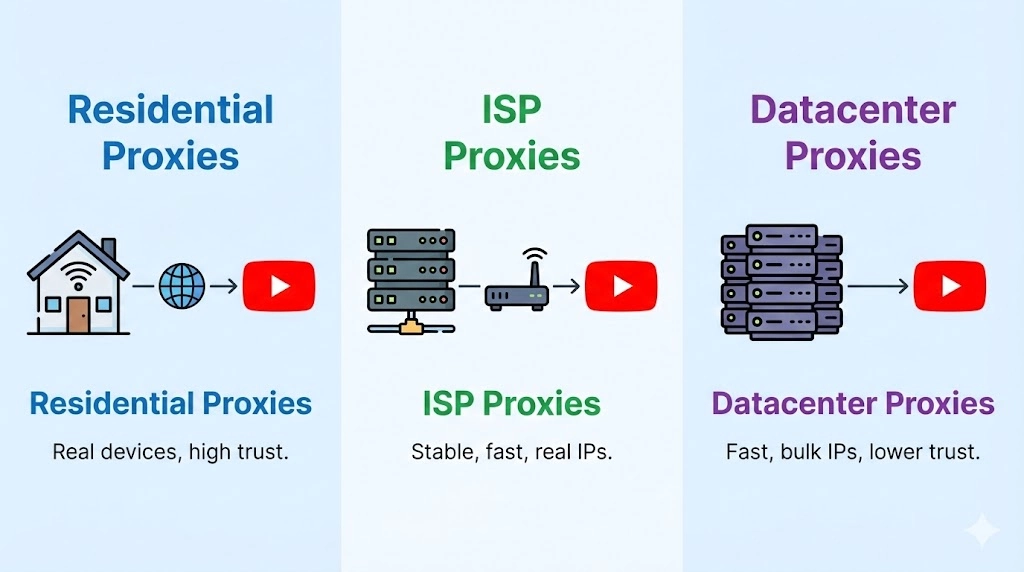
Residential Proxies (Best Choice)
Residential proxies use IPs assigned by real ISPs.
Advantages
- High trust level
- Lower ban risk
- Suitable for long sessions
These are ideal for users who want to know how to use proxy for YouTube safely. Providers like OKKProxy offer clean residential IP pools with city-level targeting.
ISP Proxies (Static Residential)
ISP proxies combine datacenter speed with residential credibility.
Best for:
- YouTube account login
- Channel management
- Long-term sessions
Datacenter Proxies
Fast and affordable but easier to detect.
Best for:
- Light scraping
- Non-login use cases
Free Proxy Sites (Croxy Proxy YouTube)
Tools like Croxy proxy YouTube or other free proxy sites work via browser-based routing.
Limitations:
- Slow speeds
- Limited video quality
- Privacy risks
- High block rates
Comparison Table: Choosing the Right YouTube Proxy
| Proxy Type | Speed | Trust | Best Use Case | Risk |
| Residential | Medium | High | Accounts, streaming | Low |
| ISP Proxy | High | High | Long sessions | Low |
| Datacenter | Very High | Medium | Scraping | Medium |
| Free Proxy Site | Low | Low | Temporary access | High |
How to Choose a YouTube Proxy (Step-by-Step)
When deciding how to choose a YouTube proxy, evaluate the following:
1. Purpose
- Streaming → Residential / ISP
- Account use → ISP proxy
- Data collection → Residential or datacenter
2. Location Accuracy
Choose proxies with country or city targeting.
3. Session Control
Sticky sessions are important for watching long videos.
4. Protocol Support
HTTP(S) and SOCKS5 are recommended.
How to Proxy YouTube: Setup Methods
Method 1: Browser Extension (Easiest)

2. Add proxy IP and port

3. Activate the proxy

4. Open YouTube
This is the simplest way to open YouTube with proxy.
Method 2: Manual Proxy Settings
Windows

- Settings → Network → Proxy
- Enter IP and port
macOS

- Network → Advanced → Proxies
- Enable HTTP/HTTPS
Method 3: Web-Based Proxy
Paste the YouTube URL into a proxy site.
Useful on public Wi-Fi, but not recommended for logged-in use.
How to Unblock YouTube Without a Proxy
If you’re asking how can I open YouTube without proxy, alternatives include:
- Changing DNS
- Switching networks
- Using mobile data
These methods are limited and lack flexibility.
Why OKKProxy Is a Reliable YouTube Proxy Provider
OKKProxy offers:
- Residential and ISP proxies
- Global IP coverage
- Stable sessions
- SOCKS5 & HTTPS support
- Transparent IP sourcing
These features make OKKProxy suitable for professional YouTube access, testing, and research.
Conclusion: Choosing the Right YouTube Proxy
Understanding how to choose a YouTube proxy helps you avoid unreliable tools and protect your accounts. Free proxy sites may work temporarily, but they introduce speed, privacy, and stability risks.
For consistent access, residential and ISP proxies remain the safest option. By selecting the right proxy type, configuring it properly, and following platform rules, you can use YouTube efficiently and responsibly.
For even more details and real examples, check out this quick video tutorial: How to Choose a YouTube Proxy in 2026 – click to watch!
