
For any data acquisition or web scraping project, the greatest enemy is — and always will be — the IP ban. That’s exactly why a reliable Python proxy solution has become non-negotiable in 2025: whether you’re rotating residential IPs in Requests, building Scrapy middleware, or handling millions of daily requests, the right Python proxy setup is the only thing standing between you and instant blocks from Amazon, Google, TikTok, or any anti-bot system.
You confidently run your Python scraper, only to be met with a screen full of 403 Forbidden or 503 Service Unavailable errors minutes later. You’ve hit the wall every scraper engineer knows: the target website has identified high-frequency requests from your single IP and blacklisted you.
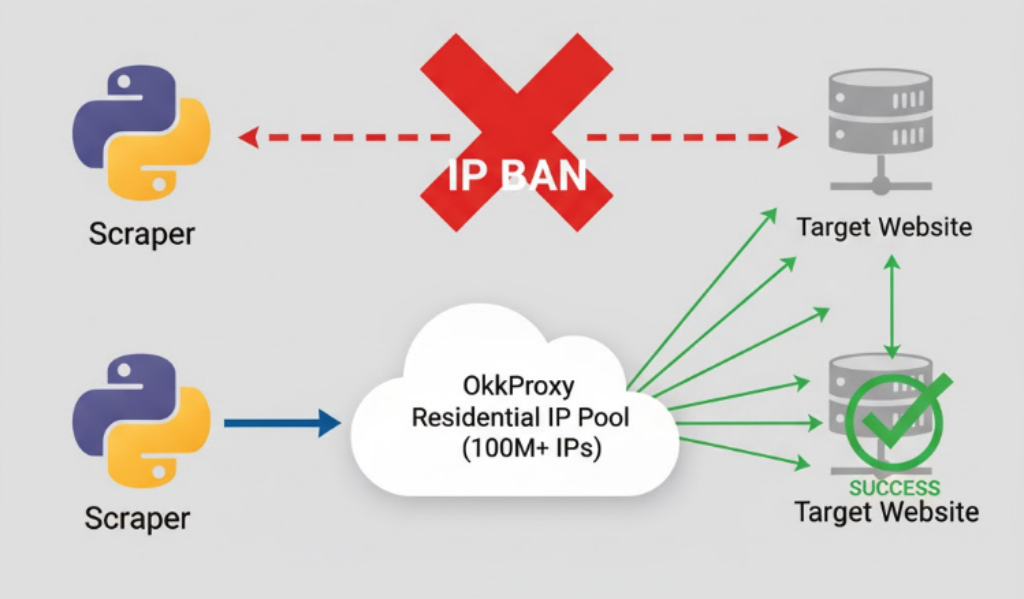
The solution? A massive, clean, rotating pool of IP addresses that mimics real user behavior.
This is where OkkProxy Dynamic Residential Proxies come in. With a pool of over 100 million real household IPs, OkkProxy allows your scraper to “disappear” among millions of real users across the globe.
In this technical guide, we’ll show you exactly how to integrate OkkProxy’s residential proxies into the two most popular Python scraping libraries: Requests and Scrapy, complete with battle-tested anti-banning techniques.
Preparation: Get Your OkkProxy Credentials
Regardless of the library, you’ll need four key pieces of information from your OkkProxy dashboard:
- Proxy Host:
un-residential.okkproxy.com - Proxy Port:
16666 - Username: Your account username
- Password: Your account password
Pro-Tip: OkkProxy allows you to control sessions by adding parameters to your username. For example, username-country-us-session-abc1234 would give you a “sticky” session from the US. To achieve “Dynamic Rotation” (a new IP for every request), we will add a random session ID to the username.
Method 1: Integrating OkkProxy with Python Proxy Requests
Requests is the go-to for simple web requests. Integrating a proxy is as simple as constructing a proxies dictionary.
Step 1: The Basic Proxy Request
This is the most basic setup. We hard-code the proxy credentials into the proxies dictionary.
import requests

# --- Your OkkProxy Credentials ---
OKK_HOST = "un-residential.okkproxy.com"
OKK_PORT = "16666"
OKK_USER = "YOUR_USERNAME"
OKK_PASS = "YOUR_PASSWORD"
# --------------------------------

# Construct the proxy URL
proxy_url = f"http://{OKK_USER}:{OKK_PASS}@{OKK_HOST}:{OKK_PORT}"

# Set up proxies for both http and https
proxies = {
    "http": proxy_url,
    "https": proxy_url
}

# The URL we want to scrape
url_to_scrape = "[https://httpbin.org/ip](https://httpbin.org/ip)"

try:
    # Send the request
    response = requests.get(url_to_scrape, proxies=proxies, timeout=10)

    # Print our current exit IP
    print(f"Request successful! Our Exit IP is: {response.json()['origin']}")

except requests.exceptions.RequestException as e:
    print(f"Request failed: {e}")
Step 2: Advanced (IP Rotation & Anti-Banning)
In a real-world scenario, you must do two more things to avoid being banned:
- Rotate IPs: Ensure every request comes from a different IP.
- Fake Your User-Agent: Make your request look like it’s from a real browser, not a Python script.
We will achieve IP rotation by generating a random session ID for every single request.
import requests
import random
import string

# --- Your OkkProxy Credentials ---
OKK_HOST = "un-residential.okkproxy.com"
OKK_PORT = "16666"
OKK_USER_PREFIX = "YOUR_USERNAME" # Just the username, no session
OKK_PASS = "YOUR_PASSWORD"
# --------------------------------

# A common browser User-Agent
HEADERS = {
    'User-Agent': 'Mozilla/5.0 (Windows NT 10.0; Win64; x64) AppleWebKit/537.36 (KHTML, like Gecko) Chrome/108.0.0.0 Safari/537.36'
}

def get_random_session_proxy():
    """Generates a proxy auth string with a new random session ID"""

    # Generate a 10-digit random string for the session ID
    session_id = ''.join(random.choices(string.ascii_letters + string.digits, k=10))

    # Construct the dynamic username to rotate IP
    dynamic_user = f"{OKK_USER_PREFIX}-session-{session_id}"

    proxy_url = f"http://{dynamic_user}:{OKK_PASS}@{OKK_HOST}:{OKK_PORT}"

    return {
        "http": proxy_url,
        "httpsA": proxy_url
    }

# --- Let's Start Scraping ---
url_to_scrape = "[https://httpbin.org/ip](https://httpbin.org/ip)"

print("Testing IP Rotation (Sending 3 requests)...")

for i in range(3):
    try:
        proxies = get_random_session_proxy()
        response = requests.get(
            url_to_scrape,
            proxies=proxies,
            headers=HEADERS, # CRITICAL: Add the User-Agent
            timeout=10
        )
        print(f"Request {i+1} successful! Exit IP is: {response.json()['origin']}")

    except requests.exceptions.RequestException as e:
        print(f"Request {i+1} failed: {e}")
(When you run this, you’ll see 3 different IP addresses printed for the 3 requests!)
Method 2: Integrating OkkProxy with Scrapy
Scrapy is the professional framework for large-scale, asynchronous scraping. Integrating OkkProxy in Scrapy requires configuring Middlewares.
Step 1: Install scrapy-proxy-pool (Recommended)
While you can write a custom middleware, the easiest and most robust method is to use the scrapy-proxy-pool library.
pip install scrapy-proxy-pool
Step 2: Configure settings.py
This is the most critical step. You need to disable Scrapy’s default downloader middlewares and enable the ones from scrapy-proxy-pool.
# settings.py

# ... (Your other settings) ...

# --- OkkProxy Configuration ---
# Enable the Proxy-Pool
PROXY_POOL_ENABLED = True

# Your list of OkkProxy proxies
# Format: [http://YOUR_USERNAME:YOUR_PASSWORD@un-residential.okkproxy.com:16666](http://YOUR_USERNAME:YOUR_PASSWORD@un-residential.okkproxy.com:16666)
# You can add multiple OkkProxy credentials or sessions here
PROXY_POOL_PROXIES = [
    '[http://YOUR_USERNAME:YOUR_PASSWORD@un-residential.okkproxy.com:16666](http://YOUR_USERNAME:YOUR_PASSWORD@un-residential.okkproxy.com:16666)',
    # Example: If you want to mix in US and German sessions
    # 'http://YOUR_USERNAME-country-us:YOUR_PASSWORD@un-residential.okkproxy.com:16666',
    # 'http://YOUR_USERNAME-country-de:YOUR_PASSWORD@un-residential.okkproxy.com:16666',
]

# --- Disable default middlewares and enable Proxy-Pool's ---
DOWNLOADER_MIDDLEWARES = {
    # Disable Scrapy's default Retry and HttpProxy middlewares
    'scrapy.downloadermiddlewares.retry.RetryMiddleware': None,
    'scrapy.downloadermiddlewares.httpproxy.HttpProxyMiddleware': None,

    # Enable Proxy-Pool's middlewares
    'scrapy_proxy_pool.middlewares.ProxyPoolMiddleware': 610,
    'scrapy_proxy_pool.middlewares.RetryMiddleware': 620,
}

# --- Anti-Banning: Set a User-Agent ---
USER_AGENT = 'Mozilla/5.0 (Windows NT 10.0; Win64; x64) AppleWebKit/537.36 (KHTML, like Gecko) Chrome/108.0.0.0 Safari/537.36'

# Obey robots.txt (You may want this False for production, but be careful)
ROBOTSTXT_OBEY = True

# Slow down to avoid hammering the site
DOWNLOAD_DELAY = 1.5
# -----------------------------------
Step 3: Create Your Spider
After configuring settings.py, you don’t need to do anything extra in your spider code. scrapy-proxy-pool will handle the proxying for every request automatically.
# spiders/my_spider.py
import scrapy

class IpCheckSpider(scrapy.Spider):
    name = 'ip_check'
    allowed_domains = ['httpbin.org']

    # Scrapy will automatically use different proxies
    # from your PROXY_POOL_PROXIES for these 3 requests
    start_urls = [
        '[https://httpbin.org/ip](https://httpbin.org/ip)',
        '[https://httpbin.org/ip](https://httpbin.org/ip)',
        '[https://httpbin.org/ip](https://httpbin.org/ip)',
    ]

    def parse(self, response):
        # Log the exit IP
        self.logger.info(f"Success! Exit IP is: {response.json()['origin']}")

        yield {
            'ip': response.json()['origin']
        }
Now, when you run scrapy crawl ip_check, Scrapy will route all requests through your OkkProxy residential proxies, handling rotation and retries automatically.
Conclusion
Whether you’re using Requests for a quick script or Scrapy for a complex AI data project, integrating OkkProxy’s Dynamic Residential Proxies is the key to bypassing IP bans and ensuring your data collection succeeds.
By faking a real User-Agent and leveraging OkkProxy’s massive 100M+ IP pool for rotation, your scraper becomes unstoppable.
Ready to level-up your scraping projects? Visit OkkProxy today and start your free trial (no credit card required) to experience the power of a premium residential proxy network.
