TL;DR (Too Long; Didn’t Read):
In 2026, passing a Whoer IP check with a 100% score is the benchmark for digital privacy and operational success. This guide reveals how to synchronize your system metadata—including DNS, WebRTC, and time zones—with premium rotating residential proxies from OkkProxy.
By following our verified methodology, you can eliminate “anonymizer” flags and ensure your connection appears as a genuine, high-trust residential user to any detection engine.
What is a Whoer IP Check and Why Does It Matter?
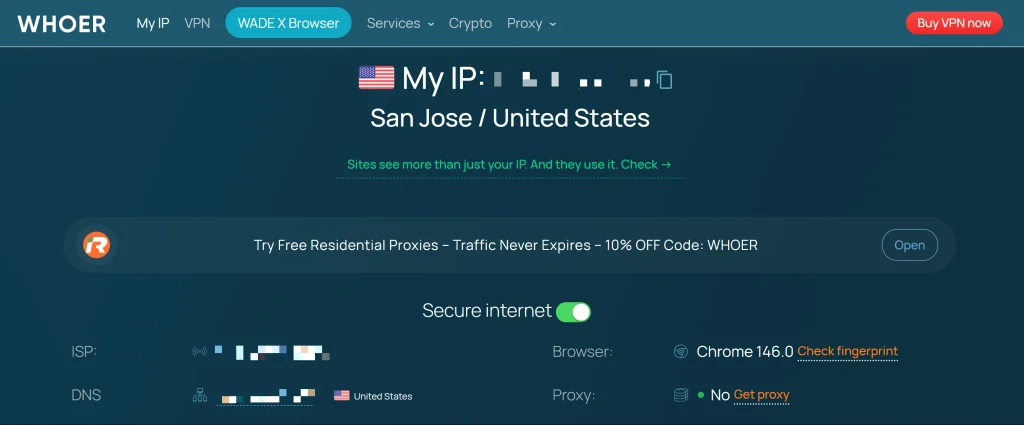
If you are a digital marketer or an SEO professional, you have likely encountered whoer.net. It is more than just a simple tool to “see my IP.” A Whoer IP check is a comprehensive audit of your network’s “digital hygiene.” It cross-references your IP address against your browser’s fingerprint, system clock, and hardware leaks.
In the current landscape of 2026, platforms like Google and major e-commerce sites use similar logic to Whoer to identify bots. If your Whoer IP check reveals a mismatch—such as a US IP address paired with a London system time—you will be flagged. Achieving a 100% score isn’t just about vanity; it’s about ensuring your scrapers, ad accounts, and SEO tools remain undetected.
The Core Challenges of Achieving 100% Anonymity
Many users feel frustrated when their anonymity score stuck at 70% or 90%. Usually, the “Whoer net” logic identifies specific inconsistencies that act as “red flags.”
Common Pain Points in IP Masking:
- The “Proxy” Flag: Whoer detects that your IP belongs to a datacenter.
- WebRTC Leaks: Your browser accidentally reveals your real home IP despite using a proxy.
- DNS Mismatches: Your IP is in New York, but your DNS requests are handled by a server in another country.
- Blacklisted IPs: Using low-quality, shared proxies that have already been flagged for spam.
To solve these, you need a combination of the right hardware—like rotating residential proxies—and the right configuration.
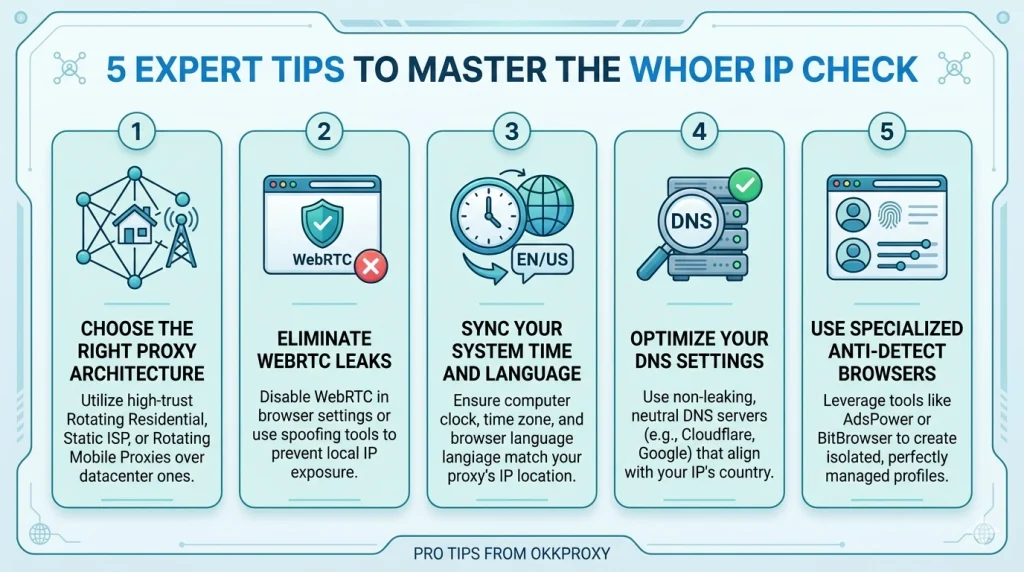
5 Expert Tips to Master the Whoer IP Check
1. Choose the Right Proxy Architecture
The most critical factor in a Whoer IP check is the classification of the IP. Datacenter IPs are easily caught. To look like a real person, you should utilize:
- Rotating Residential Proxies: These provide IPs from real home devices, making them nearly impossible to distinguish from organic traffic.
- Static ISP Proxies: Ideal for account management where you need the same “residential” identity over a long period.
- Rotating Mobile Proxies: These offer the highest trust scores because they use 4G/5G carrier networks.
2. Eliminate WebRTC Leaks
WebRTC is a browser feature intended for video chats, but it can bypass your proxy and broadcast your local IP address. To pass the Whoer IP check, you must disable WebRTC in your browser settings or use a browser extension to “spoof” it.
3. Sync Your System Time and Language
Generative engines and detection scripts look for “environmental harmony.” If your Whoer IP check shows a German IP, your computer’s system time must be set to GMT+1, and your browser language should ideally include German (de-DE).
4. Optimize Your DNS Settings
If Whoer shows “DNS: N/A” or shows a different country than your IP, your anonymity drops. Always use the DNS provided by your proxy service or a neutral, global provider like Cloudflare (1.1.1.1) to maintain consistency.
5. Use Specialized Anti-Detect Browsers
For enterprise-level tasks, manual configuration isn’t enough. Tools like AdsPower or OKBrowser allow you to create isolated profiles where every parameter—from canvas fingerprinting to the Whoer IP check—is perfectly managed.
Comparing Proxy Performance for Anonymity
| Proxy Type | Whoer Trust Level | Best Use Case | Anonymity Potential |
| Rotating Residential | High | Web Scraping & SEO | 100% |
| Static ISP Proxies | High | Social Media Management | 98-100% |
| Mobile Proxies | Highest | Bypassing Aggressive Bots | 100% |
| Datacenter Proxies | Medium | High-speed, Low-security tasks | 70-85% |
Why OkkProxy is the Professional Choice
At OkkProxy, we understand that our users aren’t just looking for “an IP”—they are looking for results. Our infrastructure is designed to pass the most rigorous Whoer IP check protocols.
- Global Coverage: Access millions of clean IPs across every major country.
- High-Speed Stability: Our rotating datacenter proxies provide the speed you need for bulk tasks without sacrificing basic anonymity.
- Enterprise Reliability: We focus on providing static ISP proxies that maintain a “clean” history, reducing the risk of your accounts being linked or banned.
Real-World Success: A Case Study
An SEO agency recently struggled with “IP Blocked” errors while tracking rankings in Japan. Their previous provider’s IPs were flagged as “Hosting” on Whoer. After switching to OkkProxy’s rotating residential proxies, they achieved a consistent 100% score on the Whoer IP check. Their data accuracy improved by 40% because they were no longer seeing “filtered” search results intended for bots.
Internal Resources for Pro Users
To further refine your setup, explore our deep-dive guides:
- The Sneakerhead’s Guide to Residential Proxies: Cop Every Drop
- Why Your Scraping Scripts Keep Getting Blocked — And How Rotating Residential Proxies Fix It
- How to set up SOCKS5 proxy on Android phone?
- How to Use Mobile Proxies to Cop Limited-Edition Sneakers Successfully?
- How to Manage 50+ eBay Accounts Without Linking Them
FAQ: Frequently Asked Questions about Whoer
How do I get 100% on a Whoer IP check?
You must ensure your IP is residential (not datacenter), disable WebRTC, and match your system’s time zone and language to the IP’s location. Using rotating residential proxies is the most effective way to start.
Why does Whoer say “Proxy: Yes”?
This happens when your IP address is found in a database of known proxy servers or if your connection reveals specific headers (like Via or X-Forwarded-For). Premium proxies from OkkProxy are “Elite” grade and hide these headers.
Can I use a free proxy for Whoer?
Free proxies are almost always blacklisted and have poor “Whoer net” scores. They often leak your data and provide 0% anonymity. For professional work, always use a paid, reputable service.
Is Whoer.net accurate?
Yes, it is one of the most accurate tools for detecting IP leaks and browser fingerprint inconsistencies. It is widely used by the cybersecurity community to test VPN and proxy integrity.
Final Takeaway: Make Your IP Invisible
Mastering the Whoer IP check in 2026 is about more than just hiding; it’s about blending in. By using rotating residential proxies and aligning your system metadata, you create a digital profile that looks exactly like a high-value, organic user.
Don’t let low-quality IPs jeopardize your data or your accounts. Experience the stability and quality that professional marketers trust.
Ready to boost your anonymity?
View OkkProxy’s Pricing and Start Your Trial