MoreLogin creates an independent browser profile for each account or task. OkkProxy supplies the IP connection assigned to that profile. Used together, they give teams a clearer way to separate browser data, network locations, and daily operating workflows.
This guide focuses on choosing an appropriate OkkProxy connection and preparing the information needed before adding it to MoreLogin.
1. How the Integration Works
The setup has two layers:
Browser environment — managed in MoreLogin
Each profile can keep its own cookies, cache, local storage, login session, User-Agent, Canvas, WebGL, timezone, language, and other browser settings. Profiles can also be grouped, tagged, shared with team members, and assigned different permissions.
Network environment — supplied by OkkProxy
OkkProxy provides the proxy host, port, authentication details, protocol, and IP location used by the MoreLogin profile. Depending on the selected product, the connection may use a rotating IP, sticky session, static ISP address, mobile network, or datacenter IP.
The goal is not to make an account “undetectable.” It is to keep the browser profile and network configuration consistent with the account’s intended region and workflow.
2. Choosing an OkkProxy Proxy for Your Task
The right proxy depends mainly on whether the task needs stability, rotation, mobile-network access, or higher connection speed.
For repeated account access
Static ISP proxies are generally a better fit for store dashboards, social media management, and other workflows where the same profile is opened regularly. A stable IP can make ongoing sessions easier to manage.
For research and regional checks
Residential dynamic proxies are useful when a workflow needs different IPs, broader location coverage, or repeated browsing across multiple regions. Common examples include market research, ad verification, price monitoring, and public-data collection.
For mobile-focused workflows
Rotating or static mobile proxies may be considered for mobile app testing, carrier-based regional checks, and workflows where a mobile-network IP is relevant.
For speed-sensitive public-data tasks
Datacenter proxies may be suitable when low latency and cost are more important than using a residential or mobile IP. They are typically better suited to public pages and less account-sensitive browsing.
Before purchasing or assigning a proxy, check the available countries, cities, protocols, authentication methods, session duration, bandwidth rules, and current pricing in the OkkProxy dashboard.
3. Practical Workflows
OkkProxy and MoreLogin can be used together for:
- Managing different e-commerce stores in separate profiles
- Organizing social media accounts by market, client, or campaign
- Checking regional pages, search results, and advertisements
- Keeping affiliate campaigns and login sessions separated
- Running research or monitoring tasks from different locations
- Assigning profiles and proxy connections across a team
For example, a team can create one MoreLogin profile for each store, assign a stable OkkProxy connection to each profile, and give employees access only to the profiles they are responsible for. A research team may instead create temporary profiles with rotating residential proxies for different markets.
4. Before You Start
Prepare the following information before opening the proxy settings in MoreLogin:
- A MoreLogin account and the desktop app
- An active OkkProxy account and proxy plan
- Proxy host or IP address
- Port
- Username
- Password
- Protocol, such as HTTP, HTTPS, or SOCKS5
- Target country or region
- Session type or rotation rule, when applicable
Keep the OkkProxy dashboard open while configuring the profile so that each field can be copied accurately. After the details are entered, use MoreLogin’s proxy detection function to confirm the connection and displayed location.
5. Step-by-Step Guide: Integrating OkkProxy with MoreLogin
Follow these simple steps to configure your OkkProxy credentials into MoreLogin profiles for complete anonymity.
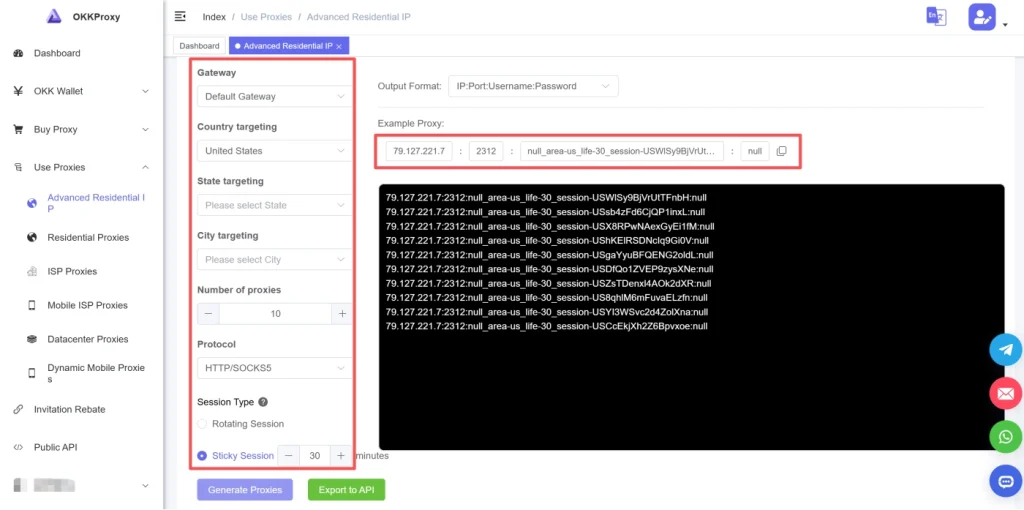
Step 1: Obtain Your OkkProxy Credentials
1. Log into your OkkProxy Dashboard.
2. Navigate to the proxy type you wish to deploy (e.g., Static ISP or Dynamic Residential).
3. Select your target country, state, or city, and choose your protocol preference (HTTP/HTTPS or SOCKS5).
4. Copy the Proxy Host / IP, Port, Username, and Password generated by the dashboard.
Step 2: Download and Launch MoreLogin
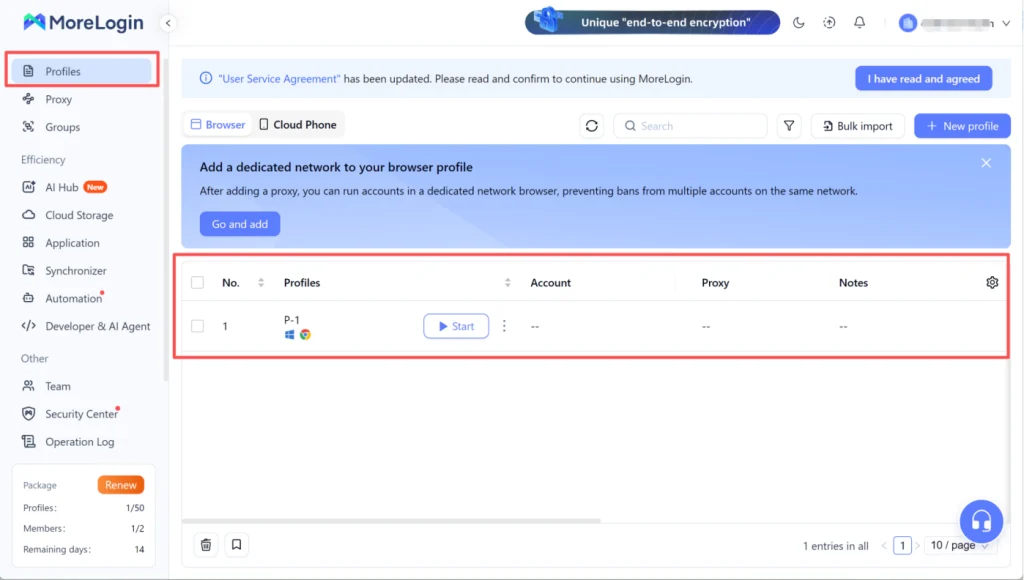
1. Download MoreLogin Antidetect Browser from the official website and install it on your device.
2. Open MoreLogin and log into your account dashboard.
3. Click on the New Profile button in the top left corner.
Step 3: Configure Proxy Settings in MoreLogin
1. In the profile setup window, select your desired browser engine (Chromium or Firefox) and operating system (Windows, macOS, or Android).
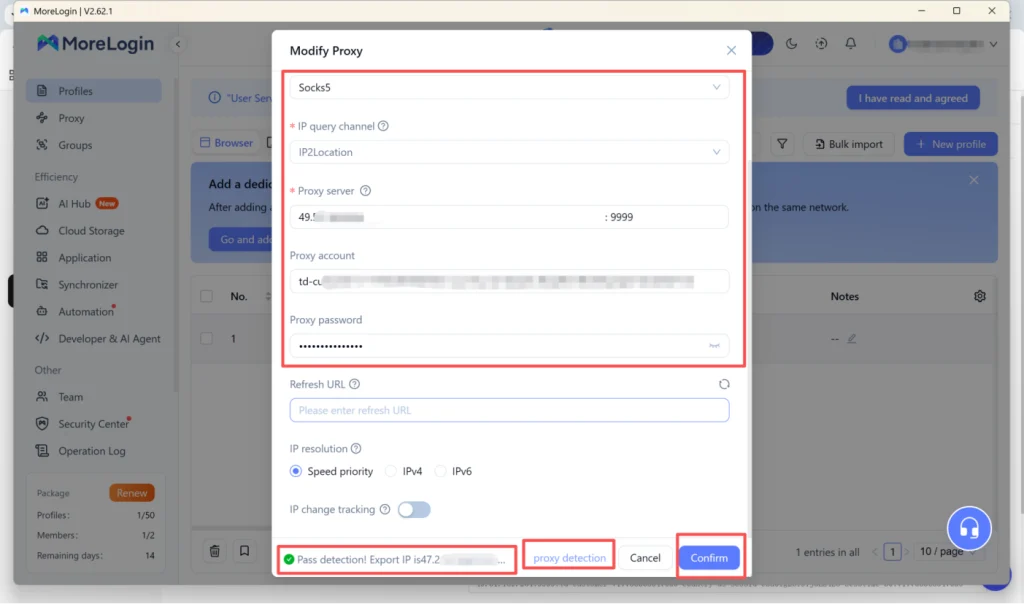
2. Locate the Proxy Settings section and click Custom Proxy.
3. Select your proxy type: HTTP, HTTPS, or SOCKS5 (OkkProxy supports all options).
4. Enter the Proxy Host and Port obtained from OkkProxy.
5. Fill in the Proxy Account (Username) and Proxy Password.
6. Click the Proxy Detection or Test Proxy button to verify connection speed, IP location, and anonymity status.
7. Once verified, click OK / Save Profile to finalize creation.
Step 4: Launch and Operate
Click Start on your newly created profile. MoreLogin will launch an isolated browser instance equipped with a custom hardware fingerprint and your OkkProxy IP address. You can now log into your target platform safely without risk of cross-linking.
6. Key Advantages of Using OkkProxy with MoreLogin
● Intelligent Geo-Matching: MoreLogin automatically aligns profile time zones, WebRTC settings, and language preferences with the physical location of your OkkProxy IP address.
● Unmatched Reliability: OkkProxy’s 99.9% network uptime ensures your static profiles never suffer unexpected drop-offs, preventing risk control flags on sensitive platforms.
● Flexible Multi-Protocol Support: Seamless integration across SOCKS5 and HTTP(S) protocols allows custom automation scripts and extensions to run without friction.
● Cost-Effective Scaling: With OkkProxy’s residential proxies starting at just $0.5/GB and MoreLogin’s flexible pricing, scaling operations from 10 to 1,000 accounts remains affordable.
7. Conclusion
Combining OkkProxy‘s robust, global IP network with MoreLogin’s advanced antidetect technology gives digital marketers, e-commerce sellers, and data scrapers the ultimate toolset for secure online operations. Explore OkkProxy’s full pricing and proxy lineup at OkkProxy today and elevate your account management strategy.