Android users can successfully run a SOCKS5 proxy on Android either by configuring proxy settings manually for a specific WiFi network or, more commonly and more powerfully, by using a dedicated Android SOCKS5 proxy app that creates a secure tunnel for system-wide or per-app traffic. With the right setup, SOCKS5 enables better anonymity, higher compatibility with apps, and improved performance compared to traditional HTTP proxies.
In this comprehensive guide, we explain how to set up SOCKS5 proxy on Android, compare manual and app-based methods, highlight best practices, and help you choose the best SOCKS5 proxy for Android. We also address common mistakes found in existing guides by going deeper into security, authentication, real-world use cases, and provider quality.
By the end of this article, you will know exactly how to connect SOCKS5 on Android without root, how to verify your connection, and why premium services such as okkproxy outperform free SOCKS5 proxy options for Android in stability, safety, and success rate.
What Is a SOCKS5 Proxy and Why Use It on Android?
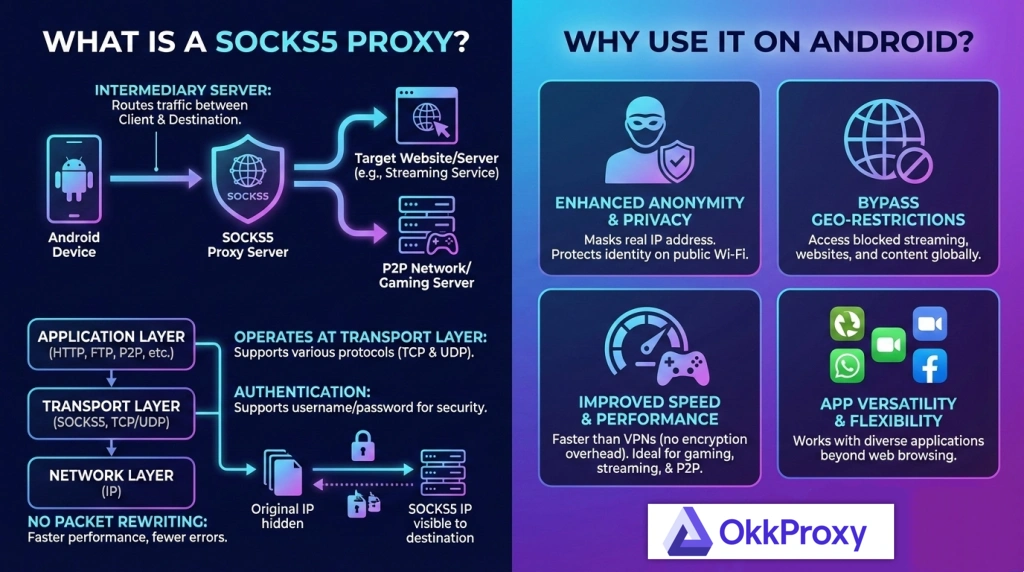
A SOCKS5 proxy is a versatile proxy protocol that routes traffic at a lower level than HTTP/HTTPS proxies. Instead of only handling browser requests, SOCKS5 can forward almost any type of traffic, including apps, games, messengers, and background services.
Benefits of Using SOCKS5 Proxy on Android
- Works with most Android apps and protocols
- Supports TCP and UDP traffic
- Allows authentication (username/password)
- Faster and more flexible than HTTP proxies
- Ideal for privacy, bypassing restrictions, and app testing
Because of these advantages, proxy SOCKS5 Android setups are widely used for social media management, automation, mobile app QA, and geo-specific access.
SOCKS5 Proxy Android vs HTTP Proxy: Quick Comparison
| Feature | SOCKS5 Proxy Android | HTTP Proxy Android |
| App compatibility | Excellent | Limited |
| Traffic type | TCP + UDP | HTTP/HTTPS only |
| Authentication | Supported | Limited |
| Performance | High | Medium |
| Use cases | Apps, games, tools | Browsers only |
How to Get a SOCKS5 Proxy for Android
Before learning how to use SOCKS5 proxy on Android, you need a valid SOCKS5 server.
Common Sources
- Free SOCKS5 proxy for Android (public lists)
- VPN apps offering SOCKS5 gateways
- Paid SOCKS5 proxy providers (recommended)
Why Paid SOCKS5 Proxies Perform Better
Free SOCKS5 proxies are often overloaded, insecure, and unreliable. In contrast, professional providers like okkproxy offer:
- Private SOCKS5 authentication
- Residential and mobile IP options
- Global IP coverage
- High uptime and speed
- Ethical and compliant IP sourcing
This makes okkproxy a strong candidate when users search for the best SOCKS5 proxy for Android or want to buy SOCKS5 proxy for long-term use.
Method 1: How to Set Up SOCKS5 Proxy on Android via WiFi (Manual)
This method configures SOCKS5 for one Wi-Fi network only.
Step-by-Step: Manual Wi-Fi Proxy Setup
- Open Settings → Network & Internet → WiFi
- Long press the connected WiFi network
- Tap Modify network or Advanced options
- Set Proxy to Manual
- Enter SOCKS5 server IP and Port
- Save settings
Note: Native Android WiFi proxy settings primarily support HTTP proxies. SOCKS5 may work inconsistently unless combined with apps.
Pros and Cons
| Pros | Cons |
| No app needed | Limited SOCKS5 support |
| Simple setup | Wi-Fi only |
| No per-app control | No authentication in some versions |
Method 2: How to Use SOCKS5 Proxy on Android with Apps (Recommended)
Using an Android SOCKS5 proxy app is the most reliable and flexible approach.
Popular SOCKS5 Proxy Apps for Android
- SocksDroid
- PIA S5 Proxy
- Super Proxy
- Shadowrocket (advanced users)
These apps create a local VPN tunnel, ensuring full SOCKS5 compatibility.
Step-by-Step: SOCKS5 Proxy App Setup
- Download a SOCKS5 proxy app from Play Store
- Create a new proxy profile
- Select SOCKS5 protocol
- Enter server IP, Port, Username, and Password
- Enable the proxy
- Approve VPN permissions
Once connected, all selected traffic routes through the SOCKS5 proxy.
How to Use SOCKS5 on Android Without Root
Many users ask how to use SOCKS5 on Android without root. The good news is that rooting is unnecessary.
Supported Non-Root Methods
- SOCKS5 proxy apps (VPN-based)
- Per-app proxy routing
- System-wide proxy tunneling
Providers like Okkproxy fully support non-root SOCKS5 usage on Android devices.
Android Configure Proxy: Key Settings Explained
| Setting | Description |
| Server IP | SOCKS5 proxy address |
| Port | Connection port |
| Username | Authentication ID |
| Password | Authentication key |
| App Filter | Choose which apps use proxy |
How to Verify SOCKS5 Proxy Connection on Android
After setup, verification is essential.
Verification Methods
- Visit IP-checking websites
- Use in-app IP test tools
- Compare IP before and after connection
A changed IP confirms your connect to SOCKS5 proxy Android setup is working.
Free SOCKS5 Proxy for Android: Risks and Limitations
Common Problems
- IP blacklisting
- Slow speeds
- Data interception risks
- No authentication
A free SOCKS5 proxy for Android may be useful for testing but is not recommended for business or privacy-sensitive tasks.
Best SOCKS5 Proxy for Android: What to Look For
| Feature | Importance |
| Authentication | High |
| Speed & latency | High |
| Mobile / residential IPs | High |
| App compatibility | Medium |
| Support | Medium |
Okkproxy meets these standards and is suitable for users searching for the best SOCKS5 for Android.
Real World Use Cases for SOCKS5 Proxy Android
- Social media account management
- App testing and QA
- Market research
- Automation tools
- Geo-restricted access
These scenarios benefit greatly from SOCKS5 proxy Android configurations.
FAQs
How to use SOCKS5 proxy in Android safely?
Use authenticated SOCKS5 proxies from reputable providers and avoid public proxy lists.
Can I use SOCKS5 on mobile data?
Yes, via SOCKS5 proxy apps that create VPN tunnels.
Does SOCKS5 slow down Android?
With high-quality providers like okkproxy, speed impact is minimal.
Is SOCKS5 better than VPN?
SOCKS5 offers more flexibility and per-app control, while VPNs encrypt all traffic.
Conclusion
Learning how to use SOCKS5 on Android phone gives you greater control, compatibility, and privacy than standard proxy methods. While manual WiFi settings offer limited functionality, dedicated SOCKS5 proxy apps for Android provide system-wide or per-app routing without root access.
The key factor is proxy quality: free options often fail, while professional providers like Okkproxy deliver secure, fast, and reliable SOCKS5 proxy infrastructure.