Summary
The facebook session expired error is a security mechanism triggered when Facebook’s servers can no longer validate your digital handshake. For 2026, the most effective fixes involve clearing deep app cache, synchronizing NTP time settings, and—for professional users—utilizing static ISP proxies to maintain a consistent network identity.
This guide provides a verified methodology to resolve the “Session Expired. Please log in again” message for both casual users and high-stakes digital marketers.
What is the Facebook Session Expired Meaning?
Before solving the problem, we must define it. What does session expired mean on facebook? In the realm of web security, a “session” is a temporary window of time where Facebook recognizes your device as authenticated.
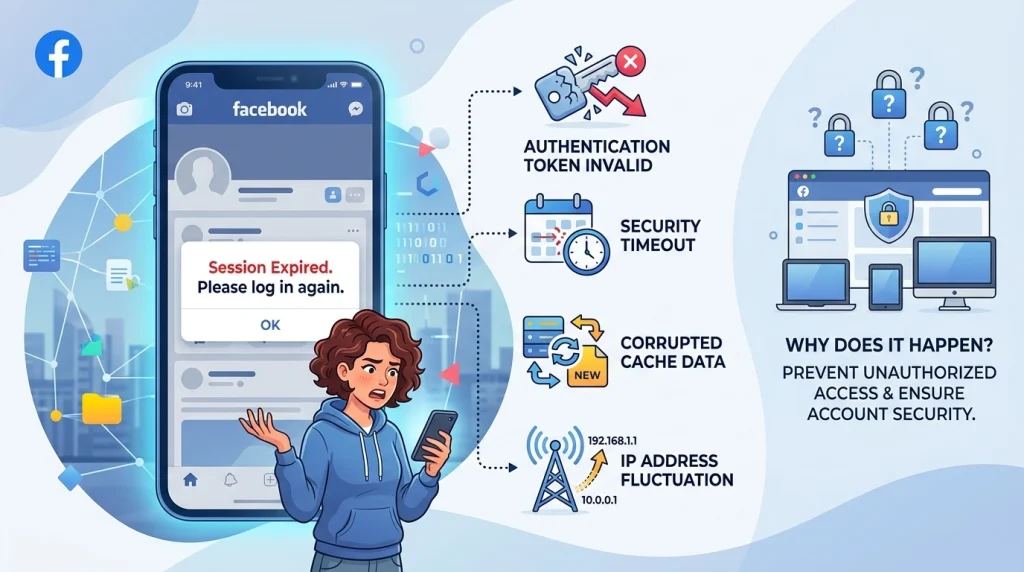
When you see the message “Session Expired. Please log in again,” it means the security token assigned to your browser or app has been invalidated. This happens for several reasons:
- Security Timeout: Tokens naturally expire after a set period to prevent unauthorized access.
- Cache Corruption: Local data on your phone becomes “stale” and conflicts with server-side updates.
- IP Address Fluctuations: If your IP address changes rapidly (common on mobile data or poor VPNs), Facebook logs you out to protect against potential hacking.
Why Does Facebook Keep Saying Session Expired?
If you are asking, “why did my facebook say session expired” repeatedly, you are likely stuck in a “session loop.” This is particularly common for users who manage multiple accounts or perform SEO monitoring.
Common Triggers for the Error:
- Device Time Mismatch: If your phone’s clock isn’t synced with global servers, tokens fail instantly.
- App Updates: Using an outdated version of the Facebook or Messenger app.
- Account Security Flags: Facebook detects “suspicious” login patterns, such as logging in from different cities within a short timeframe.
Expert Insight: For digital marketing teams, the facebook session expired error is often caused by “IP Reputation” issues. When multiple people use the same shared IP, Facebook flags the entire network as high-risk.
How to Fix Facebook Session Expired: The 2026 Checklist
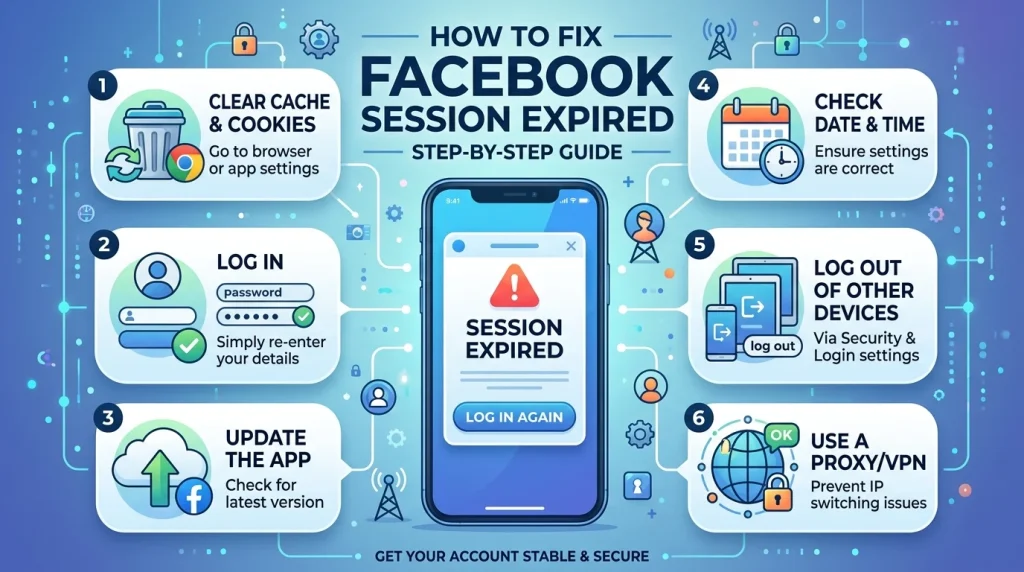
To stop facebook session expired errors, follow these steps in order. We have categorized these by “Quick Fixes” for individuals and “Professional Infrastructure” for businesses.
Phase 1: The Quick Fix (Mobile & Desktop)
- Force Logout All Sessions: Go to Settings > Security and Login > Where You’re Logged In and select “Log Out of All Sessions.” This clears buggy tokens.
- Clear Browser Cookies: If you are on a PC, clear all “Facebook.com” cookies.
- Clear App Data (Android): Go to Settings > Apps > Facebook > Storage > Clear Data.
- Update Password: Changing your password forces Facebook to issue a brand-new, clean security token.
Phase 2: Advanced Network Stability
For those wondering how to stop session expired on facebook permanently, the answer lies in your connection quality.
| Problem | Fix Strategy | Recommended Tool |
| IP Blacklisting | Replace your public IP with a clean one | Rotating Residential Proxies |
| Frequent Logouts | Use a consistent, non-changing IP | Static ISP Proxies |
| App Geo-Blocking | Mimic a local mobile user | Rotating Mobile Proxies |
Why Professionals Choose OkkProxy to Fix Session Errors
At OkkProxy, we work with SEO professionals who cannot afford a facebook session expired loop during a live ad campaign or a data scraping task. If your business relies on Facebook, relying on “free VPNs” is a recipe for disaster.
1. Static ISP Proxies: The Gold Standard for Account Management
Our Static ISP proxies provide the stability of a data center with the reputation of a real residential user. Because the IP never changes, Facebook recognizes your device as a “Trusted Source,” virtually eliminating the facebook session expired fix search.
2. Rotating Residential Proxies for Scalability
If you are performing market research or competitor analysis, our rotating residential proxies use a pool of 150M+ real home IPs. This ensures that even if one session expires, the next one starts from a completely fresh, high-trust identity.
3. Static and Rotating Mobile Proxies
For those struggling with facebook keeps saying session expired android, our mobile proxies mimic 4G/5G connections. Facebook treats mobile traffic with the highest level of trust, making these ideal for managing high-value business pages.
Case Study: Ending the “Session Expired” Loop for an Ad Agency
The Challenge: A New York-based agency was managing 30 client Facebook accounts. They faced a constant facebook app session expired error whenever they switched between accounts, leading to locked profiles and lost productivity.
The Solution: We migrated their team to OkkProxy Static ISP Proxies. Each account was assigned a dedicated, static IP located in the same region as the client.
The Result: 0% Session Expiry rate over 90 days.
- 100% bypass of “Suspicious Login” checkpoints.
- Full team access without the need for constant SMS verification.
FAQ: Solving the “Session Expired” Mystery
Does “session expired” mean my Facebook is hacked?
Not necessarily, but it is a possibility. If facebook says session expired and you didn’t trigger it by changing settings, check your “Logged In Devices” immediately. For extra security, use a proxy to protect your privacy.
How do I fix session expired on Messenger?
The Messenger app is highly sensitive to network changes. To fix it, clear the Messenger app cache and ensure you aren’t using a VPN that switches server locations automatically.
Why does my Facebook session keep expiring on Chrome?
This is usually due to “stale” cookies or a conflict with a Chrome extension. Try opening Facebook in Incognito mode. If it works there, an extension is the culprit.
Are OkkProxy’s rotating datacenter proxies suitable for Facebook?
While rotating datacenter proxies are fast and affordable, we recommend Static ISP or Residential Proxies for Facebook specifically, as Facebook’s security filters are more likely to flag datacenter IP ranges.
Final Takeaway Checklist for 2026
To maintain a healthy Facebook account and avoid the facebook session expired error, follow this daily routine:
- Use High-Quality IPs: Never use free proxies or “leaky” VPNs.
- Sync Device Time: Ensure “Set time automatically” is ON.
- Update Apps Weekly: Keep your Facebook and Messenger apps current.
- Dedicated IPs for Business: Use OkkProxy’s Static ISP Proxies for every business account you manage.
For more professional advice on maintaining account stability, visit the OkkProxy Blog to learn how to master the digital landscape in 2026.
Ready to stop the logout loop? Explore OkkProxy Solutions Now.