Summary
Managing global marketing campaigns requires precision. Clash proxies offer a sophisticated, rule-based way to handle internet traffic, allowing professionals to bypass regional blocks and manage multiple accounts seamlessly.
By integrating OkkProxy’s enterprise-grade rotating residential proxies and static ISP proxies into the Clash framework, users can eliminate IP bans and ensure 99.9% uptime for data-intensive tasks. This guide covers everything from initial configuration to advanced optimization for SEO and social media automation.
What are Clash Proxies and Why Do Marketers Need Them?
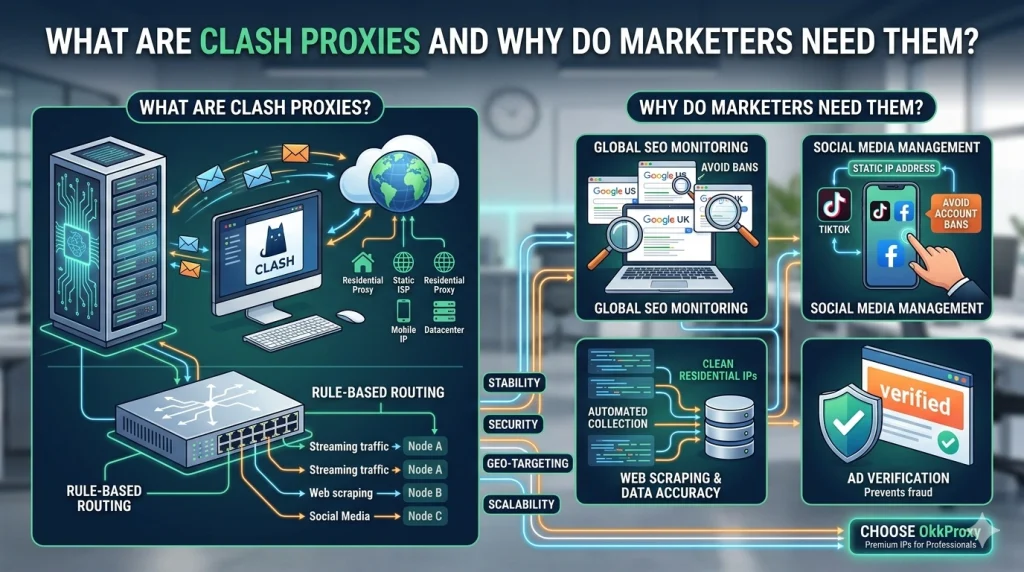
In the world of digital marketing, clash proxies refer to proxy server configurations used within the Clash core—a rule-based tunnel software. Unlike standard VPNs that route all traffic through one tunnel, clash proxies allow you to set specific rules: for example, routing your Google Ads traffic through a US-based static ISP proxy while keeping your local team communication on a domestic IP.
For SEO professionals and data analysts, the motivation is simple: data accuracy and stability. Using low-quality or shared IPs often leads to frequent Captchas and inaccurate SERP data. By utilizing professional clash proxy providers like OkkProxy, businesses can leverage high-trust residential networks that mimic real user behavior, making them nearly invisible to anti-bot systems.
The 5 Core Proxy Types for Your Clash Configuration
Choosing the right “fuel” for your Clash client is more important than the software itself. Depending on your project goals, you should select from these professional categories:
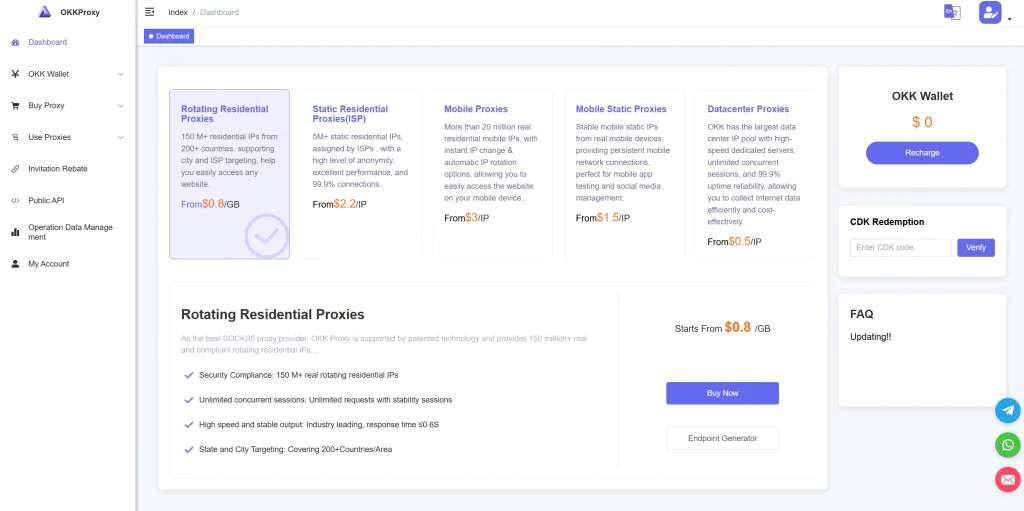
1. Rotating Residential Proxies
These are real household IP addresses. In a clash proxies setup, rotating residential proxies are ideal for large-scale web scraping. Since the IP changes automatically, you can harvest data from competitors without being flagged as a bot.
2. Static ISP Proxies
Also known as “Static Residential,” these combine the speed of a datacenter with the legitimacy of a residential IP. If you are managing a TikTok or Facebook account, static ISP proxies are a mandatory requirement to avoid account “shadowbanning.”
3. Rotating Mobile Proxies
Leveraging 4G/5G carrier networks, these provide the highest level of trust. They are virtually impossible for platforms to block because hundreds of real mobile users share these IP ranges daily.
4. Static Mobile Proxies
Ideal for high-stakes account verification and long-term mobile app management.
5. Rotating Datacenter Proxies
The go-to solution for speed. If you are performing high-speed SEO rank tracking where IP trust is secondary to performance, these provide the best ROI.
Comparison Table: Choosing the Right Proxy for Clash
| Proxy Type | Best Use Case | Trust Level | Stability |
| Rotating Residential | Web Scraping / Data Mining | High | Moderate (IPs rotate) |
| Static ISP | TikTok & Social Media Management | Very High | Excellent (Fixed IP) |
| Rotating Mobile | Ad Verification / Bypass Bot Detection | Highest | Moderate |
| Rotating Datacenter | Fast SEO Audits / Rank Tracking | Low | High Speed |
How to Configure Clash Proxies: A Step-by-Step Guide
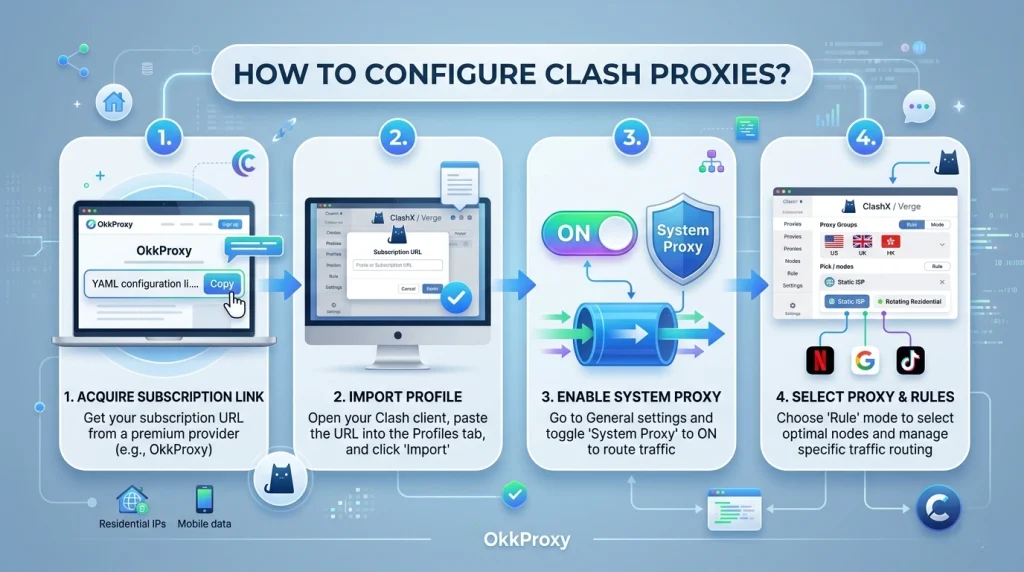
Setting up your clash proxies effectively requires a clear process. Most users struggle with the “profile does not contain proxies” error, which usually stems from incorrect YAML formatting.
Step 1: Obtain Your Subscription Link
Professional clash proxy providers like OkkProxy provide a dedicated API link.
- Log in to your dashboard.
- Select your proxy type (e.g., static ISP proxies).
- Copy the “Clash Subscription URL.”
Step 2: Import into Your Client
Whether you are using Clash Verge (Windows), ClashX (Mac), or Clash for Android:
- Navigate to the Profiles or Config section.
- Paste your subscription URL.
- Click Download or Import.
- Once the profile appears, select it to activate the clash proxies.
Step 3: Enable System Proxy and Rules
To ensure your traffic is actually moving through the nodes, toggle the System Proxy to “On.” In the Proxies tab, you can choose between “Global” (all traffic through one node) or “Rule” (recommended). Using rules ensures that only the necessary traffic uses your paid bandwidth.
Addressing Common Pain Points: Why Your Proxies Fail
Many digital marketers experience “IP burnout.” If you’ve found that your clash proxies are frequently blocked, the issue likely isn’t the software, but the IP quality.
OkkProxy Insight: Many “budget” providers resell the same IP pool to thousands of users. When one user spams a platform, the entire IP range is blacklisted. At OkkProxy, we provide clean, ethically sourced IPs to ensure your SEO monitoring and account management remain uninterrupted.
Checklist for a Healthy Proxy Setup:
- DNS Leak Protection: Ensure “TUN Mode” is enabled in Clash to prevent your real IP from leaking via DNS queries.
- Latency Check: Always use the built-in latency test (lightning icon) to select nodes with the lowest “ms” response time.
- Auto-Update: Set your profile to update every 12-24 hours to receive the latest active nodes from your clash proxy providers.
Advanced Use Case: Multi-Account Management on TikTok
One of the biggest challenges for cross-border e-commerce is managing TikTok accounts in different regions. Using a standard VPN often leads to “Zero View” issues because the IP is flagged as a commercial data center.
By using clash proxies configured with static ISP proxies, you can assign a dedicated, non-changing Los Angeles IP to your US account and a London IP to your UK account within the same Clash client. This professional-grade isolation is what separates successful agencies from those who get banned.
FAQ: Frequently Asked Questions about Clash Proxies
Why does my Clash profile say “no proxies”?
This usually happens if the subscription link is broken or the provider’s server is down. Always double-check your link in a browser; it should download a .yaml file. If it doesn’t, contact your clash proxy provider.
Are free clash proxies safe?
We strongly advise against using a free clash proxy for business. These are often “honeypots” designed to steal data or are so heavily blacklisted that they will cause your social media accounts to be permanently banned.
Can I use Clash for SEO rank tracking?
Absolutely. By using rotating residential proxies within Clash, you can simulate searches from hundreds of different cities, ensuring you see the same SERP results as a local user.
What is the best port for Clash on Windows?
The default port for clash proxies is usually 7890. You can verify this in the “General” settings of your client.
Solving Technical Errors: The “Practical Pitfall” Guide
Based on real customer experiences at OkkProxy, here are the most common technical hurdles:
- Error: “unsupport proxy type: vless clash”
- Solution: Standard Clash core is often outdated. Switch to Clash Meta (also known as Mihomo), which supports modern protocols like VLESS, Trojan, and clash xhttp.
- Error: “clash dialer-proxy” configuration failure
- Solution: This usually happens during “chaining.” Ensure your syntax in the YAML file correctly identifies the parent proxy before the child proxy.
- Issue: No internet after turning off Clash
- Solution: This is because the Windows system proxy settings weren’t cleared. Go to Settings > Network > Proxy and manually toggle “Use a proxy server” to Off.
Related Expert Resources
To further optimize your network setup, check out these related guides from the OkkProxy blog:
- OkkProxy Ultimate Guide to Static ISP Proxies: Everything You Need to Know
- The Most Common Proxy Error Codes and How to Troubleshoot Them
- Where to Buy Residential Proxies for Google scraping?
- How to have multiple TikTok accounts on your phone?
- What is a High Anonymity Proxy? The Ultimate 2026 Guide to Elite Privacy
Conclusion: Take Control of Your Connectivity
Mastering clash proxies is a transformative skill for any digital marketer or SEO professional. By moving away from rigid VPNs and adopting a rule-based approach with high-quality rotating residential proxies, you gain the ability to scale your operations globally without the fear of IP bans or data inaccuracies.
The Professional Takeaway: Stability is the foundation of growth. Whether you are performing ad verification or managing a fleet of TikTok accounts, the combination of the Clash client and OkkProxy’s premium infrastructure provides the security and performance required in 2026’s competitive digital landscape.
Ready to optimize your workflow? Start with OkkProxy’s proxies today and experience the difference that clean, dedicated IPs make for your business.