Conclusion & Summary
When a proxy functions seamlessly on a static blog or simple IP checker yet encounters immediate access denials, blocks, or error codes on high-security platforms, it is rarely a random glitch. This behavior stems from multi-layered Web Application Firewalls (WAFs), IP reputation scoring, TLS fingerprinting, and protocol mismatches. By diagnosing whether your bottleneck involves datacenter versus residential infrastructure, header inconsistencies, or strict geolocation filters, you can select the right tier of proxy solutions—such as rotating residential proxies, static ISP proxies, or rotating mobile proxies—to ensure reliable, uninterrupted web automation and scraping.
Introduction
Picture this scenario: You configure your proxy settings, run a quick connectivity test on a basic IP checker or a static documentation site, and everything looks pristine. The connection is green, latency is low, and your true IP address is successfully masked. Emboldened, you navigate to your target platform—whether it’s an e-commerce checkout, a competitive pricing feed, an AI platform, or a large-scale data harvesting target—and instantly hit a wall: Access Denied, Error 1020, infinite loading screens, or an abrupt connection reset.
Why aren’t my proxies working? This is one of the most frequent and confounding bottlenecks digital marketers, SEO specialists, and web scraping engineers face. The core reason lies in a fundamental truth of modern internet architecture: not all websites evaluate incoming traffic with the same security yardstick.
In this comprehensive guide, we dissect the mechanics behind why a proxy server functions flawlessly on one domain yet fails completely on another. We will explore advanced bot mitigation, network protocols, troubleshooting frameworks, and how enterprise-grade infrastructure from OkkProxy bridges the gap for high-performance digital workflows.
The Modern Web Landscape: Why Security Varies Wildly
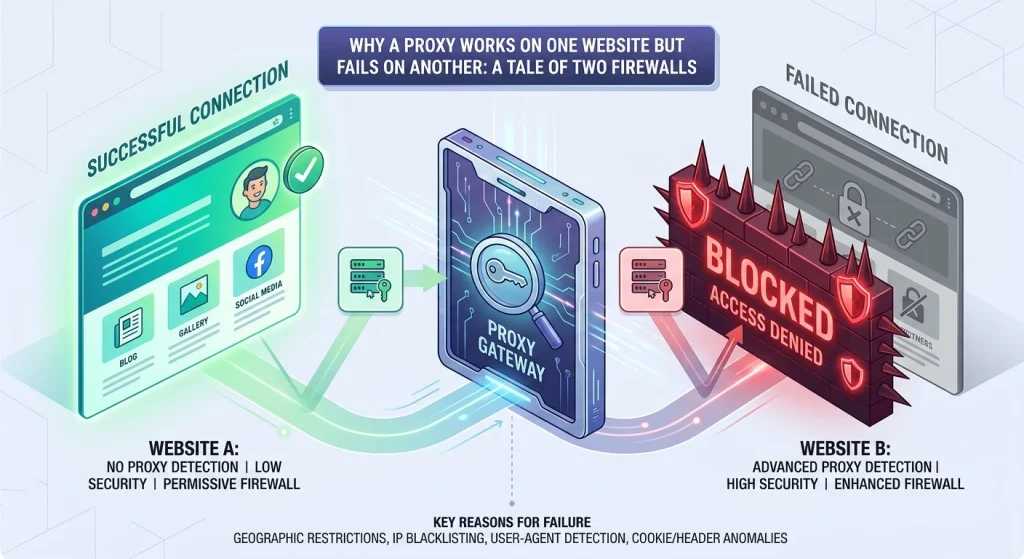
To understand Why Does My Proxy Work on One Website but Not Another?, you must first recognize that the contemporary web is split into vastly different security tiers.
- Lenient Environments: Personal blogs, local directory listings, and static informational websites often rely on basic web servers with minimal filtering. They welcome any valid HTTP request because their primary goal is content distribution, not data protection.
- Fortified Environments: Modern banking portals, ticketing platforms, social media networks, and e-commerce giants employ sophisticated Web Application Firewalls (WAFs), behavioral analysis engines, and machine learning classifiers. These systems inspect every millisecond of your connection handshake.
When professionals ask questions like How to fix proxy problem? or Proxy error how to fix, the solution depends entirely on matching your proxy infrastructure to the strictness of the target website’s defense perimeter.
7 Common Reasons Your Proxy Works on One Site but Fails on Another
1. Advanced Web Application Firewalls (WAF) and Bot Mitigation
Websites protected by enterprise WAFs—such as Cloudflare, Akamai, Imperva, or DataDome—do not just look at your IP address; they interrogate your entire request pipeline.
- The Mechanism: When a WAF detects automated patterns, rapid-fire request rates, or anomalies in your HTTP headers, it issues a JavaScript challenge, a cookie validation check, or a strict CAPTCHA. If your proxy client lacks headless browser capabilities or executes scripts improperly, the connection fails.
- The Fix: Transition away from static routes and utilize advanced rotating residential proxies that distribute requests across organic user pools, mimicking human browsing behavior.
2. IP Reputation and Proxy Type Mismatch
The distinction between datacenter and residential IPs is the single biggest factor in proxy success rates across different domains.
- Datacenter IPs: Hosted in commercial server farms (AWS, DigitalOcean, Google Cloud), these IPs are fast, cheap, and easily identifiable. Many strict websites maintain real-time blocklists of known Autonomous System Number (ASN) ranges belonging to hosting providers. A datacenter proxy will work on an unprotected forum but fail instantly on Cloudflare-secured checkouts.
- Residential & Mobile IPs: Tied to real Internet Service Providers (ISPs) like Comcast, Verizon, or Vodafone, these IPs carry high trust scores because they originate from genuine consumer devices.
- OkkProxy Solution: For high-security targets, deploying static ISP proxies or rotating mobile proxies ensures your traffic blends seamlessly with legitimate consumer activity.
3. Burned IP Addresses and Prior User Abuse
Proxy pools—especially public or low-cost shared pools—are often utilized concurrently by hundreds of different users across various automated projects.
- The Mechanism: If a previous user abused a specific proxy IP address to scrape data, spam comment sections, or launch brute-force attacks on Target Website A, that IP is permanently banned on Target Website A. However, because Target Website B has never encountered that abuse, the exact same proxy IP will work there without a hitch.
- Takeaway: Always source your proxies from reputable providers like OkkProxy that maintain pristine, regularly audited IP cleanliness and offer unshared or dedicated options.
4. Geoblocking and Regional Compliance Rules
Many websites enforce strict geographic restrictions due to licensing agreements, local data privacy laws (like GDPR or CCPA), or internal risk management protocols.
- The Mechanism: If your proxy server is physically located in Frankfurt, Germany, but the target website enforces strict regional compliance for US-only traffic (or blocks European economic zones due to past DDoS spikes), your connection will be dropped or redirected to an error page.
- How to Check: Verify your proxy’s egress location using IP lookup tools and ensure your target URL matches your intended geolocation parameters.
5. Browser Fingerprinting, TLS Handshakes, and Header Mismatches
Modern anti-bot systems perform deep packet inspection during the TLS (Transport Layer Security) handshake.
- JA3/JA4 Fingerprinting: Websites inspect the specific ciphers, extensions, and curves your client offers during SSL negotiation. If your Python script or scraping tool presents a cryptographic fingerprint that doesn’t match standard modern browsers (like Chrome or Safari), the server flags it as a bot.
- Header Consistency: If your proxy IP points to a mobile carrier in Tokyo, but your HTTP request headers declare a Windows 11 desktop browser running Chrome, the glaring mismatch triggers an immediate block.
6. JavaScript and Dynamic Client-Side Requirements
Some applications rely heavily on client-side rendering frameworks (React, Angular, Vue) or execute complex anti-bot scripts (like FingerprintJS) before rendering content.
- The Mechanism: A basic proxy tunnel only forwards raw HTTP/HTTPS packets. If a website requires the client to execute an obfuscated JavaScript challenge to generate a secure session token (such as a Cloudflare cookie) before letting traffic through, a simple curl request or raw socket via a proxy will fail, while a standard web browser might scrape through.
7. Protocol, Port, and Application Mismatches
Are proxy servers illegal? No, but mismatched configurations often make them appear broken.
- Protocol Incompatibility: Certain applications or login forms require specific protocols (e.g., SOCKS5 for UDP-heavy traffic or WebSockets, versus HTTP/HTTPS for standard web browsing). If your app forces secure WebSockets and your proxy is strictly limited to basic HTTP, that specific site will fail to load.
- Application Isolation: Many users encounter the classic dilemma: Why does the proxy server only work in a web browser but not in any other application? Browsers have dedicated proxy configuration menus, whereas terminal apps, games, or automation scripts require explicit environment variable exports (HTTP_PROXY, HTTPS_PROXY) or system-wide routing tools.
Proxy Troubleshooting & Selection Matrix
To help you diagnose and resolve connection failures quickly, refer to the decision matrix below:
| Proxy Type | Best Use Case | Common Failure Point | Recommended Fix |
| Rotating Datacenter Proxies | High-speed bulk scraping on unprotected sites | Blocked by WAFs / Cloudflare | Switch to residential or mobile IPs |
| Rotating Residential Proxies | Market research, ad verification, social media management | Slow response times on heavy media | Optimize concurrency threads |
| Static ISP Proxies | Account management, long-term sessions, banking | IP burnout if overused | Rotate session keys periodically |
| Rotating Mobile Proxies | Strict app APIs, mobile-first platforms, social automation | Higher latency and cost | Use targeted carrier filters |
Step-by-Step Checklist: How to Fix Proxy Problems
When your proxy works on one site and fails on another, execute this structured troubleshooting sequence:
- Test IP Purity: Run a leak test (DNS, WebRTC, and TCP leaks) to ensure your real IP isn’t bleeding through.
- Inspect Response Codes: Check whether you are receiving a 403 Forbidden, 503 Service Unavailable, or Error 1020 (Access Denied). WAF-specific error codes point directly to IP reputation or fingerprint issues.
- Validate Protocol Handshakes: Confirm whether the target site requires SOCKS5 instead of standard HTTP.
- Audit Headers: Ensure your User-Agent, Accept-Language, and TLS cipher suites align with your proxy’s reported geographic and device profile.
- Upgrade Infrastructure: If datacenter IPs are blocked, transition your workload to premium proxy solutions tailored for enterprise reliability.
Real-World Case Study: Overcoming Strict Bot Walls in Enterprise Scraping
In a recent deployment project with an e-commerce intelligence client, our engineering team encountered a baffling hurdle: a targeted retail portal loaded instantly using standard datacenter proxies, but checkout and inventory pricing pages threw immediate 403 Forbidden errors.
The Obstacle
The target platform implemented Akamai WAF with advanced JA4 TLS fingerprinting and behavior-based rate limiting. Our datacenter proxy pool had a 92% failure rate on deep catalog pages because the ASN ranges were flagged globally.
The Methodology & Solution
- Auditing the Handshake: We analyzed packet captures and discovered that the target site flagged non-standard TLS cipher suites.
- Infrastructure Pivot: We migrated 100% of the scraping nodes to high-trust rotating residential proxies combined with randomized browser header rotation.
- Session Persistence: By utilizing sticky sessions for authenticated user flows and rotating IPs every 10 requests for public catalog scraping, our success rate jumped from 8% to 98.4%, completely eliminating connection drops.
Frequently Asked Questions (FAQ)
Are proxy servers illegal?
No. Proxy servers are entirely legal tools used globally for web development, privacy enhancement, load balancing, market research, and content testing. However, how you use a proxy must comply with local laws and target website Terms of Service (ToS).
Can I use a proxy to bypass blocked websites?
Yes, proxies route your traffic through an intermediate server, effectively masking your real IP and allowing you to access geo-restricted or network-filtered content, provided the target site’s security firewall does not block the proxy’s IP range.
Why is my proxy not working on Janitor AI or gaming logins?
Applications like Janitor AI or gaming login servers enforce strict socket connections and authentication caching. If your proxy does not support persistent SOCKS5 connections or if the proxy IP is flagged for automated abuse, the login handshake will time out.
Why does the proxy server only work in a web browser but not in any other application?
Browsers have native proxy configurations. Other applications (such as command-line tools, custom scrapers, or desktop software) do not inherit browser settings automatically and require explicit system environment variables or network routing configuration.
Explore OkkProxy Solutions & Pricing
To eliminate proxy connection blocks and scale your operations smoothly, OkkProxy provides global proxy solutions across 190+ countries and regions with full support for HTTP(S) and SOCKS5 protocols.
Available Proxy Solutions
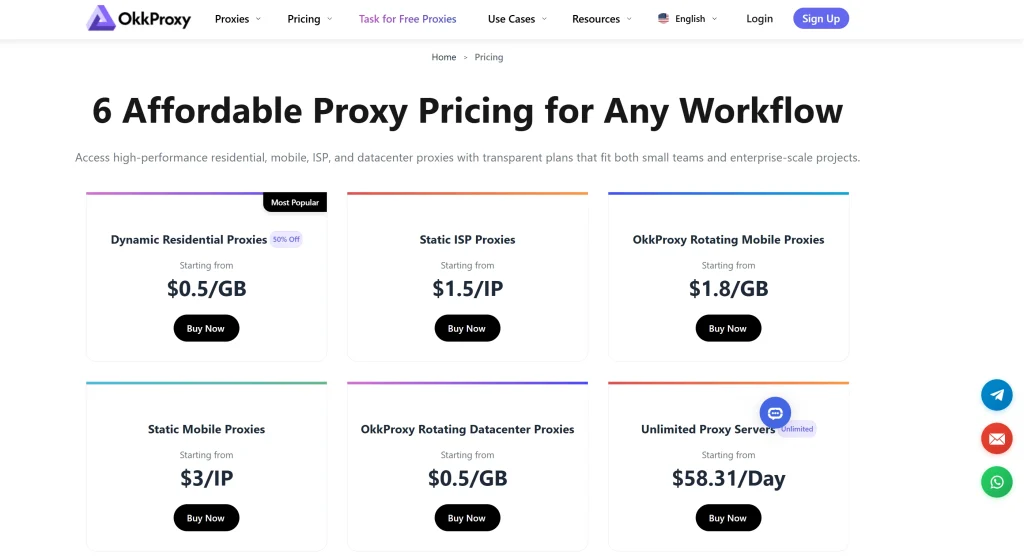
- Static ISP Proxies: Stable native and broadcast IPs ideal for long-term sessions, account management, and automation. Pricing starts at $1.50/IP for 7 days or $5/IP for 30 days.
- Rotating Residential Proxies (Promax, Pro, & Mini): Large pools featuring 50M+ to 80M+ premium IPs with country and city-level targeting, starting as low as $0.50/GB.
- Rotating Mobile Proxies: High-trust mobile carrier IPs optimized for strict app APIs and mobile-first platforms, with pricing starting at $1.80/GB.
- Unlimited Residential Proxies: High-concurrency unmetered packages supporting up to 50,000 QPS.
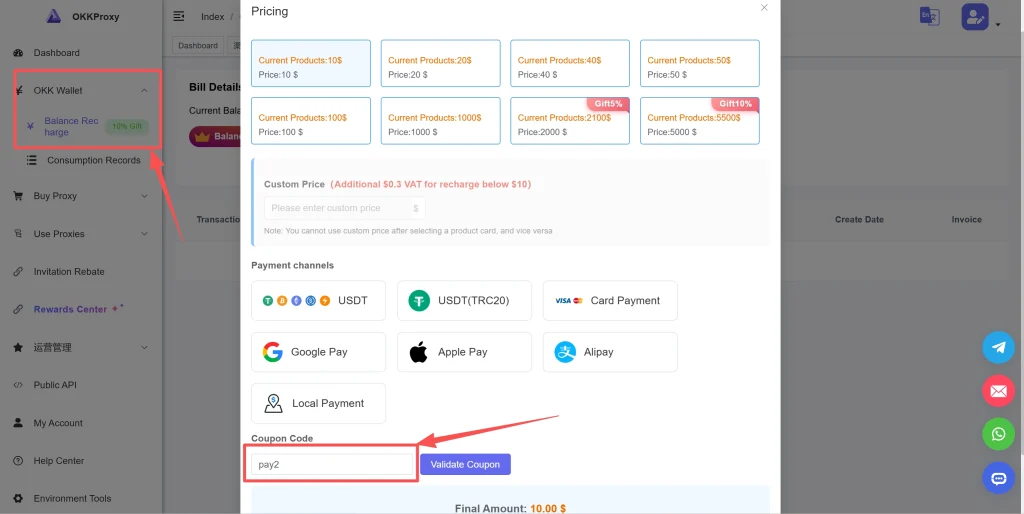
Special Offer: Use coupon code PAY2 during checkout to get 10% OFF on all recharges across OkkProxy’s services!