Proxy work becomes reliable only when the network layer and the browser identity tell the same story. A clean IP is useful, but it is not enough by itself. Each account also needs its own browser profile, cookies, storage, fingerprint settings, language, timezone and operating routine.
Afina Browser is built for this kind of practical multi-account work. It lets teams create isolated browser profiles, assign proxies, check connection quality, manage cookies, tune fingerprint settings and automate repeated actions without turning every task into custom code. For proxy-heavy workflows, that means fewer accidental overlaps between accounts and a clearer operating model for teams.
Before setting up a batch of profiles, it helps to understand the proxy format behind each account. Afina’s guide to proxy types and use cases is a useful reference for comparing residential, mobile, datacenter, static, sticky and rotating proxies before they are assigned to browser profiles.
What Afina Browser does in a proxy workflow
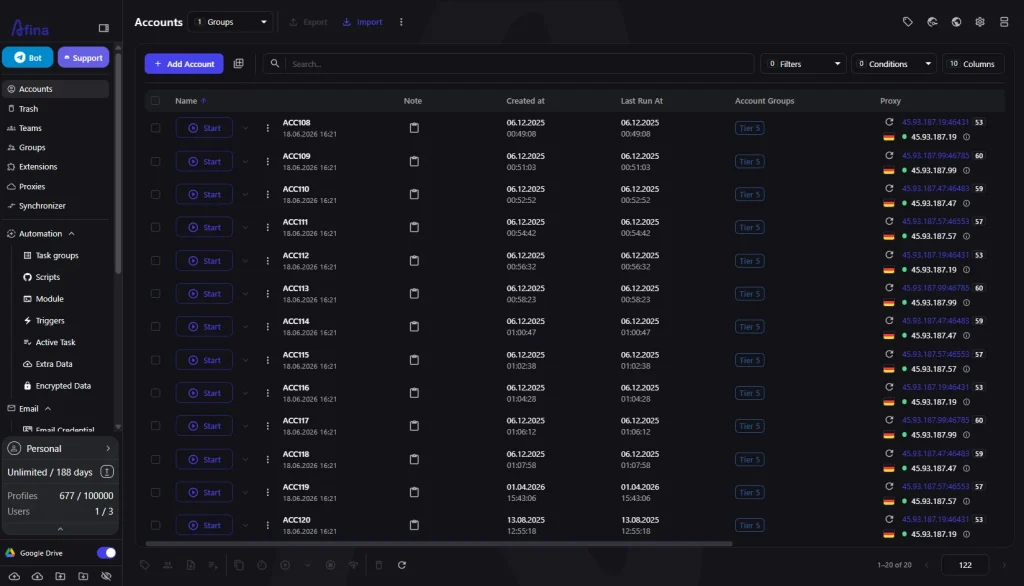
Afina Browser separates accounts at the browser level. Each profile works in its own environment, with separated cookies, localStorage, IndexedDB and cache. This matters because account separation is not only about changing an IP address. Platforms also read the browser environment around the session.
In practice, a profile should represent one working identity: one social account, one client account, one marketplace profile, one regional testing setup or one research environment. The proxy then becomes part of that profile, not a disposable setting that changes every time someone opens the browser.
This model is useful for:
- SMM teams managing several client accounts
- digital agencies testing funnels by region
- e-commerce teams separating marketplace profiles
- research teams checking regional pages and search results
- media buyers keeping ad accounts organized
- operators preparing repeatable browser environments
The point is not to hide everything. The point is to keep every account environment coherent, documented and separated.
Setting up profiles with proxy discipline
Start with the account logic before filling in the proxy field. Decide what the profile is for, name it clearly and assign the proxy that belongs to it. Afina supports proxy assignment inside browser profiles and includes a built-in proxy checker, including real network checks for SOCKS5 setups.
A practical setup can stay simple:
- create or open the Afina profile
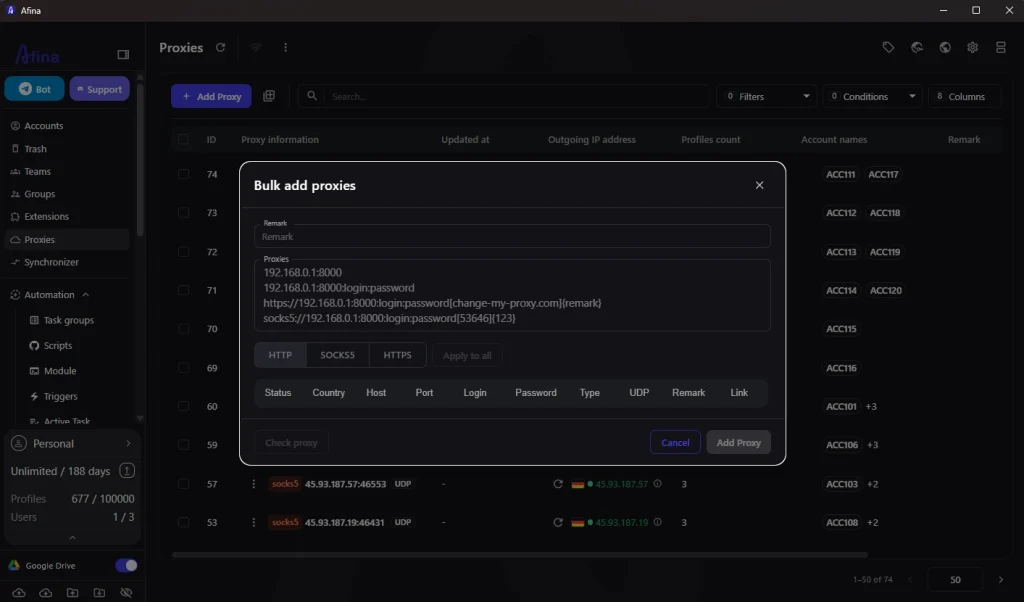
- add the proxy credentials
- choose the correct protocol, such as HTTP, HTTPS or SOCKS5
- run the proxy check before account work
- confirm the visible IP and country
- keep the proxy assigned to the same profile
- use tags and notes so the team understands the profile later
If you are preparing the first batch, Afina’s guide to browser profiles, fingerprints and proxies explains how proxy settings and browser identity work together. Treat that pairing as a stable unit.
Video walkthrough: proxy setup in Afina Browser
The setup steps are easier to follow with a short visual guide. The video below shows how a profile is created, how an OKKProxy connection is attached and how the built-in proxy check confirms the route before account work begins.
Matching fingerprint settings to the proxy
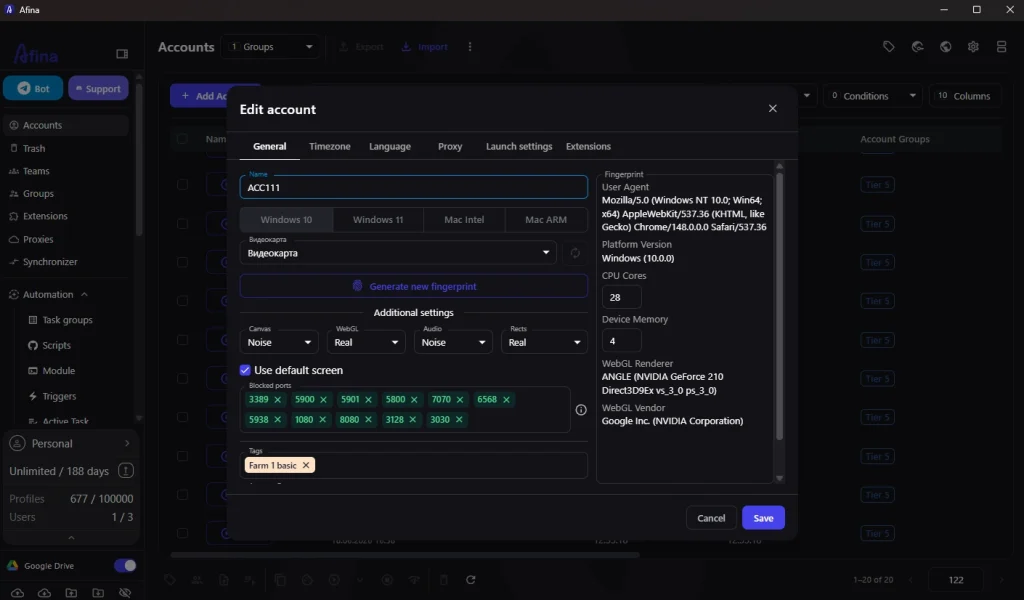
A proxy controls the visible network route. It does not automatically fix the rest of the browser environment. Timezone, language, WebRTC, canvas, WebGL, fonts, audio and hardware signals should not contradict the proxy geography.
Afina gives operators control over profile settings such as timezone, language, WebRTC, Canvas, WebGL and Audio. Fonts and hardware data are generated automatically and can be adjusted when needed. This makes it easier to build a profile where the network and browser signals look logical together.
WebRTC and modern browser transport deserve extra attention. Afina supports HTTP/3 and QUIC routing through SOCKS5 proxies when the proxy itself supports UDP. The article on UDP over SOCKS5 for QUIC and HTTP3 explains why this matters for workflows where WebRTC behavior, modern transport or SOCKS5 routing is part of the profile check.
The best habit is still manual verification before real account work. Open the profile, check the visible IP, confirm the region, test WebRTC behavior and review timezone and language. Do this before logging into anything important.
Automation and team operations
Proxy-based multi-account work becomes harder when more people join the process. One operator changes a proxy, another opens the wrong profile, someone reuses an IP because the old notes were unclear. Afina reduces this friction by keeping profiles, tags, proxy settings, cookies and workflow tools in one browser workspace.
For repeated tasks, Afina also includes no-code automation. Users can build scenarios in a visual editor with ready-made blocks instead of writing custom scripts for every routine. This can help with profile preparation, simple checks, repeated navigation and other structured browser actions.
Teams can also use the synchronizer when they need to repeat clicks and keystrokes across several open windows. For more technical setups, Afina provides a local REST API and an MCP server for AI-agent workflows. These tools should be used carefully, with realistic timing and clear account logic, not as a reason to run every account the same way.
A clean team process usually looks like this:
- prepare the proxy list
- assign one proxy to one profile when the account needs a stable identity
- check every profile before account work
- keep notes about platform, region and purpose
- import or export cookies only when the workflow requires it
- automate routine checks without making behavior look mechanical
- recheck proxies before important sessions
Consistency is the real productivity gain here. The team should always know which account, profile and proxy belong together.
Common mistakes to avoid
The first mistake is treating proxies as interchangeable. If a long-term account starts with one region and one proxy type, changing that setup casually can make the account look unstable. Static or sticky proxies usually make more sense for profiles that need history. Rotating proxies are better for short checks, monitoring or research where one stable identity is not required.
The second mistake is sharing one proxy across unrelated profiles. It may reduce cost in the short term, but it creates a shared network signal. For important accounts, separation is usually cheaper than cleanup.
The third mistake is ignoring browser signals. A profile with one region in the IP, another timezone in the browser and a mismatched language pattern is harder to trust. Keep the configuration boring and coherent.
The fourth mistake is skipping documentation. Names, tags and notes are not cosmetic. They prevent the team from mixing up accounts, proxies and work purposes after the first few batches.
Promo codes for new users:
- SALE20 – 20% off all plans except Max
- SALE30 – 30% off the Max plan
FAQ
Can Afina Browser work with proxy providers such as OKKProxy?
Yes. Afina lets users add proxy credentials to browser profiles, choose the proxy protocol and run proxy checks before work. The proxy credentials and proxy type still come from the provider.
Is one proxy enough for several profiles?
For low-value testing, it may be technically possible. For important long-term accounts, one proxy per profile is a cleaner default because it avoids a shared network signal.
Which proxy format is better for account management?
Static or sticky proxies usually fit accounts that need history and stable access. Rotating proxies are more suitable for short checks, monitoring and research tasks.
What should I check before logging into an account?
Check the visible IP, country, proxy status, WebRTC behavior, timezone and browser language. Also make sure no VPN or browser extension changes the connection inside the profile.
Does Afina automate browser work?
Yes. Afina includes visual no-code automation, a synchronizer for repeating actions across windows, a local REST API and an MCP server for AI-agent workflows.