
Summary: The Invisible Leak in Modern Data Pipelines
While standard proxy networks promise complete masking of origin client IP addresses from destination web servers, they systematically lack structural, end-to-end transport layer encryption. This infrastructure shortfall exposes corporate web scraping payloads, multi-account sessions, and cross-regional automated operations to network carriers, local Internet Service Providers (ISPs), and sophisticated anti-bot scripts.
This comprehensive 2026 guide systematically uncovers why basic setups trigger tracking alarms, examines the structural mechanics of an anonymous proxy, and lays out a clear strategy to deploy a secure network using OkkProxy’s premium enterprise infrastructure matrix.
What Is an Anonymous Proxy and How Does It Actually Work?

When businesses execute competitive intelligence gathering or handle multi-location social commerce platforms, privacy is non-negotiable. To achieve this, engineers frequently implement an anonymous proxy to obscure corporate infrastructure footprints. But what is anonymous proxy infrastructure at its core?
An anonymous proxy is a specialized intermediary server configured to route client application traffic while scrubbing the origin device’s real IP address from HTTP request parameters. When your local script queries a target website through an anonymous proxy server, the destination server only interacts with the IP address of the intermediary node.
Understanding HTTP Header Stripping Mechanics
The true classification of a proxy depends entirely on how it handles specific request variables passed through its system. When a client device connects to an intermediary network, the target web server analyzes incoming HTTP headers for specific tracking parameters:
- X-Forwarded-For: This field is designed to log the chain of IP addresses a request has passed through. Transparent networks leave your true corporate IP explicitly listed here.
- Via: This parameter indicates the specific software wrapper or server infrastructure used to forward the network packet.
A true, high-quality anonymous proxy actively scrubs your origin IP from the X-Forwarded-For field. However, it still passes its own signature or logs within the Via field, signaling to target firewalls that the incoming traffic is being routed through an intermediary.
To achieve unmitigated access, enterprise teams look toward a level 1 elite configuration, commonly known as a high anonymity proxy. This premium standard completely eliminates both fields, ensuring your automated requests look exactly like an organic, residential user browsing the web naturally.
Why Standard Proxies Fail the Privacy Test for Digital Marketers
Digital marketers, SEO monitoring groups, and data acquisition teams often assume that using any standard anonymous proxy server means their activities are completely private. This misconception can cause major issues for your data accuracy and campaign longevity. Below are the core reasons why a basic setup is not as private or secure as you think.
1. The Core Threat of Data Logging and Inspection
When you pull a list from a public anonymous proxy free registry, you are routing your company’s sensitive data streams through servers owned by completely unknown entities. The operator of that intermediary node has full visibility to monitor, log, and inspect every unencrypted data packet passing through their hardware. If your data scraper passes proprietary search queries, unencrypted login details, or target session cookies over standard HTTP connections, a unverified node can capture that data immediately.
2. Application-Level vs. Operating System Isolation
Unlike a Virtual Private Network (VPN), which secures your entire operating system’s network connection by default, proxies generally operate strictly at the application level. They are configured manually inside specific applications, like a single browser profile or an isolated web scraping script.
If your background system update services, local DNS clients, or browser extensions bypass those application settings, they will leak your real IP signature directly to target analytics trackers.
3. Absolute Lack of End-to-End Cryptographic Encryption
A standard proxy changes your location signature, but it does not act as a secure, encrypted tunnel. If your target automation runs over a basic connection, your local ISP and network sniffers can still read exactly what data you are requesting. To maintain true privacy, you must match clean proxy signatures with advanced security protocols like SOCKS5 over HTTPS.
Deconstructing the “Anonymous Proxy Detected” Error
If your team runs high-volume scraping tasks or manages multiple e-commerce store accounts, you have likely run into the dreaded “anonymous proxy detected” block. Understanding what this error means under the hood is critical to preventing automated workflow interruptions.
What Does Anonymous Proxy Detected Mean?

The anonymous proxy detected meaning is straightforward: the target website’s security system (such as Cloudflare or Akamai) has analyzed your connection’s metadata and determined that you are using an intermediary server rather than connecting as a genuine residential user.
When a security system flags an anonymous proxy detected event, it usually relies on three validation methods:
- ASN Database Checks: Security firewalls reference real-time IP databases. If your assigned IP belongs to a commercial data center company rather than a residential internet provider, it is flagged immediately.
- Active Port Scans: Many low-tier proxy networks leave common server management ports (like 8080, 3128, or 1080) completely open. Target servers can quickly scan your connecting IP to see if it accepts open proxy traffic.
- TCP/IP Fingerprint Analysis: Every operating system sends specific packet configuration data (like TTL and Window Size). If your browser says you are running Windows, but your network packets show a Linux server signature, the system flags the mismatch.
Real-World Impacts on Marketers and Analysts
For business operations, hitting these detection walls causes major, immediate setbacks:
- Distorted Search Data: Search engines frequently alter localized SERP results or serve captcha loops when they detect a low-grade anonymous proxy online node. This skews your search position metrics and keyword data.
- Streaming Platform Geo-Blocks: Media networks use strict enforcement lists, like the anonymous proxy service hulu block, to stop users from accessing geo-restricted content. This disrupts international ad verification tasks.
- Automated Account Bans: Managing multiple store or social media profiles through flagged IPs links your accounts together, causing the entire network of profiles to be suspended at once.
How to Fix Anonymous Proxy Issues on Your Local Infrastructure
If your team needs to clear local connection blocks or adjust automated setups, use this step-by-step technical guide to clean up your network footprint.
Step 1: Turn Off or Reconfigure System-Wide Settings
If an employee’s machine is triggering proxy detection blocks during normal business tasks, you may need to disable manual proxy overrides within the operating system.
For Windows 11 Platforms:
- Open the system Settings panel and navigate to Network & internet.
- Select the Proxy management tab.
- Under the Manual proxy setup option, switch Use a proxy server to Off.
For Apple macOS Environments:
- Navigate to the System Settings menu and select Network.
- Click on your active connection profile (Wi-Fi or Ethernet) and choose Details.
- Open the Proxies sub-menu and toggle off all active protocol options (such as HTTP, HTTPS, or SOCKS).
Step 2: Implement Complete DNS Leak Protection
To prevent target servers from detecting your true location via mismatched DNS queries, you must ensure your automated browser tools (like Puppeteer or Playwright) process DNS queries directly through your proxy node.
When initializing automated browser instances via Node.js or Python, always pass the explicit proxy flag to route all traffic cleanly:
Bash
# Example launching an isolated browser instance routing all web traffic securely
chromium-browser –proxy-server=”socks5://your-secure-node.okkproxy.com:9000″ –disable-blink-features=AutomationControlled
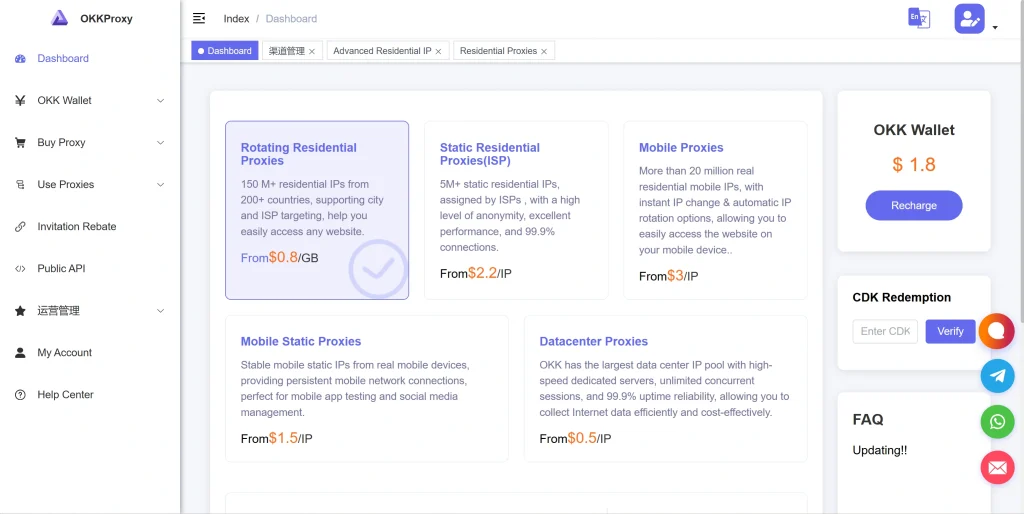
The OkkProxy Matrix: Enterprise-Grade Solutions for Secure Growth
To avoid connection blocks and data leaks, modern data teams need to move away from unverified public lists and switch to clean, private network infrastructure. OkkProxy provides a globally distributed network designed specifically to handle large-scale data tasks while maintaining maximum privacy.
1. Rotating Residential Proxies
OkkProxy’s rotating residential proxies route your automated web requests through genuine, residential home internet connections worldwide. Because these IP addresses are assigned by real local ISPs to actual home users, they carry the highest possible trust score. This makes it virtually impossible for target anti-bot systems to block them, allowing your scrapers to run continuously without triggering captchas or blocks.
2. Static ISP Proxies
For operations that require a long-term, persistent location identity—such as running international e-commerce stores or social profiles—OkkProxy’s static ISP proxies offer the perfect balance. They give you the lightning-fast processing speeds of data center hardware combined with the trusted residential signature of an organic home connection, ensuring your sessions remain stable and unlinked.
3. Rotating Mobile Proxies
Leveraging dynamic cellular networks, OkkProxy’s rotating mobile proxies route your connection through real 4G/5G mobile carrier networks (like AT&T, T-Mobile, or Vodafone). By utilizing Carrier-Grade NAT (CGNAT) configurations, thousands of genuine mobile users share the same public IP address. This means target firewalls cannot block the IP without accidentally blocking thousands of real consumers, giving your data gathering complete anonymity.
4. Static Mobile Proxies
Designed specifically for high-value account management, our static mobile proxies provide a persistent, dedicated mobile connection signature. This is ideal for managing accounts that are highly sensitive to location changes, making your access look like a real smartphone user on a stable cellular network.
5. Rotating Datacenter Proxies
When your tasks require processing massive volumes of data across targets without aggressive anti-bot firewalls, OkkProxy’s rotating datacenter proxies deliver maximum performance. They offer high-speed bandwidth and ultra-low latency, allowing you to index public market data quickly and efficiently.
Comparing Intermediary Networks: Choosing the Right Setup
Choosing the right type of network infrastructure depends heavily on your specific project goals, performance requirements, and target security levels.
| Proxy Infrastructure Offering | Detection Threat Profile | Performance Speed Score | Ideal Technical Use Case |
| Public Free Proxy | Extremely High (Instant Blocks) | Low / Unstable | Basic personal testing only; unsafe for business data. |
| Rotating Datacenter Proxies | Moderate (Flagged by advanced CDNs) | Ultra-Fast (<150ms) | Large-scale public indexing and high-speed data parsing. |
| Static ISP Proxies | Very Low (Looks like home broadband) | Fast / Persistent | Long-term multi-account management and store optimization. |
| Rotating Residential Proxies | Zero Risk (Indistinguishable from users) | High Balanced | Large-scale automated web scraping and price monitoring. |
| Rotating Mobile Proxies | Absolute Zero (Protected by CGNAT) | Variable Cellular | Ad verification, mobile app testing, and bypassing strict blocks. |
Step-by-Step Architecture for a Sealed, Leak-Proof Scraping Pipeline
Follow this four-step implementation blueprint from OkkProxy’s engineering team to ensure your automated data gathering operations run securely and efficiently.
1. Source Premium Private Proxies
Never use shared or public proxy lists for business operations. To protect your workflows, source clean, dedicated nodes from a trusted provider. You can buy private proxies through the OkkProxy platform to get exclusive access to high-performance IP pools tailored to your target location needs.
2. Match Proxies with Anti-Detect Browsers
When managing sensitive business profiles, always pair your OkkProxy connections with a secure anti-detect browser like AdsPower, Multilogin, or Dolphin{anty}. Ensure your browser profile configuration perfectly matches your proxy’s network characteristics:
- WebRTC Protocol Management: Set WebRTC behavior to Altered and ensure it routes public IP lookups directly through your proxy interface.
- Geographic Integration: Match your browser’s system time zone, default language, and apparent GPS coordinates with the true location of your proxy node.
3. Move Away from Outdated Formats
Ensure your connection strings use secure, authenticated formats. Avoid unverified HTTP setups and use authenticated SOCKS5 connection paths to secure your access keys and session details as they pass to the proxy network.
4. Continuous Network Health Audits
Build a simple validation loop into your automated scripts to check connection health before hitting your main targets. This step ensures your pipeline is running smoothly and avoids accidentally exposing your real infrastructure IP during a network hiccup:
Python
import requests
# Validation function to confirm your proxy signature before running data tasks
def verify_proxy_anonymity():
proxy_endpoint = {
“http”: “socks5://user:password@gate.okkproxy.com:9000”,
“https”: “socks5://user:password@gate.okkproxy.com:9000”
}
try:
response = requests.get(“https://api.okkproxy.com/diagnostics/ip”, proxies=proxy_endpoint, timeout=5)
print(f”Verified Active IP Signature: {response.json()[‘ip’]}”)
except Exception as network_error:
raise SystemExit(f”Validation failed to prevent IP exposure: {network_error}”)
Frequently Asked Questions
What exactly is an anonymous proxy?
An anonymous proxy is an intermediary server that forwards your web requests while removing your real origin IP address from incoming headers. This helps prevent target websites from tracking your actual physical location.
How do I turn off my anonymous proxy on local machines?
On Windows systems, go to the Network settings menu, open the Proxy tab, and turn off the “Use a proxy server” toggle. On macOS, go to System Settings, open the Network menu, click on Details for your active connection, and uncheck all active proxy options under the Proxies tab. For more step-by-step guidance, see our guide on how to disable an anonymous proxy.
Are residential proxies more anonymous than datacenter proxies?
Yes, residential options offer higher overall anonymity because their IPs are assigned by real consumer internet providers to actual home locations. This makes them look like genuine organic users, whereas datacenter IPs are hosted in commercial server blocks that are easily flagged by security firewalls.
Why does my automated scraper keep hitting proxy blocks?
This issue usually happens because your proxy provider is reusing blacklisted IP blocks, your setup is leaking data through DNS mismatches, or the target firewall is detecting a mismatch in your browser fingerprint. Switching to premium rotating residential proxies or mobile options from OkkProxy eliminates these blocks.
Conclusion: Securing Your Enterprise Data Operations
The reality of modern data operations is clear: relying on basic, low-grade proxies to protect your critical business data is a major security risk. A proxy is an invaluable tool for scaling web scraping, verifying global ad campaigns, and managing multi-regional accounts—but it only works reliably when backed by premium, enterprise-grade network infrastructure.
Protect your data pipelines from tracking blocks and leaks. Upgrade your workflows with OkkProxy’s hardened infrastructure matrix. Whether you need the high trust score of rotating residential proxies, the ultra-fast consistency of static ISP proxies, or the complete anonymity of rotating mobile proxies, OkkProxy provides the secure foundation your business needs.
Ready to protect your data workflows? Explore our premium network options and buy private proxies built for elite privacy, speed, and reliability today.