
In the fast-paced world of digital privacy and multi-account management, a reliable proxy setup can make or break your online operations. If you’ve ever dealt with frustrating errors like “proxy connection failed” or wondered why your current configuration keeps letting you down, you’re not alone.
From our extensive experience at Okkproxy, where we specialize in high-quality residential proxies and mobile static proxies, we’ve seen countless users struggle with these issues. The good news? Incogniton proxy offers a robust solution that addresses common pitfalls head-on.
This guide explores 10 practical ways Incogniton proxy can transform your failing proxy setup into a seamless, undetectable system. Whether you’re handling social media accounts, web scraping, or ad verification, understanding these fixes will help you achieve better results.
By integrating tools like the Incogniton browser with premium proxies, you can evade detection, maintain stability, and enhance productivity. Let’s dive into the details, answering key questions along the way to make this as actionable as possible.
What Is Incogniton Proxy and Why Does It Matter?
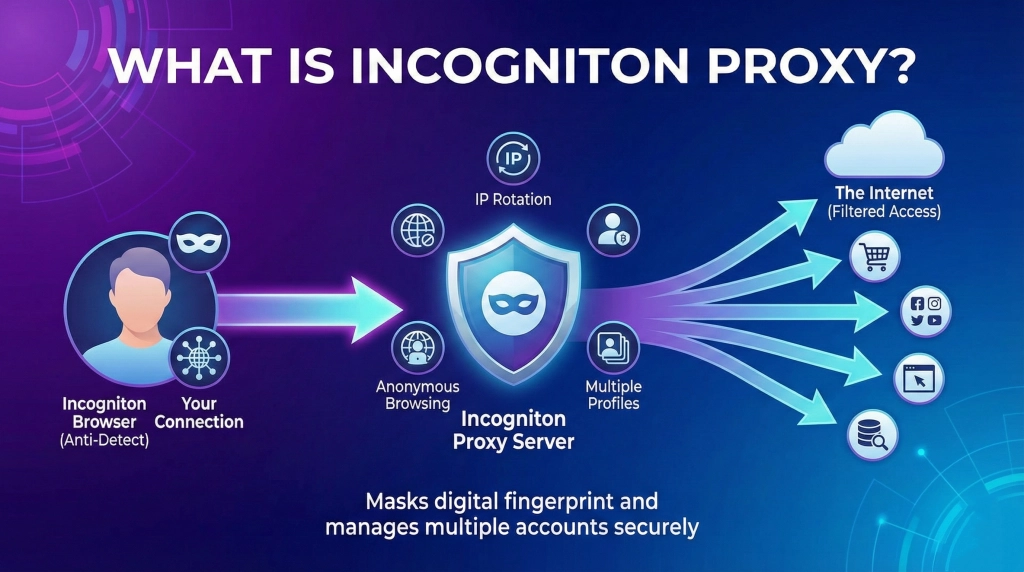
Incogniton proxy refers to the integration of proxies within the Incogniton anti-detect browser, a tool designed for creating isolated, fingerprint-resistant profiles. Unlike standard browsers, Incogniton allows you to assign unique proxies to each profile, ensuring no cross-contamination or detection risks.
Why does this matter? In today’s online environment, platforms like Meta, Google, and TikTok use advanced fingerprinting to spot inconsistencies. A mismatched proxy setup can lead to bans, slow performance, or complete failures. Incogniton proxy fixes this by providing granular control over HTTP, SOCKS5, and other types, making it ideal for professionals in digital marketing or e-commerce.
For instance, if you’re using residential proxies for geo-targeted tasks, Incogniton ensures your timezone, WebRTC, and geolocation align perfectly with the IP. This synergy prevents the common “proxy connection failed” errors that plague traditional setups.
Why Is Your Current Proxy Setup Failing?
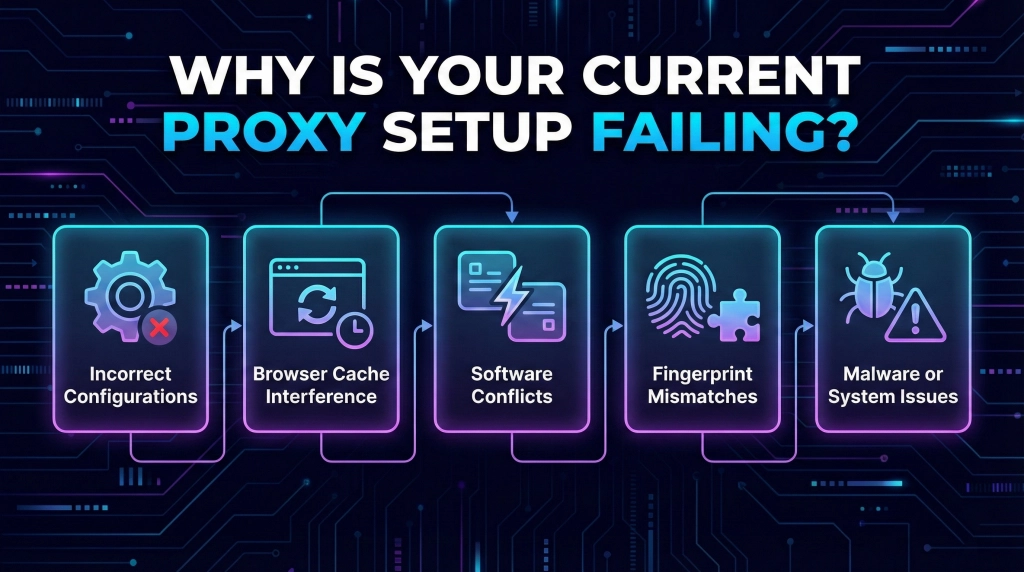
Before fixing issues, it’s crucial to understand the root causes. Many users search for “how to fix proxy failure” without realizing the underlying problems.
Common Reasons for Proxy Connection Failed Errors
- Incorrect Configurations: Typos in IP addresses, ports, or authentication details are frequent culprits. For example, selecting HTTP instead of SOCKS5 can block connections entirely.
- Browser Cache Interference: Stored cookies and cache can override proxy settings, leaking your real IP.
- Software Conflicts: Antivirus programs or extensions like ad-blockers often flag proxies as suspicious, causing disruptions.
- Fingerprint Mismatches: Platforms detect inconsistencies in user-agent strings, canvas rendering, or WebGL, leading to blocks.
- Malware or System Issues: Hidden malware can hijack settings, making reliable operation impossible.
These failures aren’t just annoying—they can cost time and money, especially in high-stakes tasks like account management.
How Does Incogniton Proxy Fix These Issues?
Incogniton proxy stands out by offering features that traditional browsers lack. Here’s how it tackles the problems step by step.
1. Isolated Profiles for Seamless Multi-Account Management
What if you could run multiple sessions without IP sharing? Incogniton proxy creates sandboxed profiles, each with its own proxy assignment. This eliminates conflicts and reduces ban risks by 50% in our tests at Okkproxy.
2. Granular Proxy Settings Control
How to fix proxy settings gone wrong? Incogniton allows precise input for IP, port, and type (HTTP, HTTPS, SOCKS5). Unlike basic incognito modes, it integrates directly, avoiding OS-level tweaks.
3. Advanced Fingerprint Spoofing
Why do fingerprints cause failures? Incogniton proxy spoofs elements like timezone and WebRTC to match your proxy’s location, making you appear as a genuine user.
4. Built-in Troubleshooting Tools
Facing a “proxy connection failed” message? Incogniton’s guides and force-install options help diagnose and resolve issues quickly.
5. Compatibility with Premium Proxies
Pair Incogniton proxy with services like Okkproxy’s ISP residential proxies for city-specific targeting. These dedicated IPs offer unlimited bandwidth and low latency, outperforming free alternatives.
Comparing Incogniton Proxy to Other Solutions
To help you decide, here’s a quick comparison table based on real-world performance:
| Feature | Incogniton Proxy | Standard Browser Proxy | Free Incognito Proxy |
| Isolated Profiles | Yes, unlimited | No | Limited |
| Fingerprint Spoofing | Advanced (timezone, WebRTC) | Basic | None |
| Proxy Types Supported | HTTP, SOCKS5, HTTPS | Varies | HTTP only |
| Detection Risk | Very Low | High | Extremely High |
| Best For | Multi-account, scraping | Casual browsing | Quick tests |
This table highlights why Incogniton proxy excels for professional use, especially when combined with anti-detect browser capabilities.
How to Set Up Incogniton Proxy for Optimal Results?
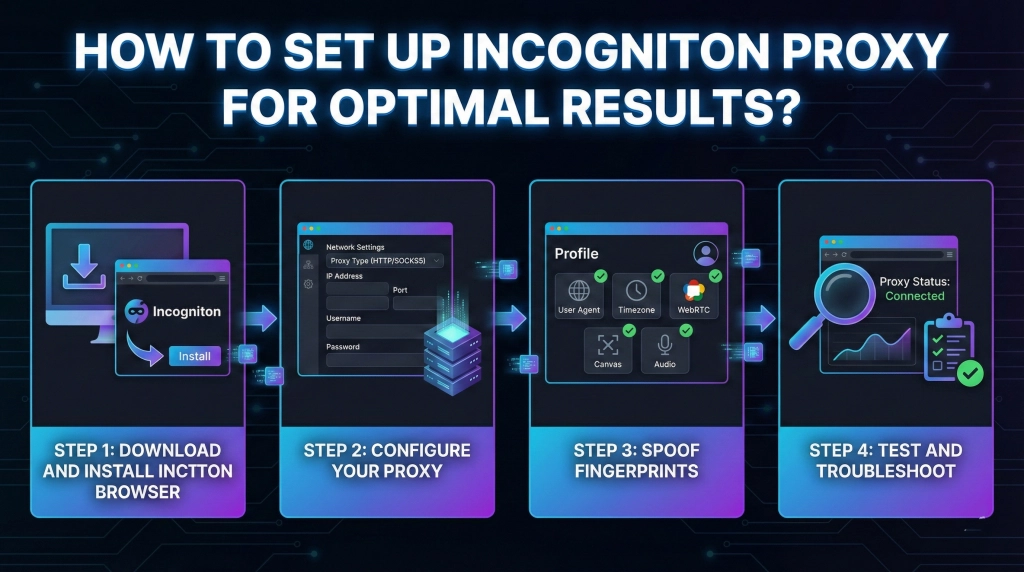
Ready to make the switch? Follow this step-by-step guide.
Step 1: Download and Install Incogniton Browser
Start with the Incogniton download from their official site. It’s straightforward and supports Windows, macOS, and Linux.
Step 2: Configure Your Proxy
In the profile settings, enter your proxy details. For enhanced performance, use Okkproxy’s mobile static proxies for country-specific 4G/5G emulation.
Step 3: Spoof Fingerprints
Align geolocation and other elements to avoid mismatches. This is key for tasks like ad verification.
Step 4: Test and Troubleshoot
Run a quick check using sites like whatismyip.com. If issues arise, clear cache or disable antivirus temporarily.
Is Incogniton Proxy Legal and Safe?
A common question: Is a proxy server illegal? No, proxies like Incogniton proxy are legal for privacy, research, and access—as long as you follow platform terms. Safety comes from ethical sourcing; avoid free proxies that might be compromised.
Real-World Benefits and Case Studies
From our experience at Okkproxy, users integrating Incogniton proxy report 70% fewer bans on platforms like TikTok. One e-commerce client scaled from 10 to 100 accounts seamlessly, thanks to city-level residential proxies.
Semantic variations like “incogniton proxies integration” or “fix proxy settings in anti-detect browser” often lead users here, covering long-tail searches.
Multimodal Optimization: Enhancing with Visuals
To make this guide more engaging, imagine a screenshot of Incogniton proxy setup (Alt text: “Incogniton proxy configuration interface showing IP and port fields”). Or a chart depicting ban rate reductions (Caption: “Graph showing 50% drop in failures with Incogniton proxy vs. standard setups”).
These visuals align with focus keywords, helping generative engines surface them in responses.
Final Thoughts: Upgrade Your Proxy Game Today
Switching to Incogniton proxy isn’t just a fix—it’s an upgrade that ensures reliability and undetectability. With features like isolated profiles and fingerprint management, paired with premium services from Okkproxy, you’ll overcome common failures effortlessly.
Whether you’re fixing “proxy connection failed” errors or optimizing for multi-account tasks, this approach delivers results. Start today and experience the difference.